The slides of my presentation about Policy-managed databases. I’ve used them to present at Collaborate14 (#C14LV).
The same abstract has been refused by OOW14 and UKOUG_TECH14 selection committees, so it’s time to publish them 🙂

The slides of my presentation about Policy-managed databases. I’ve used them to present at Collaborate14 (#C14LV).
The same abstract has been refused by OOW14 and UKOUG_TECH14 selection committees, so it’s time to publish them 🙂
 Après Oracle Open World, IOUG Collaborate et d’autres grandes conférences, RAC Attack arrive également à Genève! Installez l’environnement Oracle 12c RAC sur votre laptop. Des volontaires expérimentés (ninjas) vous aideront à résoudre
toutes les énigmes apparentés et vous guideront à travers le processus
d’installation.
Ninjas
Ludovico Caldara – Oracle ACE, RAC SIG European Chair & RAC Attack co-writer
Luca Canali – OAK Table Member & frequent speaker
Eric Grancher – OAK Table member
Jacques Kostic – OCM 11g & Senior Consultant at Trivadis
Où? nouveaux bureaux Trivadis, Chemin Château-Bloch 11, CH1219 Geneva
Quand? Mercredi 17 September 2014, dès 17h00
Coût? C’est un évènement GRATUIT! C’est un atelier communautaire, plaisant et
informel. Vous n’avez qu’à apporter votre laptop et votre bonne humeur!
Inscription: TVD_LS_ADMIN@trivadis.com
Places limitées! Réservez votre place & votre T-shirt dès à présent: TVD_LS_ADMIN@trivadis.com
 Agenda:
17.00 – Bienvenue
17.30 – RAC Attack 12c – 1ere partie
19.30 – Pizza et Bières! (sponsorisés par Trivadis)
20.00 – RAC Attack 12c – 2eme partie
22.00 – distribution des T-shirt et photo de groupe!!
TRES IMPORTANT: La participation à cet évènement requière l’apport de votre propre laptop!
Spécifications requises:
a) 64 bit OS qui supporte Oracle Virtual Box
b) 8GB RAM, 50GB free HDD space.
En raison de contraintes juridiques, merci de télécharger à l’avance Oracle Database 12c ainsi que Grid Infrastructure pour Linux x86-64 depuis https://edelivery.oracle.com/ (et pour
plus d’informations : http://goo.gl/pqavYh).
After Oracle Open World, IOUG Collaborate and all major conferences, RAC Attack comes to Geneva! Set up Oracle 12c RAC environment on your laptop. Experienced volunteers (ninjas) will help you address any related issues and guide you through the setup process.
Ninjas
Ludovico Caldara – Oracle ACE, RAC SIG European Chair & RAC Attack co-writer
Luca Canali – OAK Table Member and frequent speaker
Eric Grancher – OAK Table member
Jacques Kostic – OCM 11g & Senior Consultant at Trivadis
Where? new Trivadis office, Chemin Château-Bloch 11, CH1219 Geneva
When? Wednesday September 17th 2014, from 17h00 onwards
Cost? It is a FREE event! It is a community based, informal and enjoyable workshop.
You just need to bring your laptop and your desire to have fun!
Registration: TVD_LS_ADMIN@trivadis.com
Limited places! Reserve your seat and T-shirt now: TVD_LS_ADMIN@trivadis.com
Agenda:
17.00 – Welcome
17.30 – RAC Attack 12c part I
19.30 – Pizza and Beers! (kindly sponsored by Trivadis)
20.00 – RAC Attack 12c part II
22.00 – T-shirt distribution and group photo!!
VERY IMPORTANT: To participate in the workshop, you need to bring your own laptop.
Required specification:
a) any 64 bit OS that supports Oracle Virtual Box
b) 8GB RAM, 50GB free HDD space.
Due to legal constraints, please pre-download Oracle Database 12c and Grid Infrastructure for Linux x86-64 from https://edelivery.oracle.com/ web site (further
information here: http://goo.gl/pqavYh).
Please see the disclaimer at the end of the post.
Oracle has announced the new Oracle Database Backup Logging Recovery Appliance at the last Open World 2013, but since then it has not been released to the market yet, and very few information is available on the Oracle website.
During the last IOUG Collaborate 14, Oracle master product manager of Data Guard and MAA, Larry Carpenter, has unveiled something more about the DBRLA (call it “Debra” to simplify your life 🙂 ) , and I’ve had the chance to discuss about it directly with Larry.
At Trivadis we think that this appliance will be a game changer in the world of backup management.
Why?
Well, if you have ever worked for a big company with many hundreds of databases, you have certainly encountered many of those common problems:
That’s not all. As of now, your best recovery point in case of restore is directly related to your backup archive frequency. Oh yes, you have to low down your archive_lag_target parameter, increase your log switch frequency (and thus, the I/O) and still have… 10, 15, 30 minutes of possible data loss? Unless you protect your transactions with a Data Guard. But this will cost you money. For the additional server and storage. For the licenses. And for the effort required to put in place a Data Guard instance for every database that you want to protect. You want to protect your transactions from a storage failure and there’s a price to pay.
The Database Backup Logging Recovery Appliance (wow, I need to copy and paste the name to save time! :-)) overcomes these problems with a simple but brilliant idea: leveraging the existing redo log transport processes and ship the redo stream directly to the backup appliance (the DBLRA, off course) or to its Cloud alter ego, hosted by Oracle.
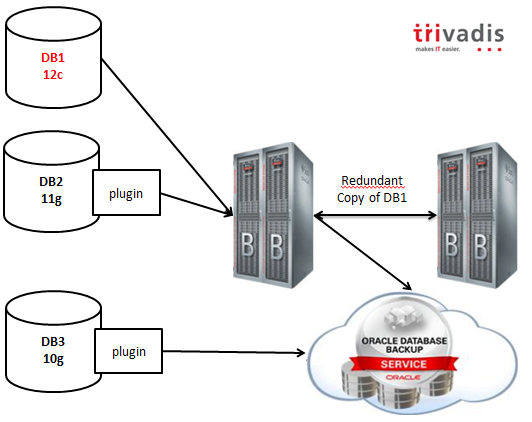
As you can infer from the picture, 12c databases will work natively with the appliance, while previous releases will have a plugin that will enable all the capabilities.
Backups can be mirrored selectively to another DBLRA, or copied to the cloud or to a 3rd party (Virtual) Tape Library.
The backup retention is enforced by the appliance and the expiration and deletion is done automatically using the embedded RMAN catalog.
Lightning fast backups and restores are guaranteed by the hardware: DBLRA is based on the same hardware used by Exadata, with High Capacity disks. Optional storage extensions can be added to increase the capacity, but all the data, as I’ve said, can be offloaded to VTLs in order to use a cheaper storage for older backups.
To resume, the key values are:
Looking forward to see it in action!
I cannot cover all the information I have in a single post, but Trivadis is working actively to be ready to implement it at the time of the launch to the market (estimated in 2014), so feel free to contact me if you are interested in boosting your backup environment. 😉
By the way, I expect that the competitors (IBM, Microsoft?) will try to develop a solution with the same characteristics in terms of reliability, or they will lose terrain.
Cheers!
Ludovico
Disclaimer: This post is intended to outline Oracle’s general product direction based on the information gathered through public conferences. It is intended for informational purposes only. The development and release of these functionalities and features including the release dates remain at the sole discretion of Oracle and no documentation is available at this time. The features and commands shown may or may not be accurate when the final product release goes GA (General Availability).
Please refer Oracle documentation when it becomes available.
I’ve just published an advanced lab on SlideShare that RAC Attack attendees may do at Collaborate this year, instead of just doing the basic 2-node RAC installation on their laptop.
We’ll offer also an advanced lab about Flex Clusters and Flex ASM (written by Maaz Anjum). Moreover, I’m working on an additional lab that allows to implement a multi-node RAC by using Virtual Box linked clones and GI Home clones like I’ve shown in my previous post.
RAC Attack at #C14LV will be like fun again. We’ll have a few t-shirts for the attendants, designed by me and Chet “Oraclenerd” Justice, kindly sponsored by OTN.
The workshop will end up with beers and snaks (again, thank you OTN for sponsoring this :-)).

If you’re planning to attend Collaborate, join us and start your conference week in a good mood 🙂
Recently I’ve had to install a four-node RAC cluster on my laptop in order to do some tests. I have found an “easy” (well, easy, it depends), fast and space-efficient way to do it so I would like to track it down.
The quick step list
Using this method the Oracle binaries (the most space consuming portion of the RAC installation) are installed and allocated on the first node only.
The long step list
Actually you can follow many instruction steps from the RAC Attack 12c book.
|
1 2 3 4 5 6 7 8 9 10 11 12 13 14 15 |
collabn1 A 192.168.78.51 collabn2 A 192.168.78.52 collabn3 A 192.168.78.53 collabn4 A 192.168.78.54 collabn1-vip A 192.168.78.61 collabn2-vip A 192.168.78.62 collabn3-vip A 192.168.78.63 collabn4-vip A 192.168.78.64 collabn1-priv A 172.16.100.51 collabn2-priv A 172.16.100.52 collabn3-priv A 172.16.100.53 collabn4-priv A 172.16.100.54 collabn-cluster-scan A 192.168.78.251 collabn-cluster-scan A 192.168.78.252 collabn-cluster-scan A 192.168.78.253 |
At this point, the procedure starts differing from the RAC Attack book.
|
1 2 3 |
# <GIHOME>/bin/crsctl stop crs # <GIHOME>/bin/crsctl disable crs # shutdown -h now |
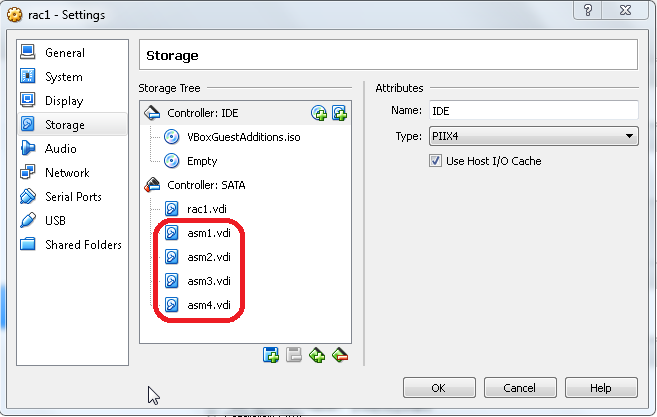
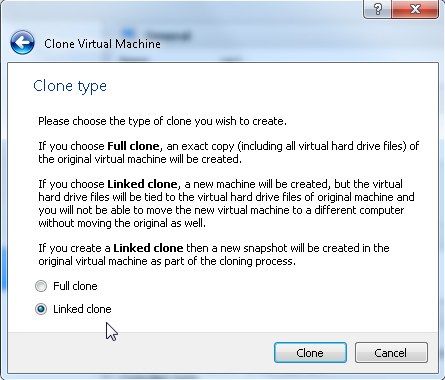
|
1 2 3 4 5 6 7 8 9 10 11 12 13 14 15 16 17 18 19 20 21 |
cd $GI_HOME rm -rf log/$(hostname) rm -rf gpnp/$(hostname) find gpnp -type f -exec rm -f {} \; rm -rf cfgtoollogs/* rm -rf crs/init/* rm -rf cdata/* rm -rf crf/* rm -rf network/admin/*.ora rm -rf crs/install/crsconfig_params find . -name '*.ouibak' -exec rm {} \; find . -name '*.ouibak.1' -exec rm {} \; rm -rf root.sh* rm -rf rdbms/audit/* rm -rf rdbms/log/* rm -rf inventory/backup/* chown -R oracle:oinstall /u01/app rm -f /etc/init.d/ohasd rm -rf /etc/oracle rm -rf /u01/app/oraInventory/* |
|
1 2 3 4 5 6 7 8 9 10 11 12 13 14 15 16 17 18 19 20 21 22 23 24 25 26 27 28 29 30 31 32 33 34 35 36 37 38 39 40 41 42 43 44 45 46 47 48 49 50 51 52 53 54 55 56 57 58 59 60 61 62 63 64 |
[oracle@collabn2 bin]$ perl clone.pl -silent ORACLE_BASE=/u01/app/oracle ORACLE_HOME=/u01/app/12.1.0/grid \ ORACLE_HOME_NAME=OraGI12Home1 INVENTORY_LOCATION=/u01/app/oraInventory \ LOCAL_NODE=collabn2 "CLUSTER_NODES={collabn1,collabn2,collabn3,collabn4}" CRS=TRUE ./runInstaller -clone -waitForCompletion "ORACLE_BASE=/u01/app/oracle" "ORACLE_HOME=/u01/app/12.1.0/grid" "ORACLE_HOME_NAME=OraGI12Home1" "INVENTORY_LOCATION=/u01/app/oraInventory" "LOCAL_NODE=collabn2" "CLUSTER_NODES={collabn1,collabn2}" "CRS=TRUE" -silent -paramFile /u01/app/12.1.0/grid/clone/clone_oraparam.ini Starting Oracle Universal Installer... Checking Temp space: must be greater than 500 MB. Actual 5537 MB Passed Checking swap space: must be greater than 500 MB. Actual 3012 MB Passed Preparing to launch Oracle Universal Installer from /tmp/OraInstall2014-02-18_03-40-00PM. Please wait ... You can find the log of this install session at: /u01/app/oraInventory/logs/cloneActions2014-02-18_03-40-00PM.log .................................................. 5% Done. .................................................. 10% Done. .................................................. 15% Done. .................................................. 20% Done. .................................................. 25% Done. .................................................. 30% Done. .................................................. 35% Done. .................................................. 40% Done. .................................................. 45% Done. .................................................. 50% Done. .................................................. 55% Done. .................................................. 60% Done. .................................................. 65% Done. .................................................. 70% Done. .................................................. 75% Done. .................................................. 80% Done. .................................................. 85% Done. .................................................. 90% Done. .................................................. 95% Done. Copy files in progress. Copy files successful. Link binaries in progress. Link binaries successful. Setup files in progress. Setup files successful. Setup Inventory in progress. Setup Inventory successful. Finish Setup successful. The cloning of OraGI12Home1 was successful. Please check '/u01/app/oraInventory/logs/cloneActions2014-02-18_03-40-00PM.log' for more details. As a root user, execute the following script(s): 1. /u01/app/12.1.0/grid/root.sh Execute /u01/app/12.1.0/grid/root.sh on the following nodes: [collabn2,collabn2,collabn3,collabn4] .................................................. 100% Done. [oracle@collabn2 bin]$ su - Password: [root@collabn2 ~]# /u01/app/oraInventory/orainstRoot.sh Changing permissions of /u01/app/oraInventory. Adding read,write permissions for group. Removing read,write,execute permissions for world. Changing groupname of /u01/app/oraInventory to oinstall. The execution of the script is complete. [root@collabn2 ~]# |
|
1 2 3 4 5 6 7 8 9 10 11 12 13 14 15 16 17 18 19 20 21 22 23 24 25 26 27 28 |
[oracle@collabn1 addnode]$ ./addnode.sh -silent -noCopy ORACLE_HOME=/u01/app/12.1.0/grid "CLUSTER_NEW_NODES={collabn2,collabn3,collabn4}" "CLUSTER_NEW_VIRTUAL_HOSTNAMES={collabn2-vip,collabn3-vip,collabn4-vip}" Starting Oracle Universal Installer... Checking Temp space: must be greater than 120 MB. Actual 6125 MB Passed Checking swap space: must be greater than 150 MB. Actual 3017 MB Passed [WARNING] [INS-13014] Target environment does not meet some optional requirements. CAUSE: Some of the optional prerequisites are not met. See logs for details. /u01/app/oraInventory/logs/addNodeActions2014-02-18_03-43-22PM.log ACTION: Identify the list of failed prerequisite checks from the log: /u01/app/oraInventory/logs/addNodeActions2014-02-18_03-43-22PM.log. Then either from the log file or from installation manual find the appropriate configuration to meet the prerequisites and fix it manually. Prepare Configuration in progress. Prepare Configuration successful. .................................................. 40% Done. As a root user, execute the following script(s): 1. /u01/app/12.1.0/grid/root.sh Execute /u01/app/12.1.0/grid/root.sh on the following nodes: [collabn2,collabn3,collabn4] The scripts can be executed in parallel on all the nodes. If there are any policy managed databases managed by cluster, proceed with the addnode procedure without executing the root.sh script. Ensure that root.sh script is executed after all the policy managed databases managed by clusterware are extended to the new nodes. .................................................. 60% Done. Update Inventory in progress. .................................................. 100% Done. Update Inventory successful. Successfully Setup Software. |
|
1 2 3 |
scp -rp /u01/app/12.1.0/grid/crs/install/crsconfig_addparams collabn2:/u01/app/12.1.0/grid/crs/install/crsconfig_addparams scp -rp /u01/app/12.1.0/grid/crs/install/crsconfig_params collabn2:/u01/app/12.1.0/grid/crs/install/crsconfig_params scp -rp /u01/app/12.1.0/grid/gpnp collabn2:/u01/app/12.1.0/grid/gpnp |
|
1 2 3 4 5 6 7 8 9 10 11 12 13 14 15 16 17 18 19 20 21 22 23 24 25 26 27 28 29 30 31 32 33 34 35 36 37 38 39 40 41 42 43 44 45 46 47 48 49 50 51 52 53 54 55 56 57 |
[oracle@collabn2 bin]$ perl clone.pl -O 'CLUSTER_NODES={collabn1,collabn2,collabn3,collabn4}' -O LOCAL_NODE=collabn2 ORACLE_BASE=/u01/app/oracle ORACLE_HOME=/u01/app/oracle/product/12.1.0/dbhome_1 ORACLE_HOME_NAME=OraDB12Home1 -O -noConfig ./runInstaller -clone -waitForCompletion "CLUSTER_NODES={collabn1,collabn2,collabn3,collabn4}" "LOCAL_NODE=collabn2" "ORACLE_BASE=/u01/app/oracle" "ORACLE_HOME=/u01/app/oracle/product/12.1.0/dbhome_1" "ORACLE_HOME_NAME=OraDB12Home1" -noConfig -silent -paramFile /u01/app/oracle/product/12.1.0/dbhome_1/clone/clone_oraparam.ini Starting Oracle Universal Installer... Checking Temp space: must be greater than 500 MB. Actual 3896 MB Passed Checking swap space: must be greater than 500 MB. Actual 3005 MB Passed Preparing to launch Oracle Universal Installer from /tmp/OraInstall2014-02-18_05-22-22PM. Please wait ...You can find the log of this install session at: /u01/app/oraInventory/logs/cloneActions2014-02-18_05-22-22PM.log .................................................. 5% Done. .................................................. 10% Done. .................................................. 15% Done. .................................................. 20% Done. .................................................. 25% Done. .................................................. 30% Done. .................................................. 35% Done. .................................................. 40% Done. .................................................. 45% Done. .................................................. 50% Done. .................................................. 55% Done. .................................................. 60% Done. .................................................. 65% Done. .................................................. 70% Done. .................................................. 75% Done. .................................................. 80% Done. .................................................. 85% Done. .................................................. 90% Done. .................................................. 95% Done. Copy files in progress. Copy files successful. Link binaries in progress. Link binaries successful. Setup files in progress. Setup files successful. Setup Inventory in progress. Setup Inventory successful. Finish Setup in progress. Finish Setup successful. The cloning of OraDB12Home1 was successful. Please check '/u01/app/oraInventory/logs/cloneActions2014-02-18_05-22-22PM.log' for more details. As a root user, execute the following script(s): 1. /u01/app/oracle/product/12.1.0/dbhome_1/root.sh Execute /u01/app/oracle/product/12.1.0/dbhome_1/root.sh on the following nodes: [collabn2] .................................................. 100% Done. |
|
1 |
./runInstaller -updateNodeList ORACLE_HOME=/u01/app/oracle/product/12.1.0/dbhome_1 -O "CLUSTER_NODES={collabn1,collabn2,collabn3,collabn4}" |
|
1 |
# /u01/app/oracle/product/12.1.0/dbhome_1/root.sh |
|
1 2 3 4 5 6 7 8 9 10 11 12 13 14 15 16 17 18 19 20 21 22 23 24 25 26 27 28 29 30 31 32 33 34 35 36 37 38 39 40 41 42 43 44 45 46 47 48 49 50 51 52 53 54 55 56 57 58 59 60 61 62 63 64 65 66 67 68 69 70 71 72 73 74 75 76 77 78 79 80 81 82 83 84 85 86 |
[root@collabn2 grid]# ./root.sh Performing root user operation for Oracle 12c The following environment variables are set as: ORACLE_OWNER= oracle ORACLE_HOME= /u01/app/12.1.0/grid Copying dbhome to /usr/local/bin ... Copying oraenv to /usr/local/bin ... Copying coraenv to /usr/local/bin ... Entries will be added to the /etc/oratab file as needed by Database Configuration Assistant when a database is created Finished running generic part of root script. Now product-specific root actions will be performed. Relinking oracle with rac_on option Using configuration parameter file: /u01/app/12.1.0/grid/crs/install/crsconfig_p 2014/02/18 17:34:00 CLSRSC-363: User ignored prerequisites during installation OLR initialization - successful 2014/02/18 17:34:47 CLSRSC-330: Adding Clusterware entries to file 'oracle-ohasd CRS-4133: Oracle High Availability Services has been stopped. CRS-4123: Oracle High Availability Services has been started. CRS-4133: Oracle High Availability Services has been stopped. CRS-4123: Oracle High Availability Services has been started. CRS-2791: Starting shutdown of Oracle High Availability Services-managed resources on 'collabn2' CRS-2673: Attempting to stop 'ora.drivers.acfs' on 'collabn2' CRS-2677: Stop of 'ora.drivers.acfs' on 'collabn2' succeeded CRS-2793: Shutdown of Oracle High Availability Services-managed resources on 'collabn2' has completed CRS-4133: Oracle High Availability Services has been stopped. CRS-4123: Starting Oracle High Availability Services-managed resources CRS-2672: Attempting to start 'ora.mdnsd' on 'collabn2' CRS-2672: Attempting to start 'ora.evmd' on 'collabn2' CRS-2676: Start of 'ora.mdnsd' on 'collabn2' succeeded CRS-2676: Start of 'ora.evmd' on 'collabn2' succeeded CRS-2672: Attempting to start 'ora.gpnpd' on 'collabn2' CRS-2676: Start of 'ora.gpnpd' on 'collabn2' succeeded CRS-2672: Attempting to start 'ora.gipcd' on 'collabn2' CRS-2676: Start of 'ora.gipcd' on 'collabn2' succeeded CRS-2672: Attempting to start 'ora.cssdmonitor' on 'collabn2' CRS-2676: Start of 'ora.cssdmonitor' on 'collabn2' succeeded CRS-2672: Attempting to start 'ora.cssd' on 'collabn2' CRS-2672: Attempting to start 'ora.diskmon' on 'collabn2' CRS-2676: Start of 'ora.diskmon' on 'collabn2' succeeded CRS-2789: Cannot stop resource 'ora.diskmon' as it is not running on server 'collabn2' CRS-2676: Start of 'ora.cssd' on 'collabn2' succeeded CRS-2672: Attempting to start 'ora.cluster_interconnect.haip' on 'collabn2' CRS-2672: Attempting to start 'ora.ctssd' on 'collabn2' CRS-2676: Start of 'ora.ctssd' on 'collabn2' succeeded CRS-2676: Start of 'ora.cluster_interconnect.haip' on 'collabn2' succeeded CRS-2672: Attempting to start 'ora.asm' on 'collabn2' CRS-2676: Start of 'ora.asm' on 'collabn2' succeeded CRS-2672: Attempting to start 'ora.storage' on 'collabn2' CRS-2676: Start of 'ora.storage' on 'collabn2' succeeded CRS-2672: Attempting to start 'ora.crf' on 'collabn2' CRS-2676: Start of 'ora.crf' on 'collabn2' succeeded CRS-2672: Attempting to start 'ora.crsd' on 'collabn2' CRS-2676: Start of 'ora.crsd' on 'collabn2' succeeded CRS-6017: Processing resource auto-start for servers: collabn2 CRS-2672: Attempting to start 'ora.ASMNET1LSNR_ASM.lsnr' on 'collabn2' CRS-2673: Attempting to stop 'ora.LISTENER_SCAN1.lsnr' on 'collabn1' CRS-2672: Attempting to start 'ora.ons' on 'collabn2' CRS-2677: Stop of 'ora.LISTENER_SCAN1.lsnr' on 'collabn1' succeeded CRS-2673: Attempting to stop 'ora.scan1.vip' on 'collabn1' CRS-2677: Stop of 'ora.scan1.vip' on 'collabn1' succeeded CRS-2672: Attempting to start 'ora.scan1.vip' on 'collabn2' CRS-2676: Start of 'ora.scan1.vip' on 'collabn2' succeeded CRS-2672: Attempting to start 'ora.LISTENER_SCAN1.lsnr' on 'collabn2' CRS-2676: Start of 'ora.ons' on 'collabn2' succeeded CRS-2676: Start of 'ora.ASMNET1LSNR_ASM.lsnr' on 'collabn2' succeeded CRS-2672: Attempting to start 'ora.asm' on 'collabn2' CRS-2676: Start of 'ora.LISTENER_SCAN1.lsnr' on 'collabn2' succeeded CRS-2676: Start of 'ora.asm' on 'collabn2' succeeded CRS-2672: Attempting to start 'ora.proxy_advm' on 'collabn2' CRS-2676: Start of 'ora.proxy_advm' on 'collabn2' succeeded CRS-6016: Resource auto-start has completed for server collabn2 CRS-6024: Completed start of Oracle Cluster Ready Services-managed resources CRS-4123: Oracle High Availability Services has been started. 2014/02/18 17:40:16 CLSRSC-343: Successfully started Oracle clusterware stack clscfg: EXISTING configuration version 5 detected. clscfg: version 5 is 12c Release 1. Successfully accumulated necessary OCR keys. Creating OCR keys for user 'root', privgrp 'root'.. Operation successful. 2014/02/18 17:40:38 CLSRSC-325: Configure Oracle Grid Infrastructure for a Cluster ... succeeded |
|
1 2 3 4 5 6 7 8 9 10 11 12 13 14 15 16 17 18 19 20 21 22 23 24 25 26 27 28 29 30 31 32 33 34 35 36 37 38 39 40 41 42 43 44 45 46 47 48 49 50 51 52 53 54 55 56 57 58 59 60 61 62 63 64 65 66 67 68 69 70 71 72 73 |
[oracle@collabn4 ~]$ crsctl stat res -t -------------------------------------------------------------------------------- Name Target State Server State details -------------------------------------------------------------------------------- Local Resources -------------------------------------------------------------------------------- ora.ASMNET1LSNR_ASM.lsnr ONLINE ONLINE collabn1 STABLE ONLINE ONLINE collabn2 STABLE ONLINE ONLINE collabn3 STABLE OFFLINE OFFLINE collabn4 STABLE ora.DATA.dg ONLINE ONLINE collabn1 STABLE ONLINE ONLINE collabn2 STABLE ONLINE ONLINE collabn3 STABLE OFFLINE OFFLINE collabn4 STABLE ora.LISTENER.lsnr ONLINE ONLINE collabn1 STABLE ONLINE ONLINE collabn2 STABLE ONLINE ONLINE collabn3 STABLE ONLINE ONLINE collabn4 STABLE ora.net1.network ONLINE ONLINE collabn1 STABLE ONLINE ONLINE collabn2 STABLE ONLINE ONLINE collabn3 STABLE ONLINE ONLINE collabn4 STABLE ora.ons ONLINE ONLINE collabn1 STABLE ONLINE ONLINE collabn2 STABLE ONLINE ONLINE collabn3 STABLE ONLINE ONLINE collabn4 STABLE ora.proxy_advm ONLINE ONLINE collabn1 STABLE ONLINE ONLINE collabn2 STABLE ONLINE ONLINE collabn3 STABLE ONLINE ONLINE collabn4 STABLE -------------------------------------------------------------------------------- Cluster Resources -------------------------------------------------------------------------------- ora.LISTENER_SCAN1.lsnr 1 ONLINE ONLINE collabn2 STABLE ora.LISTENER_SCAN2.lsnr 1 ONLINE ONLINE collabn3 STABLE ora.LISTENER_SCAN3.lsnr 1 ONLINE ONLINE collabn1 STABLE ora.MGMTLSNR 1 ONLINE ONLINE collabn1 169.254.159.216 172. 16.100.51,STABLE ora.asm 1 ONLINE ONLINE collabn1 STABLE 2 ONLINE ONLINE collabn2 STABLE 3 ONLINE ONLINE collabn3 STABLE ora.cvu 1 ONLINE ONLINE collabn1 STABLE ora.mgmtdb 1 ONLINE ONLINE collabn1 Open,STABLE ora.oc4j 1 ONLINE ONLINE collabn1 STABLE ora.collabn1.vip 1 ONLINE ONLINE collabn1 STABLE ora.collabn2.vip 1 ONLINE ONLINE collabn2 STABLE ora.collabn3.vip 1 ONLINE ONLINE collabn3 STABLE ora.collabn4.vip 1 ONLINE ONLINE collabn4 STABLE ora.scan1.vip 1 ONLINE ONLINE collabn2 STABLE ora.scan2.vip 1 ONLINE ONLINE collabn3 STABLE ora.scan3.vip 1 ONLINE ONLINE collabn1 STABLE -------------------------------------------------------------------------------- |
I know it seems a little complex, but if you have several nodes this is dramatically faster than the standard installation and also the space used is reduced. This is good if you have invested in a high-performance but low-capacity SSD disk like I did :-(.
Hope it helps, I paste here the official documentation links that I’ve used to clone the installations. The other steps are my own work.
References
I’m creating a new 12c RAC environment from scratch, Ii just want to track a few notes (primarily for my personal use ;-)) about the _PSU.
The opatch utility bundled with the GI does not contain the emocmrsp, so it is necessary to install the latest opatch (6880880).
The patching process can patch both GI and RAC homes at once, but if you don’t have a valid database registered, an error is raised:
|
1 2 3 4 5 |
# opatchauto apply /root/psu/17735306 -ocmrf /home/oracle/ocm.rsp [...] System Configuration Collection failed: oracle.osysmodel.driver.crs.productdriver.ProductDriverException: PRCD-1061 : No database exists opatchauto failed with error code 2. |
So you need to patch the Oracle Homes individually if it’s a new installation.
Remind that:
Grid:
|
1 2 3 4 5 6 7 8 9 10 11 12 13 14 15 16 17 18 19 20 21 22 23 24 25 26 27 28 29 30 31 32 33 34 35 36 37 |
[root@rac1 psu]# opatchauto apply /tmp/psu/17735306 -oh /u01/app/12.1.0/grid -ocmrf /home/oracle/ocm.rsp OPatch Automation Tool Copyright (c) 2013, Oracle Corporation. All rights reserved. OPatchauto version : 12.1.0.1.2 OUI version : 12.1.0.1.0 Running from : /u01/app/12.1.0/grid opatchauto log file: /u01/app/12.1.0/grid/cfgtoollogs/opatchauto/17735306/opatch_gi_2014-02-13_17-49-19_deploy.log Parameter Validation: Successful User specified following Grid Infrastructure home: /u01/app/12.1.0/grid Configuration Validation: Successful Patch Location: /tmp/psu/17735306 Grid Infrastructure Patch(es): 17077442 17303297 17552800 RAC Patch(es): 17077442 17552800 Patch Validation: Successful Stopping CRS ... Successful Applying patch(es) to "/u01/app/12.1.0/grid" ... Patch "/tmp/psu/17735306/17077442" successfully applied to "/u01/app/12.1.0/grid". Patch "/tmp/psu/17735306/17303297" successfully applied to "/u01/app/12.1.0/grid". Patch "/tmp/psu/17735306/17552800" successfully applied to "/u01/app/12.1.0/grid". Starting CRS ... Successful Apply Summary: Following patch(es) are successfully installed: GI Home: /u01/app/12.1.0/grid: 17077442, 17303297, 17552800 opatchauto succeeded. |
RAC:
|
1 2 3 4 5 6 7 8 9 10 11 12 13 14 15 16 17 18 19 20 21 22 23 24 25 26 27 28 29 30 31 32 33 34 35 36 37 38 39 |
[root@rac1 psu]# export PATH=/u01/app/oracle/product/12.1.0/dbhome_1/OPatch/:/usr/lib64/qt-3.3/bin:/usr/local/sbin:/usr/local/bin:/sbin:/bin:/usr/sbin:/usr/bin:/root/bin [root@rac1 psu]# opatchauto apply /tmp/psu/17735306 -oh /u01/app/oracle/product/12.1.0/dbhome_1/ -ocmrf /home/oracle/ocm.rsp OPatch Automation Tool Copyright (c) 2013, Oracle Corporation. All rights reserved. OPatchauto version : 12.1.0.1.2 OUI version : 12.1.0.1.0 Running from : /u01/app/oracle/product/12.1.0/dbhome_1 opatchauto log file: /u01/app/12.1.0/grid/cfgtoollogs/opatchauto/17735306/opatch_gi_2014-02-13_18-12-10_deploy.log Parameter Validation: Successful User specified the following RAC home(s) for this session: /u01/app/oracle/product/12.1.0/dbhome_1 Configuration Validation: Successful Patch Location: /tmp/psu/17735306 Grid Infrastructure Patch(es): 17077442 17303297 17552800 RAC Patch(es): 17077442 17552800 Patch Validation: Successful Stopping RAC (/u01/app/oracle/product/12.1.0/dbhome_1) ... Successful Applying patch(es) to "/u01/app/oracle/product/12.1.0/dbhome_1" ... Patch "/tmp/psu/17735306/17077442" successfully applied to "/u01/app/oracle/product/12.1.0/dbhome_1". Patch "/tmp/psu/17735306/17552800" successfully applied to "/u01/app/oracle/product/12.1.0/dbhome_1". Starting RAC (/u01/app/oracle/product/12.1.0/dbhome_1) ... Successful [WARNING] The local database(s) on "/u01/app/oracle/product/12.1.0/dbhome_1" is not running. SQL changes, if any, cannot be applied. Apply Summary: Following patch(es) are successfully installed: RAC Home: /u01/app/oracle/product/12.1.0/dbhome_1: 17077442, 17552800 opatchauto succeeded. |
Cheers
—
Ludovico
Some weeks ago I’ve commented a good post of Martin Bach (@MartinDBA on Twitter, make sure to follow him!)
What I’ve realized by is that Policy Managed Databases are not widely used and there is a lot misunderstanding on how it works and some concerns about implementing it in production.
My current employer Trivadis (@Trivadis, make sure to call us if your database needs a health check :-)) use PMDs as best practice, so it’s worth to spend some words on it. Isn’t it?
Why Policy Managed Databases?
PMDs are an efficient way to manage and consolidate several databases and services with the least effort. They rely on Server Pools. Server pools are used to partition physically a big cluster into smaller groups of servers (Server Pool). Each pool have three main properties:
If the cluster loses a server, the following rules apply:
This means that if a serverpool has the greatest priority, all other server pools can be reduced to satisfy the number of min servers.
Generally speaking, when creating a policy managed database (can be existent off course!) it is assigned to a server pool rather than a single server. The pool is seen as an abstract resource where you can put workload on.
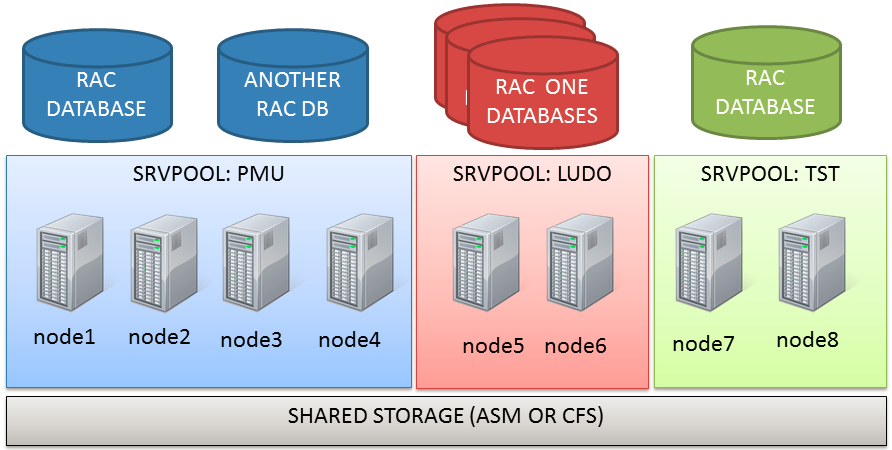
If you read the definition of Cloud Computing given by the NIST (http://csrc.nist.gov/publications/nistpubs/800-145/SP800-145.pdf) you’ll find something similar:
Cloud computing is a model for enabling ubiquitous, convenient, on-demand network access to a shared
pool of configurable computing resources (e.g., networks, servers, storage, applications, and services) that
can be rapidly provisioned and released with minimal management effort or service provider interaction
There are some major benefits in using policy managed databases (that’s my solely opinion):
What changes in real-life DB administration?
Well, the concept of having a relation Server -> Instance disappears, so at the very beginning you’ll have to be prepared to something dynamic (but once configured, things don’t change often).
As Martin pointed out in his blog, you’ll need to configure server pools and think about pools of resources rather than individual configuration items.
The spfile doesn’t contain any information related to specific instances, so the parameters must be database-wide.
The oratab will contain only the dbname, not the instance name, and the dbname is present in oratab disregarding if the server belongs to a serverpool or another.
|
1 2 3 |
+ASM1:/oracle/grid/11.2.0.3:N # line added by Agent PMU:/oracle/db/11.2.0.3:N # line added by Agent TST:/oracle/db/11.2.0.3:N # line added by Agent |
Your scripts should take care of this.
Also, when connecting to your database, you should rely on services and access your database remotely rather than trying to figure out where the instances are running. But if you really need it you can get it:
|
1 2 3 4 5 6 7 |
# srvctl status database -d PMU Instance PMU_4 is running on node node2 Instance PMU_2 is running on node node3 Instance PMU_3 is running on node node4 Instance PMU_5 is running on node node6 Instance PMU_1 is running on node node7 Instance PMU_6 is running on node node8 |
An approach for the crontab: every DBA soon or late will need to schedule tasks within the crond. Since the RAC have multiple nodes, you don’t want to run the same script many times but rather choose which node will execute it.
My personal approach (every DBA has his personal preference) is to check the instance with cardinality 1 and match it with the current node. e.g.:
|
1 2 3 4 5 6 7 |
# [ `crsctl stat res ora.tst.db -k 1 | grep STATE=ONLINE | awk '{print $NF}'` == `uname -n` ] # echo $? 0 # [ `crsctl stat res ora.tst.db -k 1 | grep STATE=ONLINE | awk '{print $NF}'` == `uname -n` ] # echo $? 1 |
In the example, TST_1 is running on node1, so the first evaluation returns TRUE. The second evaluation is done after the node2, so it returns FALSE.
This trick can be used to have an identical crontab on every server and choose at the runtime if the local server is the preferred to run tasks for the specified database.
A proof of concept with Policy Managed Databases
My good colleague Jacques Kostic has given me the access to a enterprise-grade private lab so I can show you some “live operations”.
Let’s start with the actual topology: it’s an 8-node stretched RAC with ASM diskgroups with failgroups on the remote site.
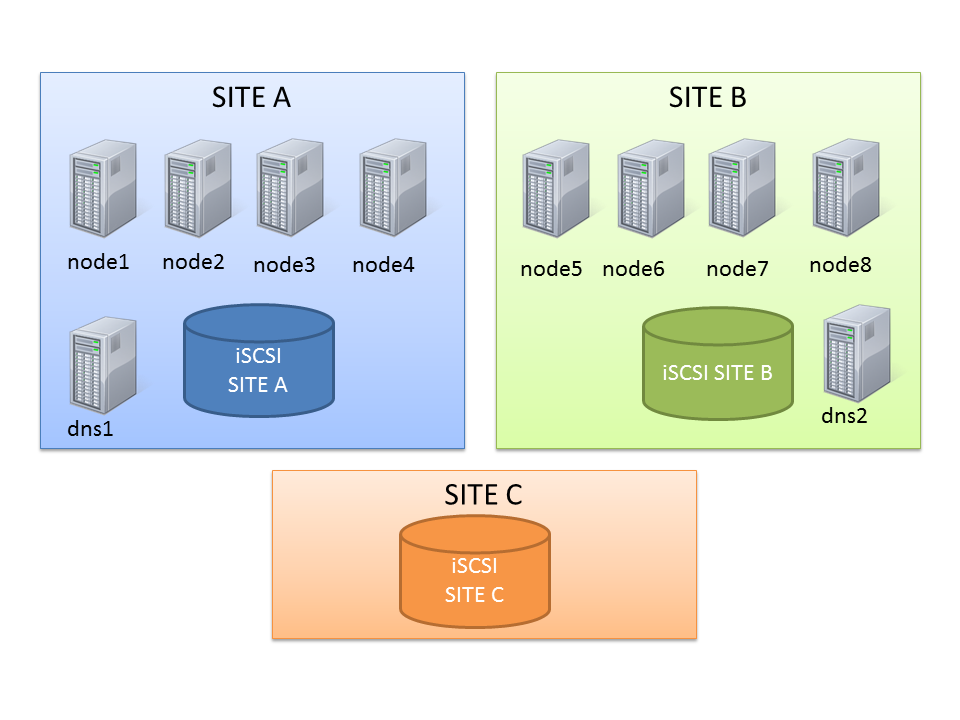
This should be enough to show you some capabilities of server pools.
The Generic and Free server pools
After a clean installation, you’ll end up with two default server pools:
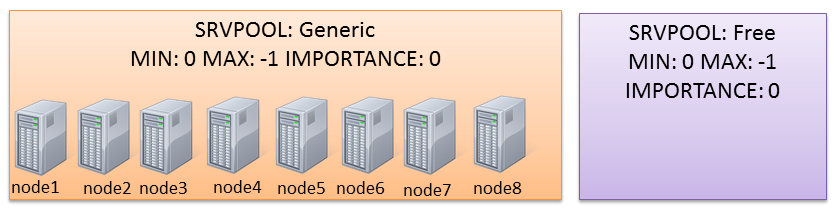
The Generic one will contain all non-PMDs (if you use only PMDs it will be empty). The Free one will own servers that are “spare”, when all server pools have reached the maximum size thus they’re not requiring more servers.
New server pools
Actually the cluster I’m working on has two serverpools already defined (PMU and TST):
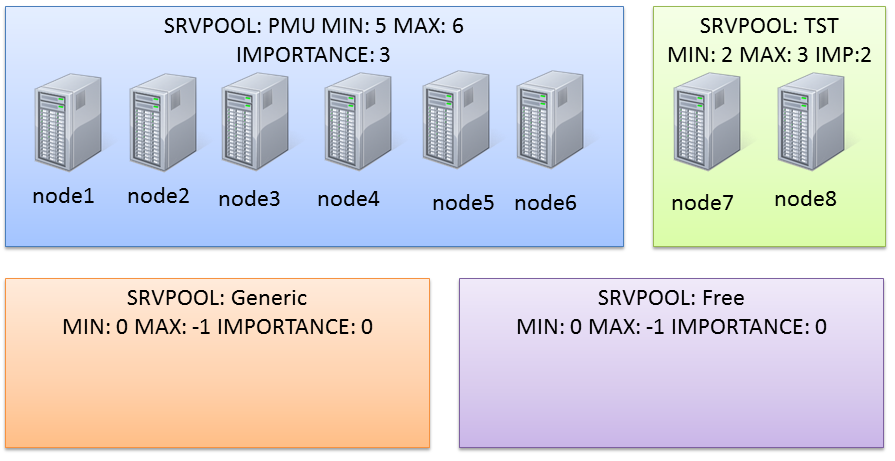
(the node assignment in the graphic is not relevant here).
They have been created with a command like this one:
|
1 |
# srvctl add serverpool -g PMU -l 5 -u 6 -i 3 |
|
1 |
# srvctl add serverpool -g TST -l 2 -u 3 -i 2 |
“srvctl -h ” is a good starting point to have a quick reference of the syntax.
You can check the status with:
|
1 2 3 4 5 6 7 8 9 |
# srvctl status serverpool Server pool name: Free Active servers count: 0 Server pool name: Generic Active servers count: 0 Server pool name: PMU Active servers count: 6 Server pool name: TST Active servers count: 2 |
and the configuration:
|
1 2 3 4 5 6 7 8 9 10 11 12 13 |
# srvctl config serverpool Server pool name: Free Importance: 0, Min: 0, Max: -1 Candidate server names: Server pool name: Generic Importance: 0, Min: 0, Max: -1 Candidate server names: Server pool name: PMU Importance: 3, Min: 5, Max: 6 Candidate server names: Server pool name: TST Importance: 2, Min: 2, Max: 3 Candidate server names: |
Modifying the configuration of serverpools
In this scenario, PMU is too big. The sum of minumum nodes is 2+5=7 nodes, so I have only one server that can be used for another server pool without falling below the minimum number of nodes.
I want to make some room to make another server pool composed of two or three nodes, so I reduce the serverpool PMU:
|
1 |
# srvctl modify serverpool -g PMU -l 3 |
Notice that PMU maxsize is still 6, so I don’t have free servers yet.
|
1 2 3 4 5 6 7 |
# srvctl status database -d PMU Instance PMU_4 is running on node node2 Instance PMU_2 is running on node node3 Instance PMU_3 is running on node node4 Instance PMU_5 is running on node node6 Instance PMU_1 is running on node node7 Instance PMU_6 is running on node node8 |
So, if I try to create another serverpool I’m warned that some resources can be taken offline:
|
1 2 3 4 5 6 |
# srvctl add serverpool -g LUDO -l 2 -u 3 -i 1 PRCS-1009 : Failed to create server pool LUDO PRCR-1071 : Failed to register or update server pool ora.LUDO CRS-2736: The operation requires stopping resource 'ora.pmu.db' on server 'node8' CRS-2736: The operation requires stopping resource 'ora.pmu.db' on server 'node3' CRS-2737: Unable to register server pool 'ora.LUDO' as this will affect running resources, but the force option was not specified |
The clusterware proposes to stop 2 instances from the db pmu on the serverpool PMU because it can reduce from 6 to 3, but I have to confirm the operation with the flag -f.
Modifying the serverpool layout can take time if resources have to be started/stopped.
|
1 2 3 4 5 6 7 8 9 10 11 |
# srvctl status serverpool Server pool name: Free Active servers count: 0 Server pool name: Generic Active servers count: 0 Server pool name: LUDO Active servers count: 2 Server pool name: PMU Active servers count: 4 Server pool name: TST Active servers count: 2 |
My new serverpool is finally composed by two nodes only, because I’ve set an importance of 1 (PMU wins as it has an importance of 3).
Inviting RAC One Node databases to the party
Now that I have some room on my new serverpool, I can start creating new databases.
With PMD I can add two types of databases: RAC or RACONDENODE. Depending on the choice, I’ll have a database running on ALL NODES OF THE SERVER POOL or on ONE NODE ONLY. This is a kind of limitation in my opinion, hope Oracle will improve it in the near future: would be great to specify the cardinality also at database level.
Creating a RAC One DB is as simple as selecting two radio box during in the dbca “standard” procedure:
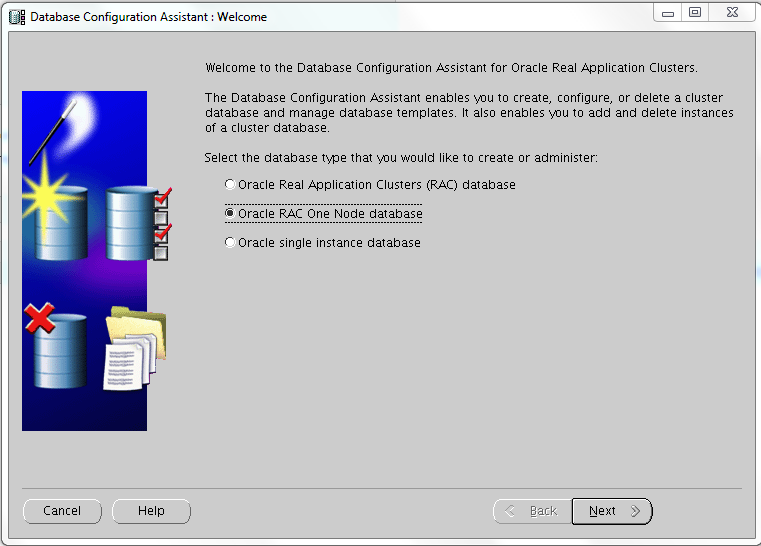
The Server Pool can be created or you can specify an existent one (as in this lab):
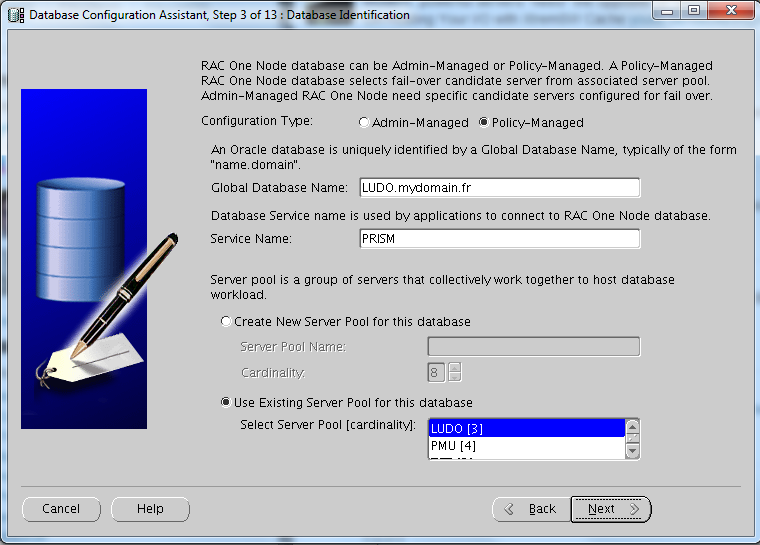
I’ve created two new RAC One Node databases:
I’ve ended up with something like this:
|
1 2 3 4 5 6 7 8 9 10 11 12 13 14 15 16 17 18 19 |
-------------------------------------------------------------------------------- NAME TARGET STATE SERVER STATE_DETAILS -------------------------------------------------------------------------------- ora.ludo.db <<<<< RAC ONE 1 ONLINE ONLINE node8 Open ora.ludo.prism.svc 1 ONLINE ONLINE node8 ora.pmu.db 1 ONLINE ONLINE node7 Open 2 ONLINE ONLINE node4 Open 3 ONLINE ONLINE node5 Open 4 ONLINE ONLINE node6 Open ora.tst.db 1 ONLINE ONLINE node1 Open 2 ONLINE ONLINE node2 Open ora.vico.cheers.svc 1 ONLINE ONLINE node3 ora.vico.db <<<< RAC ONE 1 ONLINE ONLINE node3 Open |
That can be represented with this picture:
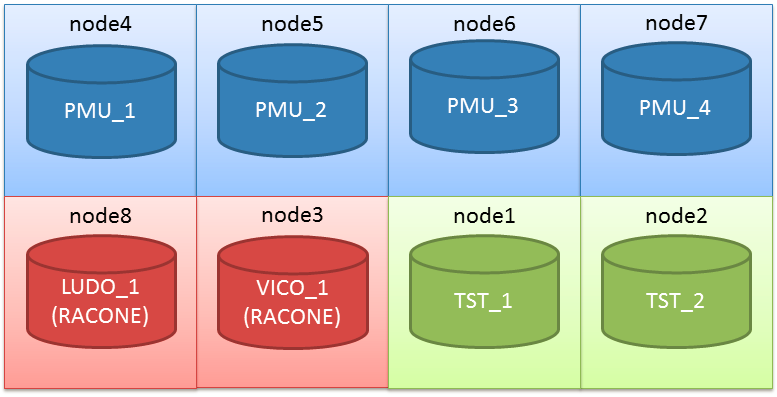
RAC One Node databases can be managed as always with online relocation (it’s still called O-Motion?)
Losing the nodes
With this situation, what happens if I loose (stop) one node?
|
1 2 3 4 5 6 7 8 9 10 11 12 13 14 15 16 17 18 19 20 21 22 23 24 25 26 27 28 29 30 31 32 33 34 35 36 37 38 39 40 41 42 43 |
# crsctl stop cluster -n node8 CRS-2673: Attempting to stop 'ora.crsd' on 'node8' CRS-2790: Starting shutdown of Cluster Ready Services-managed resources on 'node8' CRS-2673: Attempting to stop 'ora.LISTENER.lsnr' on 'node8' CRS-2673: Attempting to stop 'ora.ludo.prism.svc' on 'node8' CRS-2677: Stop of 'ora.ludo.prism.svc' on 'node8' succeeded CRS-2677: Stop of 'ora.LISTENER.lsnr' on 'node8' succeeded CRS-2673: Attempting to stop 'ora.node8.vip' on 'node8' CRS-2677: Stop of 'ora.node8.vip' on 'node8' succeeded CRS-2672: Attempting to start 'ora.node8.vip' on 'node4' CRS-2676: Start of 'ora.node8.vip' on 'node4' succeeded CRS-2673: Attempting to stop 'ora.ludo.db' on 'node8' CRS-2677: Stop of 'ora.ludo.db' on 'node8' succeeded CRS-2672: Attempting to start 'ora.ludo.db' on 'node3' CRS-2676: Start of 'ora.ludo.db' on 'node3' succeeded CRS-2672: Attempting to start 'ora.ludo.prism.svc' on 'node3' CRS-2676: Start of 'ora.ludo.prism.svc' on 'node3' succeeded CRS-2673: Attempting to stop 'ora.GRID.dg' on 'node8' CRS-2673: Attempting to stop 'ora.DATA.dg' on 'node8' CRS-2673: Attempting to stop 'ora.FRA.dg' on 'node8' CRS-2673: Attempting to stop 'ora.RECO.dg' on 'node8' CRS-2677: Stop of 'ora.DATA.dg' on 'node8' succeeded CRS-2677: Stop of 'ora.FRA.dg' on 'node8' succeeded CRS-2677: Stop of 'ora.RECO.dg' on 'node8' succeeded CRS-2677: Stop of 'ora.GRID.dg' on 'node8' succeeded CRS-2673: Attempting to stop 'ora.asm' on 'node8' CRS-2677: Stop of 'ora.asm' on 'node8' succeeded CRS-2673: Attempting to stop 'ora.ons' on 'node8' CRS-2677: Stop of 'ora.ons' on 'node8' succeeded CRS-2673: Attempting to stop 'ora.net1.network' on 'node8' CRS-2677: Stop of 'ora.net1.network' on 'node8' succeeded CRS-2792: Shutdown of Cluster Ready Services-managed resources on 'node8' has completed CRS-2677: Stop of 'ora.crsd' on 'node8' succeeded CRS-2673: Attempting to stop 'ora.ctssd' on 'node8' CRS-2673: Attempting to stop 'ora.evmd' on 'node8' CRS-2673: Attempting to stop 'ora.asm' on 'node8' CRS-2677: Stop of 'ora.evmd' on 'node8' succeeded CRS-2677: Stop of 'ora.asm' on 'node8' succeeded CRS-2673: Attempting to stop 'ora.cluster_interconnect.haip' on 'node8' CRS-2677: Stop of 'ora.cluster_interconnect.haip' on 'node8' succeeded CRS-2677: Stop of 'ora.ctssd' on 'node8' succeeded CRS-2673: Attempting to stop 'ora.cssd' on 'node8' CRS-2677: Stop of 'ora.cssd' on 'node8' succeeded |
The node was belonging to the pool LUDO, however I have this situation right after:
|
1 2 3 4 5 6 7 8 9 10 11 |
# srvctl status serverpool Server pool name: Free Active servers count: 0 Server pool name: Generic Active servers count: 0 Server pool name: LUDO Active servers count: 2 Server pool name: PMU Active servers count: 3 Server pool name: TST Active servers count: 2 |
A server has been taken from the pol PMU and given to the pool LUDO. This is because PMU was having one more server than his minimum server requirement.
Now I can loose one node at time, I’ll have the following situation:
So, my hyper-super-critical application will still have three nodes to have plenty of resources to run even with a multiple physical failure, as it is the server pool with the highest priority and a minimum required server number of 3.
What I would ask to Santa if I’ll be on the Nice List (ad if Santa works at Redwood Shores)
Dear Santa, I would like:
Think about it 😉
—
Ludovico
The installation process of a typical Standard Edition RAC does not differ from the Enterprise Edition. To achieve a successful installation refer to the nice quick guide made by Yury Velikanov and change accordingly the Edition when installing the DB software.
Standard Edition and Feature availability
The first thing that impressed me, is that you’re still able to choose to enable pluggable databases in DBCA even if Multitenant option is not available for the SE.
So I decided to create a container database CDB01 using template files, so all options of EE are normally cabled into the new DB. The Pluggable Database name is PDB01.
|
1 2 3 4 5 6 7 8 9 10 11 |
[oracle@se12c01 ~]$ sqlplus SQL*Plus: Release 12.1.0.1.0 Production on Wed Jul 3 14:21:47 2013 Copyright (c) 1982, 2013, Oracle. All rights reserved. Enter user-name: / as sysdba Connected to: Oracle Database 12c Release 12.1.0.1.0 - 64bit Production With the Real Application Clusters and Automatic Storage Management options |
As you can see, the initial banner contains “Real Application Clusters and Automatic Storage Management options“.
Multitenant option is not avilable. How SE reacts to its usage?
First, on the ROOT db, dba_feature_usage_statistics is empty.
|
1 2 3 4 5 6 7 8 9 |
SQL> alter session set container=CDB$ROOT; Session altered. SQL> select * from dba_feature_usage_statistics; no rows selected SQL> |
This is interesting, because all features are in (remember it’s created from the generic template) , so the feature check is moved from the ROOT to the pluggable databases.
On the local PDB I have:
|
1 2 3 4 5 6 7 8 9 |
SQL> alter session set container=PDB01; Session altered. SQL> select * from dba_feature_usage_statistics where lower(name) like '%multitenant%'; NAME VERSION DETECTED_USAGES TOTAL_SAMPLES CURRE ----------------------------- ----------------- --------------- ----- Oracle Multitenant 12.1.0.1.0 0 0 FALSE |
Having ONE PDB is not triggering the usage of Multitenant (as I was expecting).
How if I try to create a new pluggable database?
|
1 2 3 4 5 6 7 8 9 10 11 |
SQL> alter session set container=CDB$ROOT; Session altered. SQL> create pluggable database PDB02 admin user pdb02admin identified by pdb02admin; create pluggable database PDB02 admin user pdb02admin identified by pdb02admin * ERROR at line 1: ORA-65010: maximum number of pluggable databases created SQL> |
A-AH!! Correctly, I can have a maximum of ONE pluggable database in my container.
This allows however:
To be sure that I can plug/unplug, I’ve tried it:
|
1 2 3 4 5 6 7 8 9 10 11 12 13 14 15 16 17 18 19 20 21 22 23 24 25 |
SQL> alter pluggable database pdb01 close immediate; Pluggable database altered. SQL> alter pluggable database pdb01 unplug into '/u01/app/oracle/unplugged/pdb01/pdb01.xml'; Pluggable database altered. SQL> drop pluggable database pdb01 keep datafiles; Pluggable database dropped. SQL> create pluggable database PDB02 admin user pdb02admin identified by pdb02admin; Pluggable database created. SQL> alter pluggable database pdb02 open; Pluggable database altered. SQL> select * from dba_feature_usage_statistics where name like '%Multite%'; NAME VERSION DETECTED_USAGES TOTAL_SAMPLES CURRE ----------------------------- ----------------- --------------- ----- Oracle Multitenant 12.1.0.1.0 0 0 FALSE |
Other features of Enterprise off course don’t work
|
1 2 3 4 5 6 7 8 9 10 11 |
SQL> alter index SYS_C009851 rebuild online tablespace users; alter index SYS_C009851 rebuild online tablespace users * ERROR at line 1: ORA-00439: feature not enabled: Online Index Build SQL> alter database move datafile 'DATA/CDB01/E09CA0E26A726D60E043A138A8C0E475/DATAFILE/users.284.819821651'; alter database move datafile 'DATA/CDB01/E09CA0E26A726D60E043A138A8C0E475/DATAFILE/users.284.819821651' * ERROR at line 1: ORA-00439: feature not enabled: online move datafile |
Create a Service on the RAC Standard Edition (just to check if it works)
I’ve just followed the steps to do it on an EE. Keep in mind that I’m using admin managed DB (something will come about policy managed DBs, stay tuned).
As you can see it works pretty well. Comparing to 11g you have to specify the -pdb parameter:
|
1 2 3 4 5 6 7 8 9 10 11 12 13 14 15 16 17 18 19 20 21 22 23 24 25 26 27 28 29 30 31 32 33 34 35 36 37 38 39 40 41 42 43 44 45 46 47 48 49 50 51 52 53 |
[oracle@se12c01 admin]$ srvctl add service -db CDB01 -service testpdb02 -preferred CDB012 -pdb PDB02 [oracle@se12c01 admin]$ srvctl start service -db cdb01 -s testpdb02 [oracle@se12c01 admin]$ crsctl stat res -t -------------------------------------------------------------------------------- Name Target State Server State details -------------------------------------------------------------------------------- Local Resources -------------------------------------------------------------------------------- ora.DATA.dg ONLINE ONLINE se12c01 STABLE ONLINE ONLINE se12c02 STABLE ora.LISTENER.lsnr ONLINE ONLINE se12c01 STABLE ONLINE ONLINE se12c02 STABLE ora.asm ONLINE ONLINE se12c01 Started,STABLE ONLINE ONLINE se12c02 Started,STABLE ora.net1.network ONLINE ONLINE se12c01 STABLE ONLINE ONLINE se12c02 STABLE ora.ons ONLINE ONLINE se12c01 STABLE ONLINE ONLINE se12c02 STABLE -------------------------------------------------------------------------------- Cluster Resources -------------------------------------------------------------------------------- ora.LISTENER_SCAN1.lsnr 1 ONLINE ONLINE se12c01 STABLE ora.LISTENER_SCAN2.lsnr 1 ONLINE ONLINE se12c02 STABLE ora.LISTENER_SCAN3.lsnr 1 ONLINE ONLINE se12c02 STABLE ora.cdb01.db 1 ONLINE ONLINE se12c01 Open,STABLE 2 ONLINE ONLINE se12c02 Open,STABLE ora.cdb01.testpdb02.svc <<<<<<<<<<<<<<<<<<<<<<<<<<<<<<<< 1 ONLINE ONLINE se12c02 STABLE ora.cvu 1 ONLINE ONLINE se12c02 STABLE ora.oc4j 1 OFFLINE OFFLINE STABLE ora.scan1.vip 1 ONLINE ONLINE se12c01 STABLE ora.scan2.vip 1 ONLINE ONLINE se12c02 STABLE ora.scan3.vip 1 ONLINE ONLINE se12c02 STABLE ora.se12c01.vip 1 ONLINE ONLINE se12c01 STABLE ora.se12c02.vip 1 ONLINE ONLINE se12c02 STABLE -------------------------------------------------------------------------------- |
Then I can access my DB (and preferred instance) using the service_name I specified.
|
1 2 3 4 5 6 7 8 9 10 11 12 13 14 15 16 17 18 |
[oracle@se12c02 admin]$ $ORACLE_HOME/bin/sqlplus pdb02admin/pdb02admin@testpdb02 SQL*Plus: Release 12.1.0.1.0 Production on Wed Jul 3 16:46:06 2013 Copyright (c) 1982, 2013, Oracle. All rights reserved. Last Successful login time: Wed Jul 03 2013 16:46:01 +02:00 Connected to: Oracle Database 12c Release 12.1.0.1.0 - 64bit Production With the Real Application Clusters and Automatic Storage Management options SQL> show con_name CON_NAME ------------------------------ PDB02 SQL> |
Let me know what do you think about SE RAC on 12c. It is valuable for you?
I’m also on twitter: @ludovicocaldara
Cheers
—
Ludo
Two years after my posts:
Quick Oracle Dataguard check script and More about Dataguard and how to check it I faced a whole new Dataguard between two Oracle Real Application Clusters, aka Oracle Maximum Availability Architecture (MAA).
This enviromnent is relying on Windows OS. Don’t know how this could be called “availability” but here we are. I revisited my scripts in a quick and very dirty way. Please consider that I did copy and paste to check the alignment once per thread, but it should be improved with some kind of iteration to check each thread in a more structured fashion.
|
1 2 3 4 5 6 7 8 9 10 11 12 13 14 15 16 17 18 19 20 21 22 23 24 25 26 27 28 29 30 31 32 33 34 35 36 37 38 39 40 41 42 43 44 45 46 47 48 49 50 51 52 53 54 55 56 57 58 59 60 61 62 63 64 65 66 67 68 69 70 71 72 73 74 75 76 77 78 79 80 81 82 83 84 85 86 87 88 89 90 91 92 93 94 95 96 97 98 99 100 101 102 103 104 105 106 107 108 109 110 111 112 113 114 115 116 |
#!D:\oracle\product\10.2.0\db_1\perl\5.8.3\bin\MSWin32-x86-multi-thread\perl.exe -w use DBI; use DBD::Oracle qw(:ora_session_modes); # DB connection # my $prod = "prod"; my $stby = "stby"; my $prodh; unless ($prodh = DBI->connect('dbi:Oracle:'.$prod, 'sys', 'strongpwd', {PrintError=>0, AutoCommit => 0, ora_session_mode => ORA_SYSDBA})) { print "Error connecting to DB: $DBI::errstr\n"; exit(1); } $prodh->{RaiseError}=1; my $stbyh; unless ($stbyh = DBI->connect('dbi:Oracle:'.$stby, 'sys', 'strongpwd', {PrintError=>0, AutoCommit => 0, ora_session_mode => ORA_SYSDBA})) { print "Error connecting to DB: $DBI::errstr\n"; $prodh->disconnect; exit(1); } $stbyh->{RaiseError}=1; my $sth; ### query stdby MRP0 $sth = $stbyh->prepare( <<EOSQL ); select thread#, SEQUENCE#, BLOCK# from gv\$managed_standby where process='MRP0' EOSQL $sth->execute(); my ($mrpthread, $mrpsequence, $mrpblock) = $sth->fetchrow_array(); $sth->finish(); ### query stdby RFS $sth = $stbyh->prepare( <<EOSQL ); select thread#, SEQUENCE#, BLOCK# from gv\$managed_standby where process='RFS' and client_process='LGWR' order by thread# EOSQL $sth->execute(); my ($rfsthread1, $rfssequence1, $rfsblock1) = $sth->fetchrow_array(); my ($rfsthread2, $rfssequence2, $rfsblock2) = $sth->fetchrow_array(); $sth->finish(); ### query prod $sth = $prodh->prepare( <<EOSQL ); select thread#, SEQUENCE#, BLOCK# from gv\$managed_standby where process='LNS' order by thread# EOSQL $sth->execute(); my ($pthread1, $psequence1, $pblock1) = $sth->fetchrow_array(); my ($pthread2, $psequence2, $pblock2) = $sth->fetchrow_array(); $sth->finish(); printf ("ENVIRONM Thread Sequence Block\n"); printf ("--------- ------ ---------- ----------\n"); printf ("PROD LNS1 1 %10d %10d\n", $psequence1, $pblock1); printf ("STANDBY RFS1 1 %10d %10d\n", $rfssequence1, $rfsblock1); printf ("PROD LSN2 2 %10d %10d\n", $psequence2, $pblock2); printf ("STANDBY RFS2 2 %10d %10d\n", $rfssequence2, $rfsblock2); printf ("STANDBY MRP0 %d %10d %10d\n", $mrpthread, $mrpsequence, $mrpblock); my $psequence; my $pblock; if ( $mrpthread == 1 ) { $psequence=$psequence1; $pblock=$pblock1; } else { $psequence=$psequence2; $pblock=$pblock2; } $sth = $stbyh->prepare( <<EOSQL ); select nvl(sum(blocks),0) + $pblock - $mrpblock as BLOCK_GAP from gv\$archived_log where thread#=$mrpthread and sequence# between $mrpsequence and $psequence EOSQL $sth->execute(); my ($mrpblockgap) = $sth->fetchrow_array(); $sth->finish(); $sth = $stbyh->prepare( <<EOSQL ); select nvl(sum(blocks),0) + $pblock1 - $rfsblock1 as BLOCK_GAP from gv\$archived_log where thread#=1 and sequence# between $rfssequence1 and $psequence1 EOSQL $sth->execute(); my ($rfsblockgap1) = $sth->fetchrow_array(); $sth->finish(); $sth = $stbyh->prepare( <<EOSQL ); select nvl(sum(blocks),0) + $pblock2 - $rfsblock2 as BLOCK_GAP from gv\$archived_log where thread#=2 and sequence# between $rfssequence2 and $psequence2 EOSQL $sth->execute(); my ($rfsblockgap2) = $sth->fetchrow_array(); $sth->finish(); printf ("\n\n%-10d blocks gap in TRANSMISSION\n", $rfsblockgap1+$rfsblockgap2); printf ("%-10d blocks gap in APPLY (MRP0)\n", $mrpblockgap); $stbyh->disconnect; $prodh->disconnect; |
Please foreward me every improvement you implement over my code: it would be nice to post it here.