If you use Block Change Tracking on your production database and try to duplicate it, you there are good possibilities that you will encounter this error:
The problem is caused by the block change tracking file entry that exists in the target controlfile, but Oracle can’t find the file because the directory structure on the auxiliary server changes.
After the restore and recovery of the auxiliary database, the duplicate process tries to open the DB but the bct file doesn’t exist and the error is thrown.
If you do a quick google search you will find several workarounds:
disable the block change tracking after you get the error and manually open the auxiliary instance (this prevent the possibility to get the duplicate outcome from the rman return code)
disable the BCT on the target before running the duplicate (this forces your incremental backups to read all your target database!)
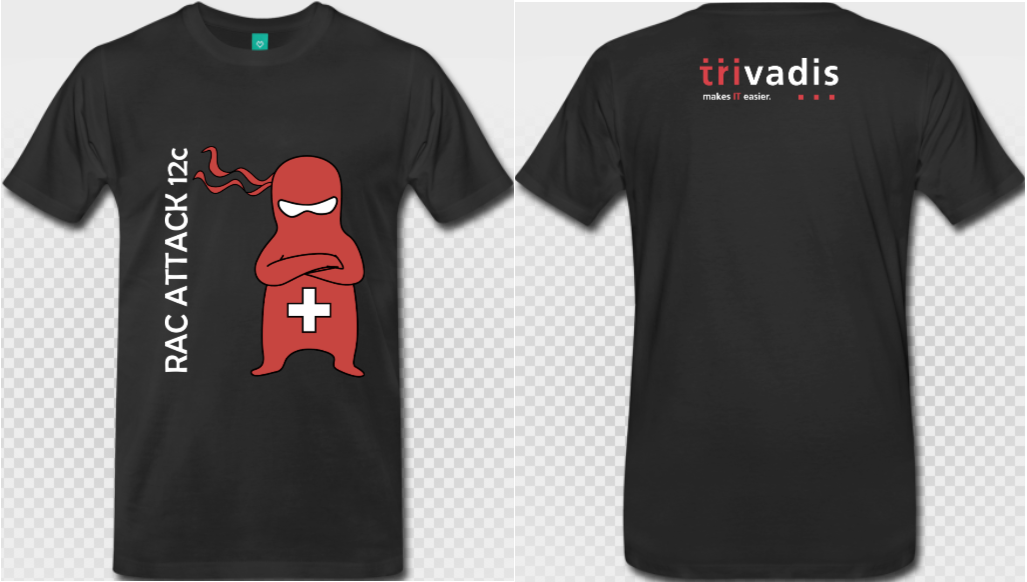
After a great success in 2014, RAC Attack! comes back to Geneva!
Set up an Oracle Real Application Clusters 12c environment on your laptop, try advanced configurations or simply take the opportunity to discuss about Oracle technology with the best experts in Suisse Romande!
Experienced volunteers (ninjas) will help you address any related issues and guide you through the setup process.
When? Thursday September 17th, 2015, from 17h00 onwards
Cost? It is a FREE event! It is a community based, informal and enjoyable workshop. You just need to bring your own laptop and your desire to have fun!
Confirmed Ninjas:
Ludovico Caldara – Oracle ACE, RAC SIG Chair & co-auteur RAC Attack Eric Grancher – Membre OAK Table & Senior DBA Jacques Kostic – OCM 11g & Senior Consultant chez Trivadis
Agenda:
17.00 – Welcome and T-shirt distribution
17.30 – RAC Attack 12c part I
19.30 – Pizza and Beers! (sponsored by Trivadis)
20.00 – RAC Attack 12c part II
22.00 – Group photo and wrap-up!!
If you are an Oracle customer who has several database versions running, you have to deal with scripts that become more and more complex to maintain. Depending on the version or the edition of your database, you may want to run different pieces of code. This forces you to get programmatically more information about your database version and edition (e.g., in order to run a statspack or AWR report if your software is either Enterprise or Standard).
The most common way to get information about the software is connecting to the database and getting it through a couple of selects. But what if you don’t have any running databases?
The ORACLE_HOME inventory has such information, and you can get it with a short shell function:
The snippet searches for a patchset entry in comps.xml to get the patch version rather than the base version (for releases prior to 11gR2 where out-of-place patching occurs). If a patchset cannot be found, it looks for the base version. Depending on the major release, the information about the edition is either in globalvariables.xml (11g, 12c) or in context.xml (10g).
When you call this “ohversion” function, you get both the Oracle version and the edition of your current ORACLE_HOME.
If you’re using the bash as user shell, you may want to take one step forward and include this information in a much fancier bash prompt than the prompt by default:
Although this prompt may seem long, it has several advantages that save you a lot of typing:
• The newline character inside the prompt let’s you start typing commands on an almost empty line so you don’t have to worry about how long your command is.
• The full username@host:path can be copied and pasted quickly for scp commands.
• The time inside the square brackets is helpful to track timings.
• The indication of the current environment (version, edition, SID) lets you know which environment you’re working on.
• The leading number is the exit code of the last command ($?). It’s green when the exit code is zero and red for all other exit codes.
• Hash characters before and after the prompt mitigate the risk of copying and pasting the wrong line by mistake inside your session.
Note: this post originally appeared on IOUG Tips & Best Practices Booklet 9th edition.
Oracle has announced the new Oracle Database Backup Logging Recovery Appliance at the last Open World 2013, but since then it has not been released to the market yet, and very few information is available on the Oracle website.
During the last IOUG Collaborate 14, Oracle master product manager of Data Guard and MAA, Larry Carpenter, has unveiled something more about the DBRLA (call it “Debra” to simplify your life 🙂 ) , and I’ve had the chance to discuss about it directly with Larry.
At Trivadis we think that this appliance will be a game changer in the world of backup management.
Why?
Well, if you have ever worked for a big company with many hundreds of databases, you have certainly encountered many of those common problems:
Oracle Backup and restore penalized by a shared infrastructure
Poor backup or restore performance
Tape drives busy when you need them urgently
Complex management of backup retentions
That’s not all. As of now, your best recovery point in case of restore is directly related to your backup archive frequency. Oh yes, you have to low down your archive_lag_target parameter, increase your log switch frequency (and thus, the I/O) and still have… 10, 15, 30 minutes of possible data loss? Unless you protect your transactions with a Data Guard. But this will cost you money. For the additional server and storage. For the licenses. And for the effort required to put in place a Data Guard instance for every database that you want to protect. You want to protect your transactions from a storage failure and there’s a price to pay.
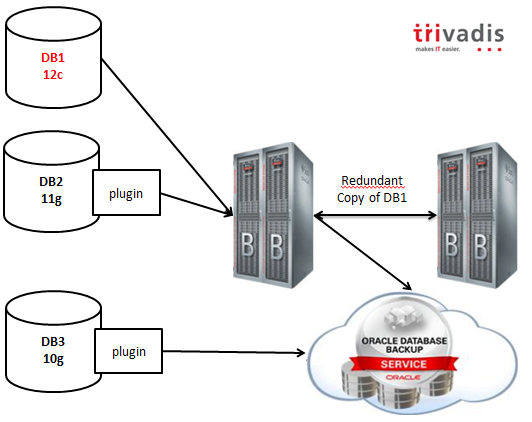
The Database Backup Logging Recovery Appliance (wow, I need to copy and paste the name to save time! :-)) overcomes these problems with a simple but brilliant idea: leveraging the existing redo log transport processes and ship the redo stream directly to the backup appliance (the DBLRA, off course) or to its Cloud alter ego, hosted by Oracle.
As you can infer from the picture, 12c databases will work natively with the appliance, while previous releases will have a plugin that will enable all the capabilities.
Backups can be mirrored selectively to another DBLRA, or copied to the cloud or to a 3rd party (Virtual) Tape Library.
The backup retention is enforced by the appliance and the expiration and deletion is done automatically using the embedded RMAN catalog.
Lightning fast backups and restores are guaranteed by the hardware: DBLRA is based on the same hardware used by Exadata, with High Capacity disks. Optional storage extensions can be added to increase the capacity, but all the data, as I’ve said, can be offloaded to VTLs in order to use a cheaper storage for older backups.
To resume, the key values are:
No transaction loss!!
Lightning fast backups and restores
Integrated, Oracle engineered, scalable solution for hundreds to thousands of databases
Looking forward to see it in action!
I cannot cover all the information I have in a single post, but Trivadis is working actively to be ready to implement it at the time of the launch to the market (estimated in 2014), so feel free to contact me if you are interested in boosting your backup environment. 😉
By the way, I expect that the competitors (IBM, Microsoft?) will try to develop a solution with the same characteristics in terms of reliability, or they will lose terrain.
Cheers!
Ludovico
Disclaimer: This post is intended to outline Oracle’s general product direction based on the information gathered through public conferences. It is intended for informational purposes only. The development and release of these functionalities and features including the release dates remain at the sole discretion of Oracle and no documentation is available at this time. The features and commands shown may or may not be accurate when the final product release goes GA (General Availability). Please refer Oracle documentation when it becomes available.
As already pointed by the existing articles, I can’t create a common user into the root container without the c## prefix, unless I’m altering the hidden parameter _common_user_prefix.
PgSQL
1
2
3
4
5
SQL>createusergoofyidentifiedbypippo;
createusergoofyidentifiedbypippo
*
ERRORatline1:
ORA-65096:invalidcommonuserorrolename
so I specify the correct prefix, and it works:
Oracle PL/SQL
1
2
3
4
5
6
7
SQL>createuserC##GOOFYidentifiedbypippo;
Usercreated.
SQL>grantcreatesession,altersessiontoc##goofy;
Grantsucceeded.
The user is common, so it appears in all the containers, I can check it by querying CDB_USERS from the root container.
Note that the error ORA-65049 is different from the ORA-65096 that I’ve got before.
My conclusion is that the clause container of the create role and create user statements doesn’t make sense as you can ONLY create common users and roles into the root container and only local ones into the PDBs.
Creating a local role
Just as experiment, I’ve tried to see if I can create a local role with container=ALL. It doesn’t work:
Oracle PL/SQL
1
2
3
4
5
6
7
8
9
SQL>altersessionsetcontainer=hr;
Sessionaltered.
SQL>createroleREGION_ROLEcontainer=ALL;
createroleREGION_ROLEcontainer=ALL
*
ERRORatline1:
ORA-65050:CommonDDLsonlyallowedinCDB$ROOT
So I create the local role with container=current:
Oracle PL/SQL
1
2
3
SQL>createroleREGION_ROLEcontainer=CURRENT;
Rolecreated.
Now, from the PDB I can see the two roles I can access, whereas from the root I can see all the roles I’ve defined so far: the common role is available from all the PDBs, the local role only from the db where it has been defined, just like the users.
From the root I can’t give grants on objects that reside in a PDB since I cannot see them: I need to connect to the PDB and give the grants from there:
Oracle PL/SQL
1
2
3
4
5
6
7
8
9
10
11
12
13
14
15
16
17
SQL>grantselectonhr.countriestoC##country_role;
grantselectonhr.countriestoC##country_role
*
ERRORatline1:
ORA-00942:tableorviewdoesnotexist
SQL>altersessionsetcontainer=hr;
Sessionaltered.
SQL>grantselectonhr.countriestoC##COUNTRY_ROLE;
Grantsucceeded.
SQL>grantselectonhr.regionstoREGION_ROLE;
Grantsucceeded.
Now, if I query CDB_TAB_PRIVS from the root, I see that the grants are given at a local level (con_id=3 and common=N):
give the grant commonly while connected to the root:
Oracle PL/SQL
1
2
3
4
5
6
7
SQL>altersessionsetcontainer=cdb$root;
Sessionaltered.
SQL>grantC##COUNTRY_ROLEtoc##goofycontainer=all;
Grantsucceeded.
I can also grant locally both roles and system privileges to common users while connected to the root container: in this case the privileges are applied to the root container only. Finally having the clause container finally starts to make sense:
Ok, I’ve given the grants and I’ve never verified if they work, so far.
Let’s try with theselect any table privilege I’ve given in the last snippet. I expect C##GOOFY to select any table from the root container and only HR.COUNTRIES and HR.REGIONS on the HR PDB bacause they have been granted through the two roles.
Now I see that the grants give two distinct permissions : one local and the other common.
If I revoke the grants without container clause, actually only the local one is revoked and the user can continue to login. To revoke the grants I would need to check and revoke both local and common privileges.
After the first revoke statement, I can still connect to HR and verify that my select any table privilege doesn’t apply to the PDB as it’s local to the root container:
Oracle PL/SQL
1
2
3
4
5
6
7
SQL>connectC##GOOFY/pippo@node4:1521/hr
Connected.
SQL>selectcount(*)fromhr.DEPARTMENTS;
selectcount(*)fromhr.DEPARTMENTS
*
ERRORatline1:
ORA-00942:tableorviewdoesnotexist
After that, I want to check the privileges given through the local and common roles.
I expect both users to select from hr.countries and hr.regions since they have been granted indirectly by the roles.
Let’s try the local user first:
Oracle PL/SQL
1
2
3
4
5
6
7
8
9
10
11
12
13
14
15
16
17
SQL>connectgoofy/pippo@node4:1521/hr
Connected.
SQL>selectcount(*)fromhr.regions;
COUNT(*)
----------
4
1rowselected.
SQL>selectcount(*)fromhr.countries;
COUNT(*)
----------
25
1rowselected.
Yeah, it works as expected.
Now let’s try the common user:
Oracle PL/SQL
1
2
3
4
5
6
7
8
9
10
11
12
13
14
15
16
17
SQL>connectc##goofy/pippo@node4:1521/hr
Connected.
SQL>selectcount(*)fromhr.regions;
COUNT(*)
----------
4
1rowselected.
SQL>selectcount(*)fromhr.countries;
COUNT(*)
----------
25
1rowselected.
It also work, so everything is ok.
Common and local grants, why you must pay attention
During the example, I’ve granted the C##COUNTRY_ROLE many times: locally to PDB, locally to the ROOT, commonly. The result is that I’ve flooded the grant table with many entries:
When granting privileges from the root container, keep in mind that container=current is the default even when the grantee or the role granted are common.
When revoking the grants with a Multitenant architecture, keep in mind that there is a scope and you may need more than one statement to actually remove the grant from all the scopes.
As always, I look for opinions and suggestions, feel free to comment!
NOTE: The maximum number of database instances per cluster is 512 for Oracle 11g Release 1 and higher. An upper limit of 128 database instances per X2-2 or X3-2 database node and 256 database instances per X2-8 or X3-8 database node is recommended. The actual number of database instances per database node or cluster depends on application workload and their corresponding system resource consumption.
But how many instances are actually beeing consolidated by DBAs from all around the world?
I’ve asked it to the Twitter community
I’ve sent this tweet a couple of weeks ago and I would like to consolidate some replies into a single blog post.
who has done more than this on a single server? $ ps -eaf | grep ora_pmon | wc -l 77 #oracle#consolidation
Does this thread of tweets reply to the question? Are you planning to consolidate your Oracle environment? If you have questions about how to plan your consolidation, don’t hesitate to get in touch! 🙂
One of the new features of Oracle 12c is the new is the MySQL C API implementation for Oracle, so that all applications and tools built on this API can use transparently a MySQL or an Oracle database as backend.
Oracle says that this will facilitate the migration from MySQL to Oracle, but I ask myself: Won’t be attractive for many developers to start developing applications with the MySQL API rather than with the Oracle libraries? This can potentially permit new applications to be migrated quickly in the opposite direction… (Oracle -> MySQL).
After a long, long wait, Oracle finally announced the availability of his new generation database. And looking at the new features, I think it will take several months before I’ll learn them all. The impressive number of changes brings me back to the release 10gR1, and I’m not surprised that Oracle has waited so long, I still bet that we’ll find a huge amount of bugs in the first release. We need for sure to wait a first Patchset, as always, before going production.
Does ‘c’ stand for cloud?
While Oracle has developed this release with the cloud in mind, the first word that comes out of my mind is “consolidation”. The new claimed feature Pluggable Database (aka Oracle Multitenancy) will be the dream of every datacenter manager along with CloneDB (well, it was somehow already available on 11.2.0.2) and ASM Thin_provisioned diskgroups.
But yes, it’s definitely the best for clouds
Other features like Flex ASM, Flex Cluster, several new security features, crossplatform backups… let imagine how deeply we can work to make private, multi-tenant clouds.
First steps, what changes with a typical installation
The process for a traditional standalone DB+ASM installation is the same as the old 11gR2: You’ll need to install the Grid Infrastructure first (and then take advantage of the Oracle Restart feature) and subsequently the Database installation.
The installation documentation is complete as always and is getting quite huge as the Grid Infrastructure capabilities increment.
To meet most installation prerequisites, Oracle has prepared again an RPM that does the dirty work:
Oracle suggests to use Ksplice and also explicitly recommends to use the deadline I/O scheduler (it has been longtime a best practice but I can’t remember it was documented officially).
The splash screen has become more “red” giving a colorful experience on the installation process. 😉
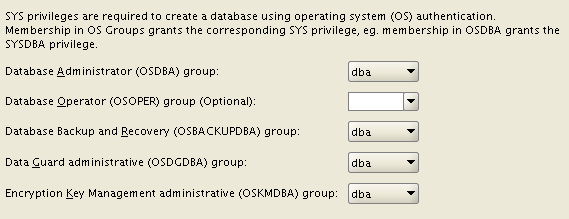
Once the GI is installed, the Database installation asks for many new OS groups: OSBACKUPDBA, OSDGDBA, OSKMDBA. This give you more possibilities to split administration duties, not specifying them will lead to the “old behavior”.
You can decide to use an ACFS filesystemfor both the installation AND the database files (with some exceptions, e.g. Windows servers). So, you can take advantage of the snapshot features of ACFS for your data, provided that the performance is acceptable (I’ll try to test and blog more about this). You can use the feature Copy-On-Write to provide writable snapshot copies, directly embedding a special syntax inside the “create pluggable database” command. Unfortunately, Oracle has decided to deliver pluggable databases as an extra-cost option. :-/
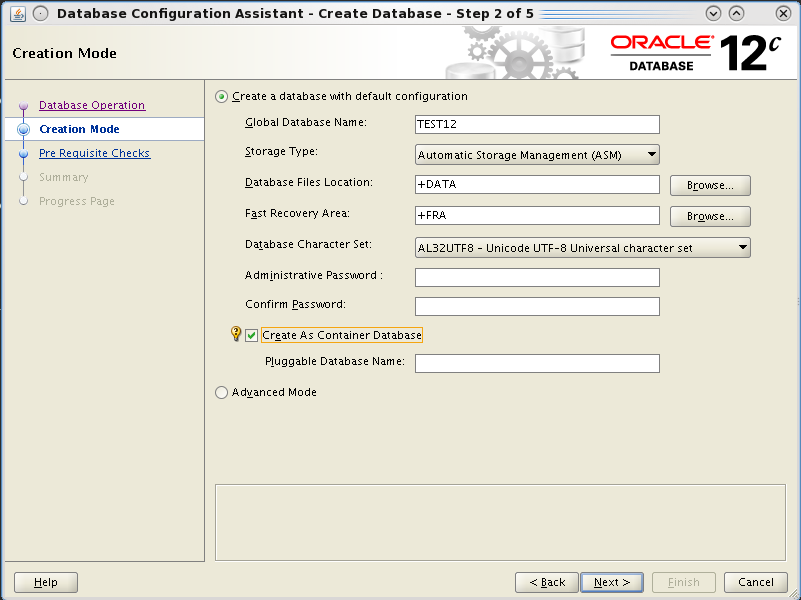
The database creation with DBCA is even easier, you have an option for a very default installation, you can guess it uses templates with all options installed by default.
But the Hot topic is that you can create it as a “Container Database”. This is done by appending the keywords “enable pluggable database;” at the end of the create database command. The process will then put all the required bricks (creation of the pdb$seed database and so on), I’ll cover the topic in separate posts cause it’s the really biggest new feature.
You can still use advanced mode to have the “old style” database creation, where you can customize your database.
If you try to create only the scripts and run them manually (that’s my habit), you’ll notice that SQL scripts are not run directly within the opened SQL*Plus session, but they’re run from a perl script that basically suppresses all the output to terminal, giving the impression of a cleaner installation. IMO it could be better only if everything runs fine.
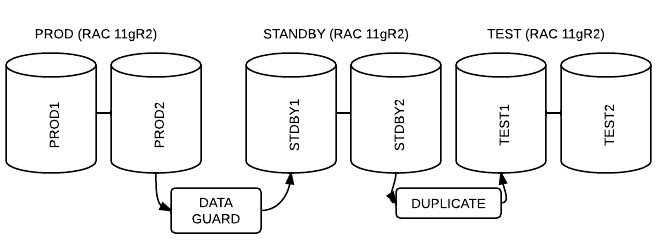
It’s possibile to duplicate a database for testing purposes (it’s an example) using a standby database as source. This allows you to off-load the production environment.
This is a simple script that makes use of ASM and classic duplicate, although I guess it’s possible to use the standby DB for a duplicate from active database.
You can launch it everyday to align your test env at a point in time.
Shell
1
2
3
4
5
6
7
8
9
10
11
12
13
14
15
16
17
18
19
20
21
22
23
24
25
26
27
28
29
30
31
32
33
34
35
36
37
38
39
40
41
42
43
44
45
46
47
48
49
50
51
#!/bin/bash
if[$USER!='oracle'];then
echo"need to be oracle"
exit0
fi
.$HOME/set11
export ORACLE_SID=test1
srvctl stop database-dtest-oimmediate
## this is supposed to be a script that erase your ASM from your old test dbfiles:
## it's as simple as running with the CORRECT ENV:
alter system set cluster_database=truescope=spfile;
shutdown immediate
startup mount
alter database noarchivelog;
shutdown immediate
EOF
srvctl start database-dtest
This website uses cookies to improve your experience. We'll assume you're ok with this, but you can opt-out if you wish.Accept
Privacy & Cookies Policy
Privacy Overview
This website uses cookies to improve your experience while you navigate through the website. Out of these, the cookies that are categorized as necessary are stored on your browser as they are essential for the working of basic functionalities of the website. We also use third-party cookies that help us analyze and understand how you use this website. These cookies will be stored in your browser only with your consent. You also have the option to opt-out of these cookies. But opting out of some of these cookies may affect your browsing experience.
Necessary cookies are absolutely essential for the website to function properly. This category only includes cookies that ensures basic functionalities and security features of the website. These cookies do not store any personal information.
Any cookies that may not be particularly necessary for the website to function and is used specifically to collect user personal data via analytics, ads, other embedded contents are termed as non-necessary cookies. It is mandatory to procure user consent prior to running these cookies on your website.