FPP was still young and lacking many features at that time, but it already changed the way I’ve worked during the next years. I embraced the out of place patching, developed some basic scripts to install Oracle Homes, and sought automation and standardization at all costs:
And discovered that meanwhile, FPP did giant steps, with many new features and fixes for quite a few usability and performance problems.
Last year, when joining the Oracle Database High Availability (HA), Scalability, and Maximum Availability Architecture (MAA) Product Management Team at Oracle, I took (among others) the Product Manager role for FPP.
Becoming an Oracle employee after 20 years of working with Oracle technology is a big leap. It allows me to understand how big the company is, and how collaborative and friendly the Oracle employees are (Yes, I was used to marketing nonsense, insisting salesmen, and unfriendly license auditors. This is slowly changing with Oracle embracing the Cloud, but it is still a fresh wound for many customers. Expect this to change even more! Regarding me… I’ll be the same I’ve always been 🙂 ).
Now I have daily meetings with big customers (bigger than the ones I have ever had in the past), development teams, other product managers, Oracle consultants, and community experts. My primary goal is to make the product better, increasing its adoption, and helping customers having the best experience with it. This includes testing the product myself, writing specs, presentations, videos, collecting feedback from the customers, tracking bugs, and manage escalations.
I am a Product Manager for other products as well, but I have to admit that FPP is the product that takes most of my Product Manager time. Why?
I will give a few reasons in my next blog post(s).
I have been a DBA/consultant for customers and big production environments for over twenty years. I have explained more or less my career path in this blog post.
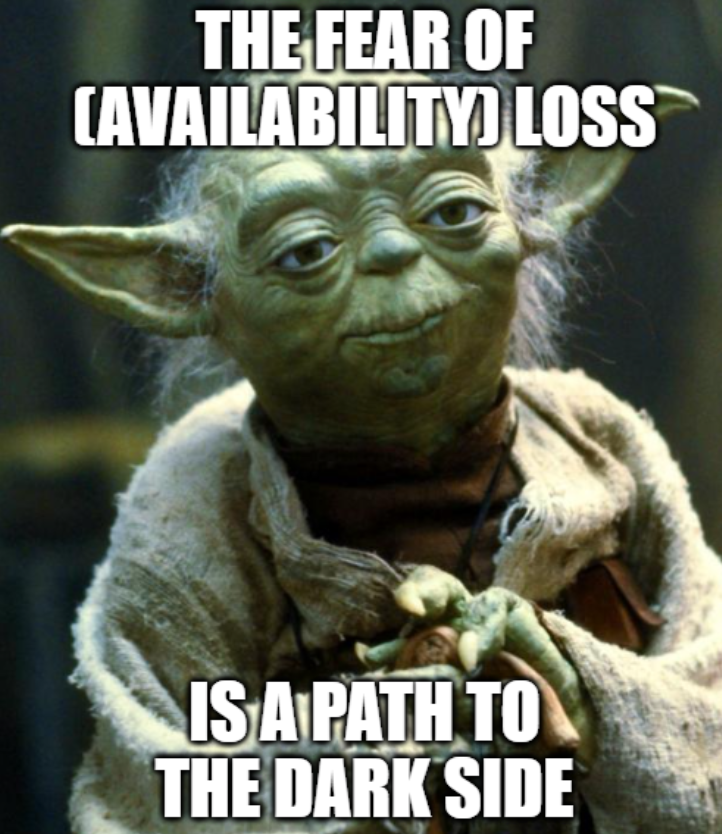
Database (and application) high availability has always been one of my favorite areas. Over the years I have become a high availability expert (my many blog posts are there to confirm it) and I have spent a lot of time building, troubleshooting, teaching, presenting, advocating these gems of technology that are RAC, Data Guard, Application Continuity and the many other products that are part of the Oracle Maximum Availability Architecture solution. Customers fear downtime, and I have always been with them on that. But in my case, it looks like Yoda’s famous quote worked well for me (in a good way):
I’ll be joining the Oracle Maximum Availability Architecture Product Management team as MAA Product Manager (or rather Cloud MAA, I will not explain here ;-)) next November.
(for those who are not familiar with the joke, the “Dark Side” is how we often refer to the Oracle employees in the Oracle Community 😉 )
I remember just like if it was yesterday that I was presenting some Data Guard 12c new features in front of a big audience at Collaborate 2014. There I have met two incredible people that were part of the MAA Product Management team: Larry Carpenter and Markus Michalewicz. Larry has been a great source of inspiration to improve my seniority and ease of presenting in front of the public, while Markus has become a friend over the years in addition of being one of the most influent persons in my professional network.
Now I have got the opportunity to join that team, and I feel like it’s the most natural change to do in my career.
And because I imagine some of you will have some questions, there are some answers to questions I’ve been frequently asked so far:
MAA PM does not mean becoming team lead or supervising other colleagues, I’ll be a “regular” PM
I will stay in Switzerland and work remotely from here
I will stay in “the conference circus” and keep presenting as soon the COVID-19 situation will allow to do so
Yes, I was VERY happy in Trivadis and it will always have a special place in my heart
One of the challenges of automation in bin Oracle Environments is dealing with tnsnames.ora files.
These files might grow big and are sometimes hard to distribute/maintain properly.
The worst is when manual modifications are needed: manual operations, if not made carefully, can screw up the connection to the databases.
The best solution is always using LDAP naming resolution. I have seen customers using OID, OUD, Active Directory, openldapd, all with a great level of control and automation. However, some customer don’t have/want this possibility and keep relying on TNS naming resolution.
When Data Guard (and eventually RAC) are in place, the tnsnames.ora gets filled by entries for the DGConnectIdentifiers and StaticConnectIdentifier. If I add the observer, an additional entry is required to access the dbname_CFG service created by the Fast Start Failover.
Actually, all these entries are not required if I use Easy Connect.
The basic configuration with Data Guard is quite simple to achieve with Easy Connect. In this examples I have:
– The primary database TOOLCDB1_SITE1
– The duplicated database for standby TOOLCDB1_SITE2
After setting up the static registration (no Grid Infrastructure in my lab):
Lisp
1
2
3
4
5
6
7
8
SID_LIST_LISTENER=
(SID_LIST=
(SID_DESC=
(GLOBAL_DBNAME=TOOLCDB1_SITE1_DGMGRL)
(SID_NAME=TOOLCDB1)
(ORACLE_HOME=/u01/app/oracle/product/db_19_8_0)
)
)
and copying the passwordfile, the configuration can be created with:
Oracle PL/SQL
1
2
3
4
5
6
7
8
9
10
11
12
13
14
DGMGRL> create configuration TOOLCDB1 as primary database is TOOLCDB1_SITE1 connect identifier is 'newbox01:1521/TOOLCDB1_SITE1';
Configuration "toolcdb1" created with primary database "toolcdb1_site1"
DGMGRL> edit database TOOLCDB1_SITE1 set property 'StaticConnectIdentifier'='newbox01:1521/TOOLCDB1_SITE1_DGMGRL';
Property "StaticConnectIdentifier" updated
DGMGRL> add database TOOLCDB1_SITE2 as connect identifier is 'newbox02:1521/TOOLCDB1_SITE2';
Database "toolcdb1_site2" added
DGMGRL> edit database TOOLCDB1_SITE2 set property 'StaticConnectIdentifier'='newbox02:1521/TOOLCDB1_SITE2_DGMGRL';
Property "StaticConnectIdentifier" updated
DGMGRL> enable configuration;
Enabled.
That’s it.
Now, if I want to have the configuration observed, I need to activate the Fast Start Failover:
Oracle PL/SQL
1
2
3
4
5
6
7
8
9
10
11
12
13
14
15
16
17
DGMGRL> edit database toolcdb1_site1 set property LogXptMode='SYNC';
Property "logxptmode" updated
DGMGRL> edit database toolcdb1_site2 set property LogXptMode='SYNC';
Property "logxptmode" updated
DGMGRL> edit database toolcdb1_site1 set property FastStartFailoverTarget='toolcdb1_site2';
Property "faststartfailovertarget" updated
DGMGRL> edit database toolcdb1_site2 set property FastStartFailoverTarget='toolcdb1_site1';
Property "faststartfailovertarget" updated
DGMGRL> edit configuration set protection mode as maxavailability;
Succeeded.
DGMGRL> enable fast_start failover;
Enabled in Zero Data Loss Mode.
With just two databases, FastStartFailoverTarget is not explicitly needed, but I usually do it as other databases might be added to the configuration in the future.
After that, the broker complains that FSFO is enabled but there is no observer yet:
Oracle PL/SQL
1
2
3
4
5
6
7
8
9
10
11
12
13
14
15
16
17
18
19
20
21
22
23
24
25
26
27
28
29
30
31
32
33
34
35
36
37
38
39
40
41
42
43
44
DGMGRL> show fast_start failover;
Fast-Start Failover: Enabled in Zero Data Loss Mode
Protection Mode: MaxAvailability
Lag Limit: 0 seconds
Threshold: 180 seconds
Active Target: toolcdb1_site2
Potential Targets: "toolcdb1_site2"
toolcdb1_site2 valid
Observer: (none)
Shutdown Primary: TRUE
Auto-reinstate: TRUE
Observer Reconnect: 180 seconds
Observer Override: FALSE
Configurable Failover Conditions
Health Conditions:
Corrupted Controlfile YES
Corrupted Dictionary YES
Inaccessible Logfile NO
Stuck Archiver NO
Datafile Write Errors YES
Oracle Error Conditions:
(none)
DGMGRL> show configuration;
Configuration - toolcdb1
Protection Mode: MaxAvailability
Members:
toolcdb1_site1 - Primary database
Warning: ORA-16819: fast-start failover observer not started
toolcdb1_site2 - (*) Physical standby database
Fast-Start Failover: Enabled in Zero Data Loss Mode
Configuration Status:
WARNING (status updated 39 seconds ago)
Observer for multiple configurations
This feature has been introduced in 12.2 but it is still not widely used.
Before 12.2, the Observer was a foreground process: the DBAs had to start it in a wrapper script executed with nohup in order to keep it live.
Since 12.2, the observer can run as a background process as far as there is a valid wallet for the connection to the databases.
Also, 12.2 introduced the capability of starting multiple configurations with a single dgmgrl command: “START OBSERVING”.
First, I need a wallet. And here comes the first compromise:
Having a single dgmgrl session to start all my configurations means that I have a single wallet for all the databases that I want to observe.
Fair enough, all the DBs (CDBs?) are managed by the same team in this case.
If I have only observers on my host I can easily point to the wallet from my central sqlnet.ora:
Which connection descriptors do I need?
The Observer uses the DGConnectIdentifier to keep observing the databases, but needs a connection to both of them using the TOOLCDB1_CFG service (unless I specify something different with the broker configuration property ConfigurationWideServiceName) to connect to the configuration and get the DGConnectIdentifier information. Again, you can check it in the doc. or the note Oracle 12.2 – Simplified OBSERVER Management for Multiple Fast-Start Failover Configurations (Doc ID 2285891.1)
So I need to specify three secrets for three connection descriptors:
Oracle Secret Store Tool Release 21.0.0.0.0 - Production
Version 21.0.0.0.0
Copyright (c) 2004, 2020, Oracle and/or its affiliates. All rights reserved.
Your secret/Password is missing in the command line
Enter your secret/Password:
Re-enter your secret/Password:
Enter wallet password:
The first one will be used for the initial connection. The other two to observe the Primary and Standby.
I need to be careful that the first EZConnect descriptor matches EXACTLY what I put in observer.ora (see next step) and the last two match my DGConnectIdentifier (unless I specify something different with ObserverConnectIdentifier), otherwise I will get some errors and the observer will not observe correctly (or will not start at all).
The dgmgrl needs then a file named observer.ora.
$ORACLE_BASE/admin/observers or the central TNS_ADMIN would be good locations, but what if I have observers that must be started from multiple Oracle Homes?
In that case, having a observer.ora in $ORACLE_HOME/network/admin (or $ORACLE_BASE/homes/{OHNAME}/network/admin/ if Read-Only Oracle Home is enabled) would be a better solution: in this case I would need to start one session per Oracle Home
The content of my observer.ora must be something like:
This is the example for my configuration, but I can put as many (CONFIG=…) as I want in order to observe multiple configurations.
Then, if everything is configured properly, I can start all the observers with a single command:
Oracle PL/SQL
1
2
3
4
5
6
7
8
9
10
11
12
13
14
15
16
17
18
19
20
21
22
23
24
DGMGRL> SET OBSERVERCONFIGFILE=/u01/app/oracle/admin/observers/observer.ora
DGMGRL> START OBSERVING
ObserverConfigFile=observer.ora
observer configuration file parsing succeeded
Submitted command "START OBSERVER" using connect identifier "newbox01,newbox02:1521/TOOLCDB1_CFG"
Check superobserver.log, individual observer logs and Data Guard Broker logs for execution details.
In my config, the Oracle Database version is 19.7 and the databases are actually CDBs. No Grid Infrastructure, non-OMF datafiles.
It is important to highlight that a lot of things have changed since 12.1. And because 19c is the LTS version now, it does not make sense to try anything older.
First, I just want to make sure that my standbys are aligned.
PR00 (PID:6718): Media Recovery Waiting for T-1.S-41
So, yeah, not having OMF might get you some warnings like: WARNING: File being created with same name as in Primary
But it is good to know that the cascade standby deals well with new PDBs.
Of course, this is not of big interest as I know that the problem with Multitenant comes from CLONING PDBs from either local or remote PDBs in read-write mode.
So absolutely the same behavior between the two levels of standby.
According to the documentation: https://docs.oracle.com/en/database/oracle/oracle-database/19/sqlrf/CREATE-PLUGGABLE-DATABASE.html#GUID-F2DBA8DD-EEA8-4BB7-A07F-78DC04DB1FFC
I quote what is specified for the parameter STANDBYS={ALL|NONE|…}: “If you include a PDB in a standby CDB, then during standby recovery the standby CDB will search for the data files for the PDB. If the data files are not found, then standby recovery will stop and you must copy the data files to the correct location before you can restart recovery.”
“Specify ALL to include the new PDB in all standby CDBs. This is the default.”
“Specify NONE to exclude the new PDB from all standby CDBs. When a PDB is excluded from all standby CDBs, the PDB’s data files are unnamed and marked offline on all of the standby CDBs. Standby recovery will not stop if the data files for the PDB are not found on the standby. […]”
So, in order to avoid the MRP to crash, I should have included STANDBYS=NONE
But the documentation is not up to date, because in my case the PDB is skipped automatically and the recovery process DOES NOT STOP:
However, the recovery is marked ENABLED for the PDB on the standby, while usind STANDBYS=NONE it would have been DISABLED.
Oracle PL/SQL
1
2
3
4
5
6
7
1*selectname,recovery_statusfromv$pdbs
NAMERECOVERY
------------------------------ --------
PDB$SEEDENABLED
LATERALUSENABLED
PNEUMAENABLED
So, another difference with the doc who states: “You can enable a PDB on a standby CDB after it was excluded on that standby CDB by copying the data files to the correct location, bringing the PDB online, and marking it as enabled for recovery.”
This reflects the findings of Philippe Fierens in his blog (http://pfierens.blogspot.com/2020/04/19c-data-guard-series-part-iii-adding.html).
This behavior has been introduced probably between 12.2 and 19c, but I could not manage to find exactly when, as it is not explicitly stated in the documentation.
However, I remember well that in 12.1.0.2, the MRP process was crashing.
In my configuration, not on purpose, but interesting for this article, the first standby has the very same directory structure, while the cascaded standby has not.
In any case, there is a potentially big problem for all the customers implementing Multitenant on Data Guard:
With the old behaviour (MRP crashing), it was easy to spot when a PDB was cloned online into a primary database, because a simple dgmgrl “show configuration” whould have displayed a warning because of the increasing lag (following the MRP crash).
With the current behavior, the MRP keeps recovering and the “show configuration” displays “SUCCESS” despite there is a PDB not copied on the standby (thus not protected).
The missing PDB is easy to spot once I know that I have to do it. However, for each PDB to recover (I might have many!), I have to prepare the rename of datafiles and creation of directory (do not forget I am using non-OMF here).
Now, the datafile names on the standby got changed to …/UNNAMEDnnnnn.
So I have to get the original ones from the primary database and do the same replace that db_file_name_convert would do:
Oracle PL/SQL
1
2
3
4
settrimon
colrename_filefora300
setlines400
select'set newname for datafile '||file#||' to '''||replace(name,'/TOOLCDB1/','/TOOLCDX1/')||''';'asrename_filefromv$datafilewherecon_id=6;
and put this in a rman script (this will be for the second standby, the first has the same name so same PATH):
Then, I need to stop the recovery, start it and stopping again, put the datafiles online and finally restart the recover.
These are the same steps used my Philippe in his blog post, just adapted to my taste 🙂
Now, I do not have anymore any datafiles offline on the standby:
Oracle PL/SQL
1
2
3
SQL>select'ERROR: CON_ID '||con_id||' has '||count(*)||' datafiles offline!'fromv$recover_filewhereonline_status='OFFLINE'groupbycon_id;
norowsselected
I will not publish the steps for the second standby, they are exactly the same (same output as well).
At the end, for me it is important to highlight that monitoring the OFFLINE datafiles on the standby becomes a crucial point to guarantee the health of Data Guard in Multitenant. Relying on the Broker status or “PDB recovery disabled” is not enough.
On the bright side, it is nice to see that Cascade Standby configurations do not introduce any variation, so cascaded standbys can be threated the same as “direct” standby databases.
When consolidating to multitenant, there are several consolidation patterns.
Big, complex databases usually have special requirements for which it might be a good choice to go to single-tenant (a single PDB in one CDB)
Small, relatively easy databases are the best candidate for consolidation to multitenant
Schema consolidated databases require special attention, but in general there are several advantages to convert individual schemas (or group of schemas) to individual PDBs
For the latter, there are some techniques to convert a schema in a PDB.
export/import (obviously), with eventually Golden Gate to do it online
Transportable tablespaces (if the schemas follow strict 1-to-1 tablespace separation
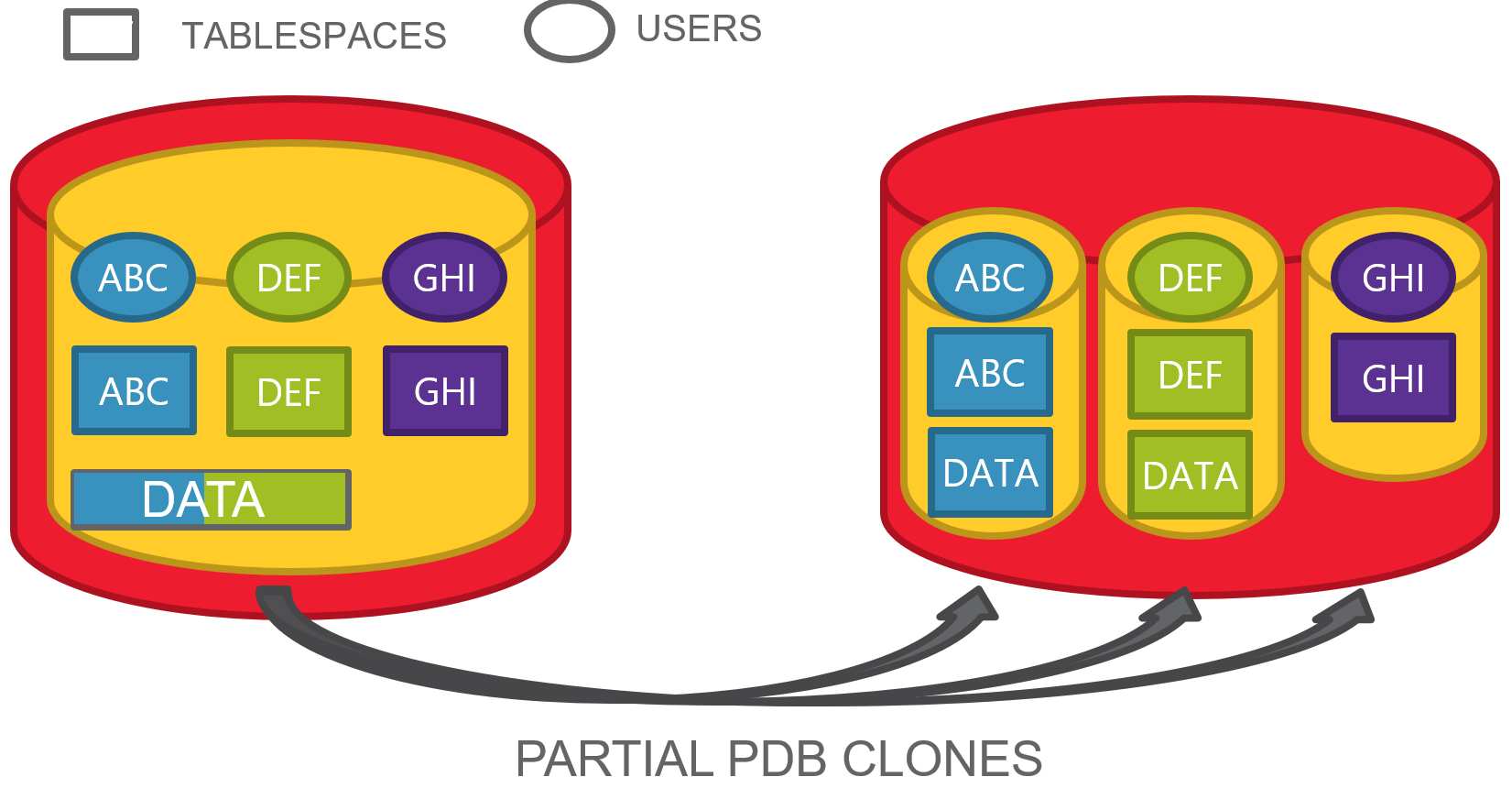
partial PDB cloning
We will focus on the last one for this blog post.
Situation
Here we have a PDB with some schemas, each of them has a dedicated tablespace, but accidentally, two of them have also some objects on a common tablespace.
This happens frequently when all the users have quota on the default database tablespace and they do not have necessarily a personal default tablespace.
This is the typical situation where transportable tablespaces become hard to achieve without some upfront segment movement, as tablespaces are not self-contained.
Thankfully, Oracle Multitenant allows us to clone a PDB from a remote one and specify only a subset of tablespaces.
Not at all! The tables are still there and reference to tablespaces that do not exist anymore. Possible?
Actually, the tablespaces definition are still there if we look at v$tablespace:
Oracle PL/SQL
1
2
3
4
5
6
7
8
9
10
11
12
13
14
SQL>selectnamefromv$tablespace;
NAME
------------------------------
SYSTEM
SYSAUX
UNDOTBS1
TEMP
DATA
ABC
DEF
GHI
8rowsselected.
If we give a look at the DBA_TABLESPACES view definition, there are a few interesting filters:
Oracle PL/SQL
1
2
3
4
5
6
7
createorreplaceviewDBA_TABLESPACES
...
wherets.online$!=3
andbitand(flags,2048)!=2048
andbitand(ts.flags,16777216)!=16777216
...
/
What is their meaning?
Oracle PL/SQL
1
2
3
4
5
6
online$/* status (see KTT.H): */
/* 1 = ONLINE, 2 = OFFLINE, 3 = INVALID */
flags/* various flags: see ktt3.h */
/* 0x800 = this actually describes a group */-- 2048
/* 0x1000000 = bad transport of ts in pdb */-- 16777216
So the first WHERE clause skips all the INVALID TABLESPACES (when you drop a tablespace it is still stored in ts$ with this state), the second skips the definition of TEMPORARY TABLESPACE GROUPS, the third one is actually our candidate.
Indeed, this is what we get from ts$ for these tablespaces:
But the user GHI, who has no objects anymore, is still there.
Oracle PL/SQL
1
2
3
4
5
6
7
8
SQL>selectusernamefromdba_users
2whereusernamein('ABC','DEF','GHI');
USERNAME
-------------------------
GHI
DEF
ABC
So we need to drop it explicitly.
Oracle PL/SQL
1
2
3
4
5
SQL>dropuserghicascade;
Userdropped.
SQL>
Automate the cleanup
This is an example PL/SQL that is aimed to automate the cleanup.
Actually:
Users that had segments in one of the excluded tablespaces but do not have any segments left are just LOCKED (for security reasons, you can guess why).
Tablespaces that meet the “excluded PDB” criteria, are just dropped
Oracle PL/SQL
1
2
3
4
5
6
7
8
9
10
11
12
13
14
15
16
17
18
19
20
21
22
23
24
25
26
27
28
29
30
31
32
33
34
35
36
37
38
39
40
41
42
43
44
45
46
47
48
49
50
51
52
53
54
55
setserveroutputon
DECLARE
-- get the users that had tables in the non-cloned TBSP that do not have any other segments...
dbms_output.put_line('Cannot drop default tablespace '||r_tbsps.name||'. Please change the default tablespace and drop it afterwards.');
END;
ENDLOOP;
END;
/
This is the output for the clone procedure we have just seen:
Oracle PL/SQL
1
2
3
4
5
6
7
8
9
SQL>@cleanup_partial_pdb.sql
ALTERUSERGHIACCOUNTLOCK
UserGHIlocked.
DROPTABLESPACEDEFINCLUDINGCONTENTSANDDATAFILES
TablespaceDEFdropped.
DROPTABLESPACEGHIINCLUDINGCONTENTSANDDATAFILES
TablespaceGHIdropped.
PL/SQLproceduresuccessfullycompleted.
The PL/SQL block can be quite slow depending on the segments and tablespaces, so it might be a good idea to have a custom script instead of this automated one.
What about user DEF?
The automated procedure has not locked the account DEF. Why?
Actually, the user DEF still has some segments in the DATA tablespace. Hence, the procedure cannot be sure what was the original intention: copy the user ABC ? The clone procedure allows only to specify the tablespaces, so this is the only possible result.
The Oracle Multitenant architecture introduces some nice opportunities, including local and remote cloning (see this example on ORACLE_BASE blog).
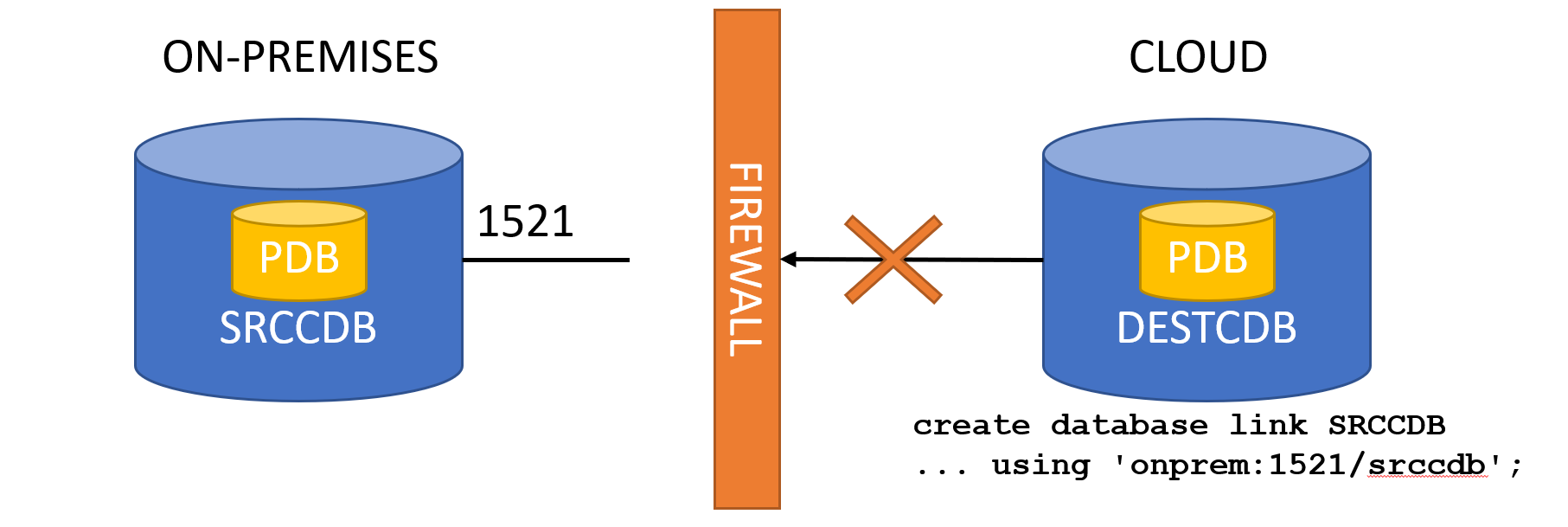
However, the only available cloning procedure use the PULL method to get the data from the remote source PDB.
This can be a limitation, especially in environments where the cloning environment does not have direct access to the production, or where the clones must be done in the Cloud with no direct access to the production VLAN on-premises.
So, one common approach is to clone/detach locally, put the PDB files in the Object Store and then attach them in the cloud.
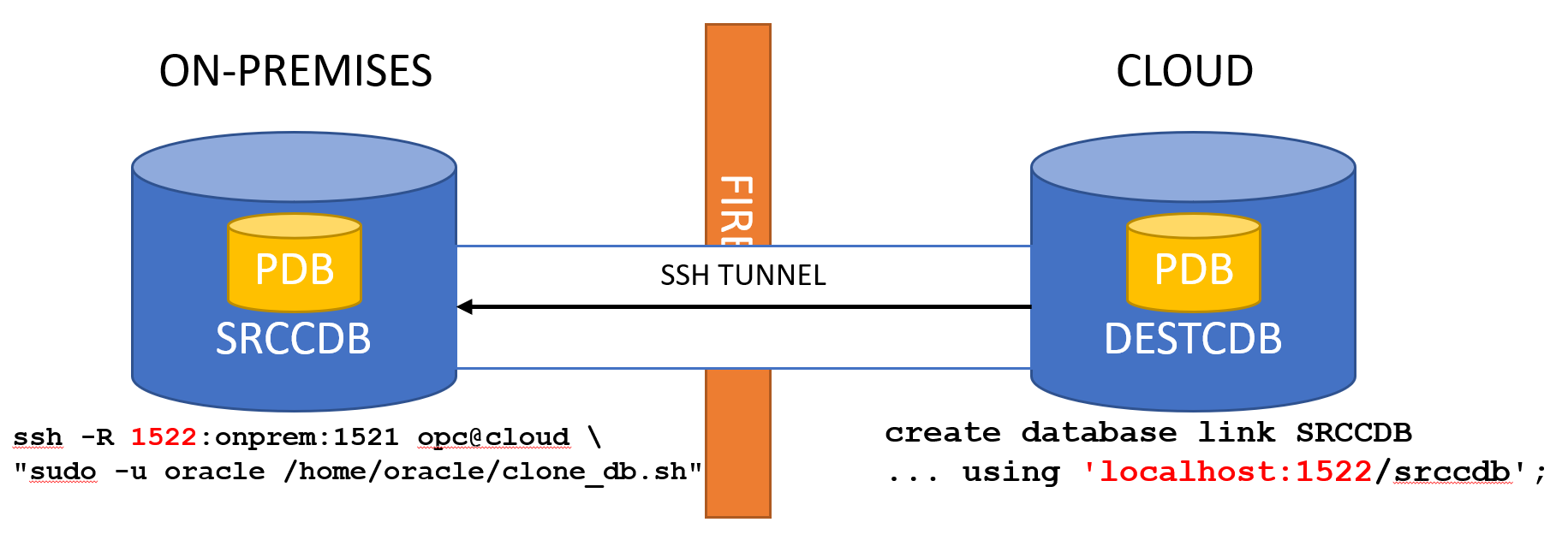
Another approach is to use SSH tunnels. If you follow my blog you can see it is something that I use every now and then to do stuff from on-premises to the cloud.
How to set it up?
Actually, it is super-easy: just prepare a script in the cloud that will do the create pluggable database, then trigger it from on-premises.
connect toC##ONPREM identified by manager using '$ALIAS';
create pluggable database$2from$1@onprem_temp;
drop database linkonprem_temp;
alter pluggable database$2open;
alter pluggable database$2save state;
exit
EOF
It takes as parameters: the name of the source PDB, the name of the target PDB and the SQL*Net descriptor to create the temporary database link from the cloud CDB to the on-premises CDB.
The user C##ONPREM must obviously exist on-premises with the following privileges:
The cloud database should use OMF so you don’t have to take care about file name conversions.
At this point, if you have set up correctly the SSH keys to connect to the cloud server, it is just a matter of running the script remotely using the proper SSH tunnel. Once the remote port binding established, the cloud server can contact the on-premises listener port using localhost:remote_bind:
Of course the timing depends a lot on the size of the database and your connection to the Cloud.
I have tested this procedure with Oracle Database 19.7 on OCI compute instances and on DBaaS VM instance, it works without any additional work. Of course, it does not work for Autonomous Database 🙂
There are cases, however, where you cannot do it. For example, it the existing PDB should have been the clone, or if you are converting a copy of the same database from Non-CDB to PDB using autoupgrade (with autoupgrade you cannot modify the CREATE PLUGGABLE DATABASE statement).
In this case, the solution might be to change the DBID of the existing PDB, via unplug/plug:
With Oracle 19c, Oracle has released a new script, annotated for parallel execution, to create the CATALOG and CATPROC in parallel at instance creation.
I have a customer who is in the process of migrating massively to Multitenant using many CDBs, so I decided to give it a try to check how much time they could save for the CDB creations.
I have run the tests on my laptop, on a VirtualBox VM with 4 vCPUs.
Test 1: catalog.sql + catproc.sql
In this test, I use the classic way (this is also the case when DBCA creates the scripts):
The catalog is created first on CDB$ROOT and PDB$SEED. Then the catproc is created.
Looking at the very first occurrence of BEGIN_RUNNING (start of catalog for CDB$ROOT) and the very last of END_RUNNING in the log (end of catproc in PDB$SEED), I can see that it took ~ 44 minutes to complete:
This creates catalog and catproc first on CDB$ROOT, than creates them on PDB$SEED. So, same steps but in different orders.
By running vmstat in the background, I noticed during the run that most of the time the creation was running serially, and when there was some parallelism, it was short and compensated by a lot of process synchronizations (waits, sleeps) done by the catctl.pl.
At the end, the process took ~ 45 minutes to complete.
During the last months I have had to deal with highly consolidated databases, where there was no basic rule to achieve something maintainable. Over many years (some schemas are 30 years old) the number of schemas and their dependencies became a problem up to a point where basic operations like patching or upgrading were very complex to achieve.
In order to try to split these big databases and move towards Oracle Multitenant, I have created some graphs that helped me and my colleagues to understand the connections between schemas (grants) and databases (db links).
Attacking the big beast with math algorithms to get a scientific approach on how to split it. Each color will likely be a separated PDB. Thanks @sandeshr and @HeliFromFinland for the inspiration given by your ML talks 🙂 pic.twitter.com/LQln0DwpQn
I used Gephi , an open source software to generate graphs. Gephi is very powerful, I feel I have used just 1% of its capabilities.
How to create a graph, depends mostly on what you want to achieve and which data you have.
First, some basic terminology: Nodes are the “dots” in the graph, Edges are the lines connecting the dots. Both nodes and edges can have properties (e.g. edges have weight), but you might not need any.
Basic nodes and edges without properties
If you need just to show the dependencies between nodes, a basic edge list with source->target will be enough.
For example, you can have a edge list like this one: gephi_1_edges.csv
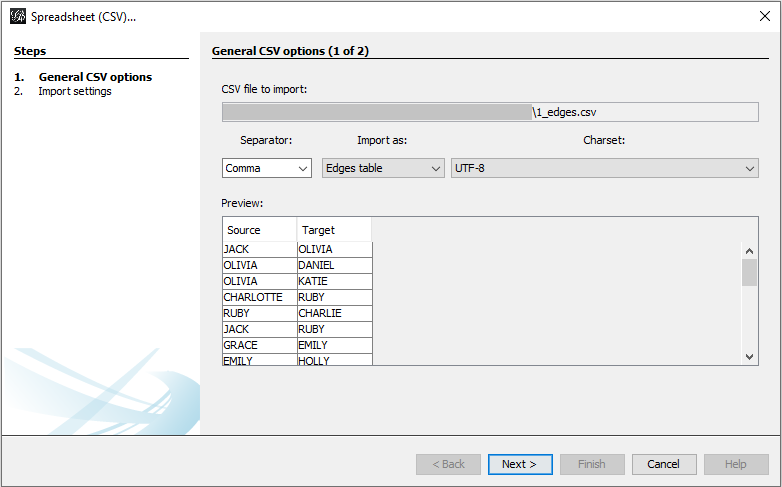
Open Gephi, go to New Project, File -> Import Spreadsheet, select the file. If you already have a workspace and you want to add the edges to the same workspace, select Append to existing workspace.
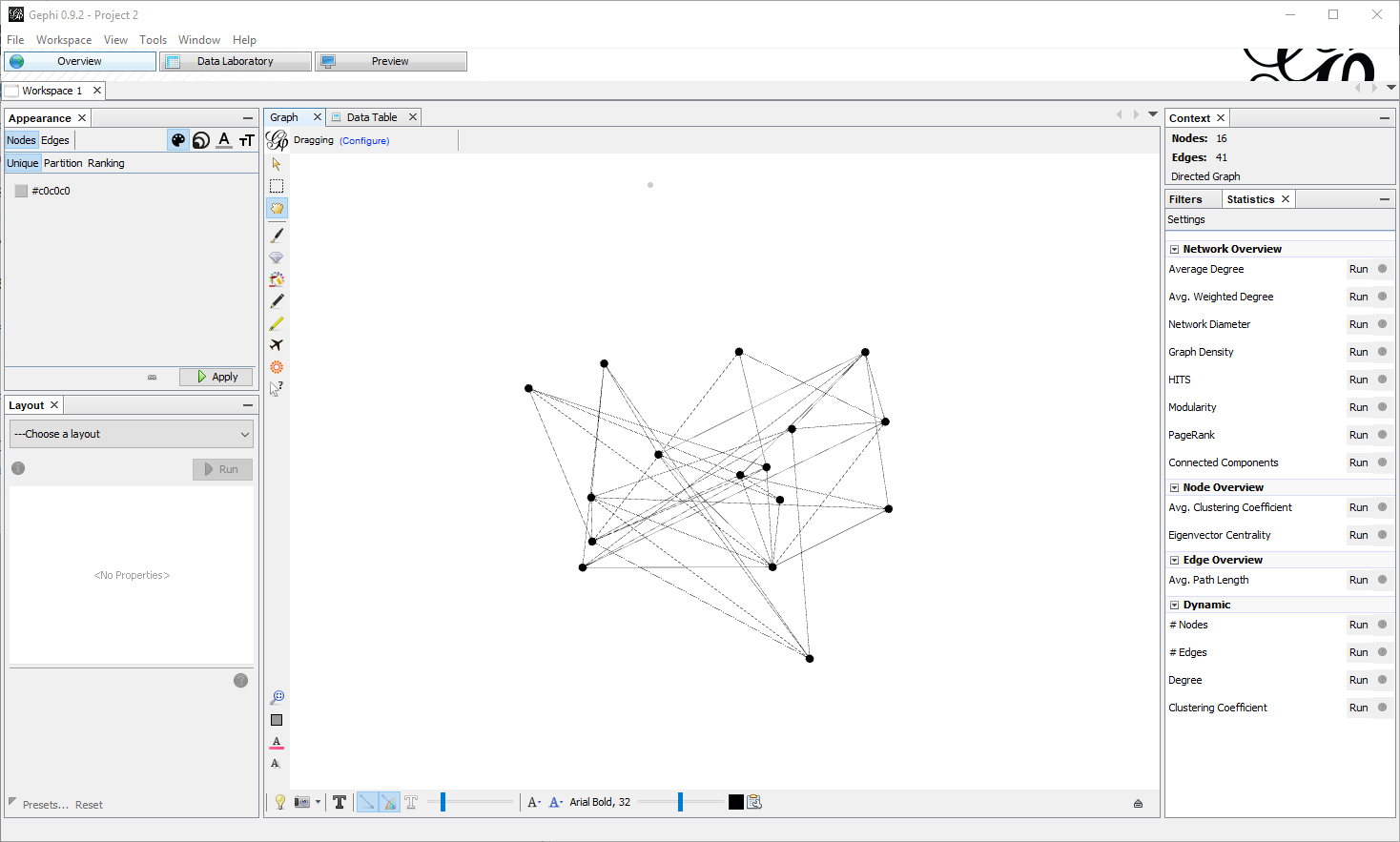
This will lead to something very basic:
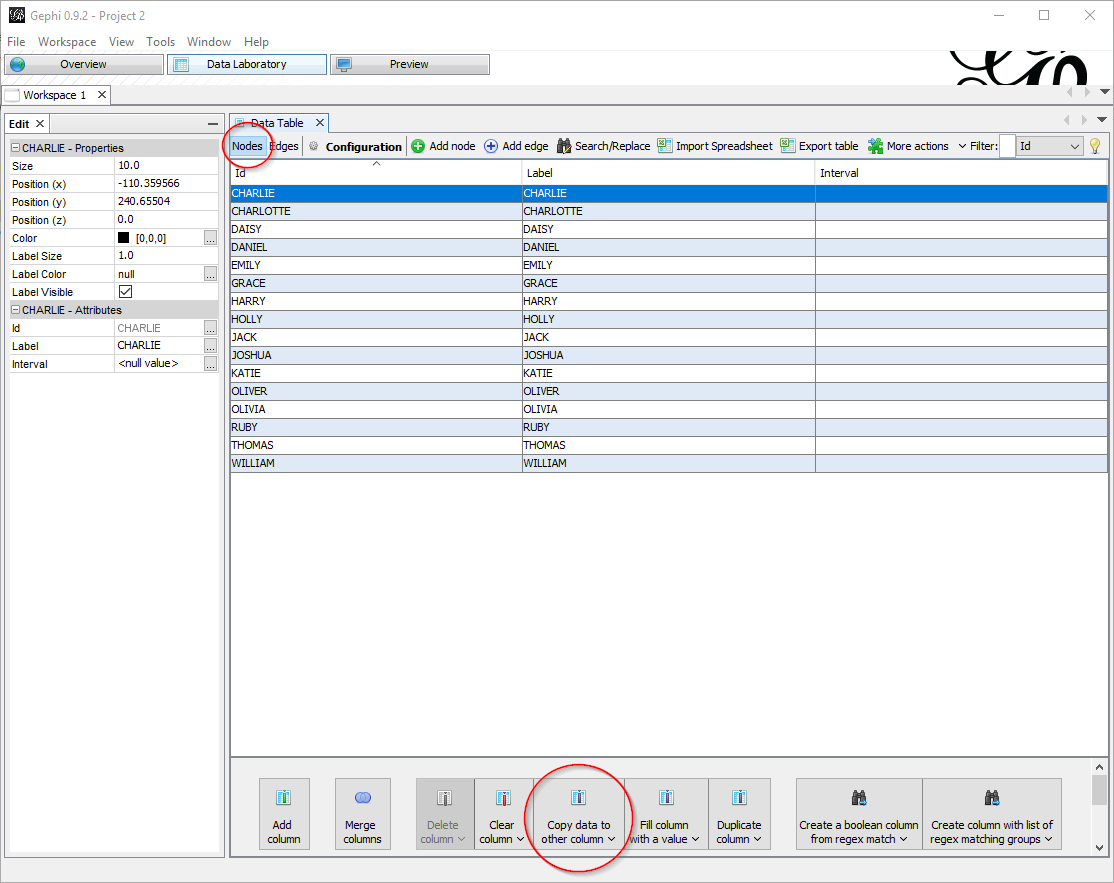
In the Data Laboratory tab, you might want to copy the value of the ID column to the label column, so that they match:
Now you must care about two things:
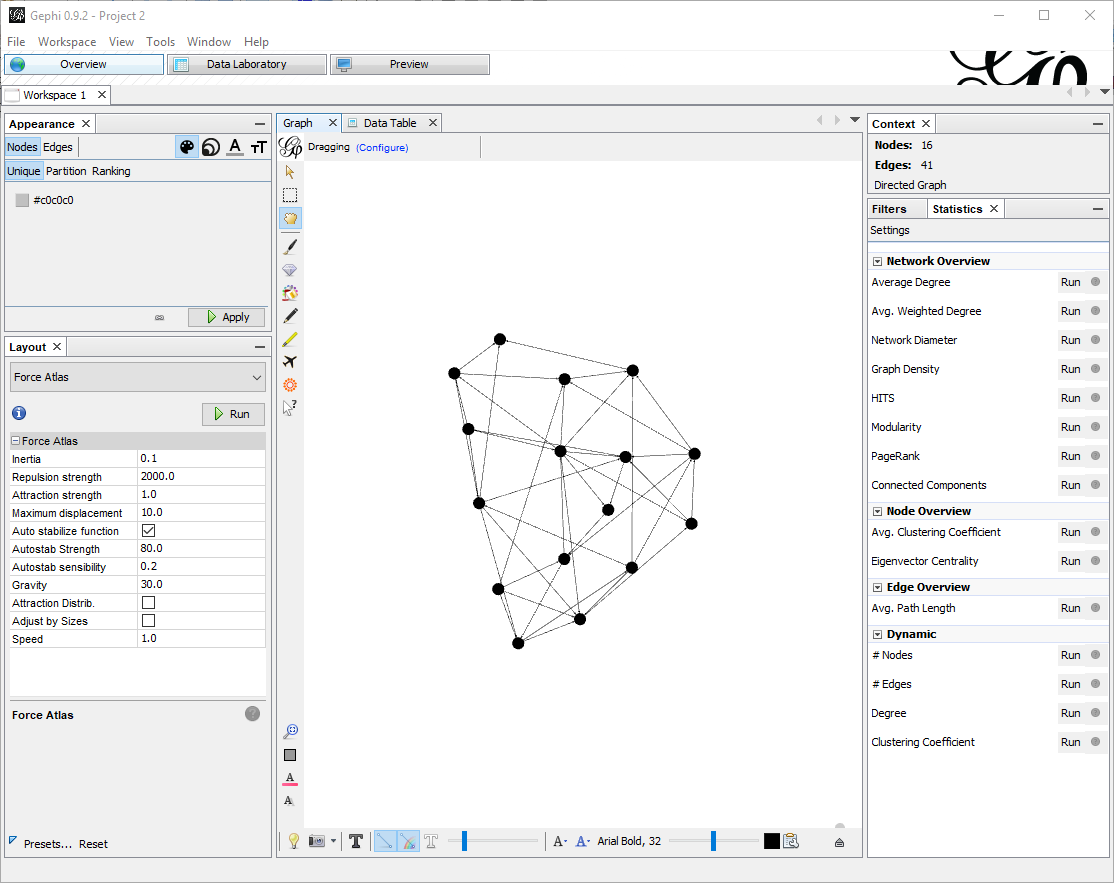
First, re-arranging the nodes. With few nodes this is often not required, but when there are many, the default visualization is not satisfying. In the tab Overview , pane Layout there are a few algorithms you can choose. For big graphs I prefer Force Atlas. There are a few parameters to tune, especially the attraction/repulsion strengths and the gravity. Speed is also crucial if you have many nodes. For this small example I put Repulsion Strength to 2000, Attraction Strength to 1. Clicking on Run starts the algorithm to rearrange the nodes, which with few edges will almost instantaneous (don’t forget to stop it afterwards).
Here is what I get:
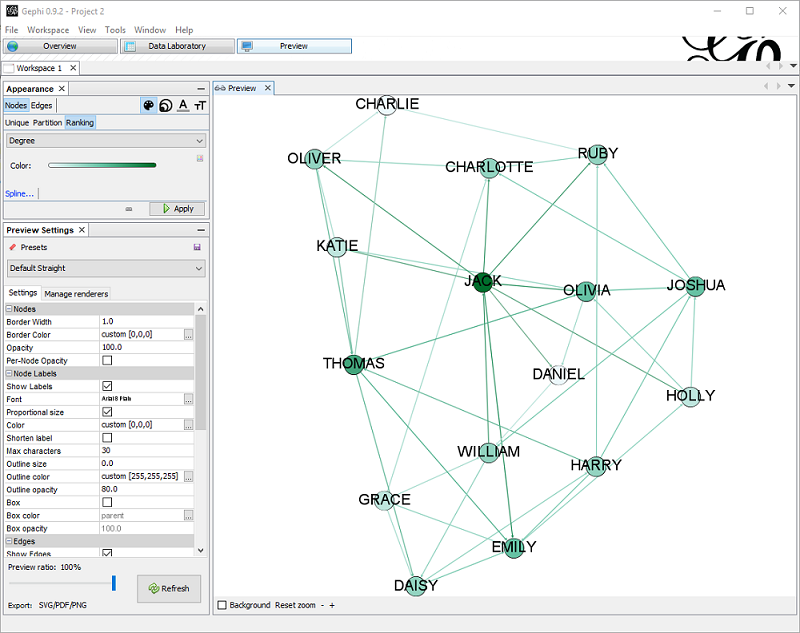
Now that the nodes are in place, in the preview pane I can adjust the settings, like showing labels and changing colors. Also, in the Appearance pane I can change the scheme to have for example colors based on ranking.
In this example, I choose to color based on ranking (nodes with more edges are darker).
I also set the Preset Default Straight, Show labels (with smaller size) , proportional size.
Adding nodes properties
Importing edges from CSV gives only a dumb list of edges, without any information about nodes properties. Having properties set might be important in order to change how the graph is displayed.
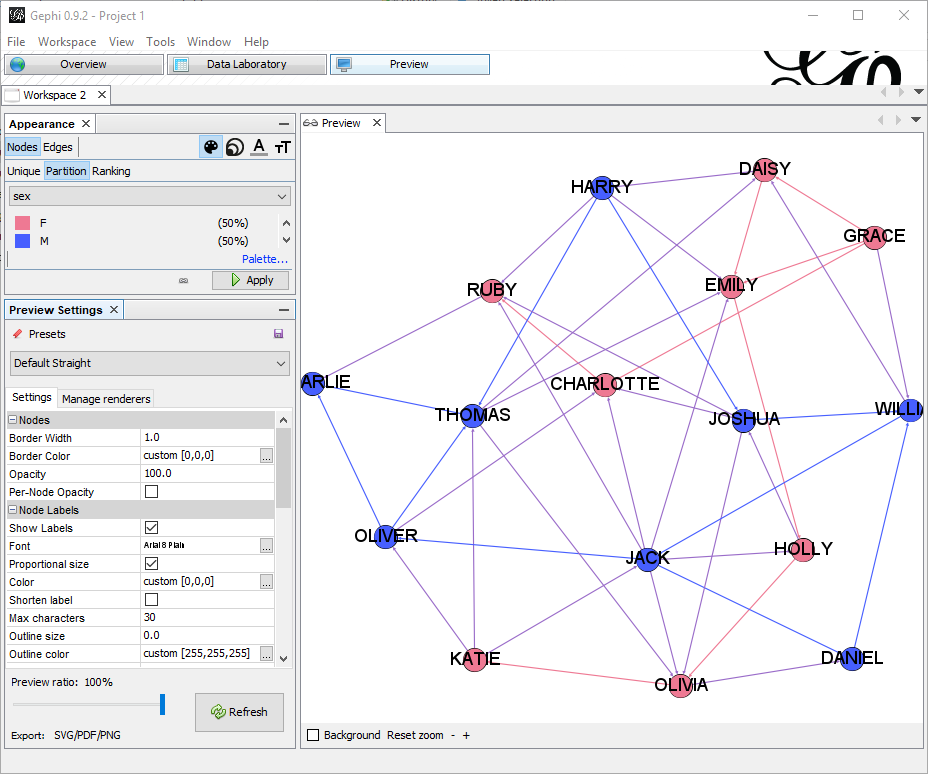
By importing a node list containing the properties of each node , I can add important information. In this example file, I have columns Id, Label and Sex, that I will use to color the nodes differently: gephi_1_nodes.csv
In the appearance node, I have just selected to partition by sex with a meaningful color.
Using real metadata to understand schemas or dependencies…
I will take, as an example, the dependencies in a database between objects of type VIEW, MATERIALIZED VIEW and TABLE. The database has quite a usage of materialized views and understanding the relation is not always easy.
So I need the nodes, for that I need a UNION to get nodes from both sides of the dependency. The best tool to achieve this is SqlCl as it has the native CSV output format:
Using the very same procedure as above, it is easy to generate the graph.
I am interested in understanding what is TABLE, what is VIEW and what MATERIALIZED VIEW, so I partition the color by type. I also set the edge color to source so the edge will have the same color of the source node type.
I am also interested in highlighting which tables have more incoming dependencies, so I rank the node size by In-Degree.
In the graph:
All the red dots are MVIEWS
All the blue dots are VIEWS
All the black dots are TABLES
All the red lines are dependencies between a MVIEW and a (TABLE|VIEW).
All the blue lines are dependencies between a VIEW and a (TABLE|MVIEW).
The bigger the dots, the more incoming dependencies.
With the same approach I can get packages, grants, roles, db_links, client-server dependencies, etc. to better understand the infrastructure.
I hope you like it!
This website uses cookies to improve your experience. We'll assume you're ok with this, but you can opt-out if you wish.Accept
Privacy & Cookies Policy
Privacy Overview
This website uses cookies to improve your experience while you navigate through the website. Out of these, the cookies that are categorized as necessary are stored on your browser as they are essential for the working of basic functionalities of the website. We also use third-party cookies that help us analyze and understand how you use this website. These cookies will be stored in your browser only with your consent. You also have the option to opt-out of these cookies. But opting out of some of these cookies may affect your browsing experience.
Necessary cookies are absolutely essential for the website to function properly. This category only includes cookies that ensures basic functionalities and security features of the website. These cookies do not store any personal information.
Any cookies that may not be particularly necessary for the website to function and is used specifically to collect user personal data via analytics, ads, other embedded contents are termed as non-necessary cookies. It is mandatory to procure user consent prior to running these cookies on your website.