Oracle Database 12c finally out!! First impressions

After a long, long wait, Oracle finally announced the availability of his new generation database. And looking at the new features, I think it will take several months before I’ll learn them all. The impressive number of changes brings me back to the release 10gR1, and I’m not surprised that Oracle has waited so long, I still bet that we’ll find a huge amount of bugs in the first release. We need for sure to wait a first Patchset, as always, before going production.

Does ‘c’ stand for cloud?

While Oracle has developed this release with the cloud  in mind, the first word that comes out of my mind is “consolidation”. The new claimed feature  Pluggable Database (aka Oracle Multitenancy) will be the dream of every datacenter manager along with CloneDB (well, it was somehow already available on 11.2.0.2) and ASM Thin_provisioned diskgroups.

But yes, it’s definitely the best for clouds

Other features like Flex ASM, Flex Cluster, several new security features, crossplatform backups… let imagine how deeply we can work to make private, multi-tenant clouds.

First steps, what changes with a typical installation

splash

The process for a traditional standalone DB+ASM installation is the same as the old 11gR2: You’ll need to install the Grid Infrastructure first (and then take advantage of the Oracle Restart feature) and subsequently the Database installation.

The installation documentation is complete as always and is getting quite huge as the Grid Infrastructure capabilities increment.

To meet most installation prerequisites, Oracle has prepared again an RPM that does the dirty work:

oracle-rdbms-server-12cR1-preinstall-1.0-3.el6.x86_64.rpm

Oracle suggests to use Ksplice and also explicitly recommends to use the deadline I/O scheduler (it has been longtime a best practice but I can’t remember it was documented officially).

The splash screen has become more “red” giving a colorful experience on the installation process. 😉

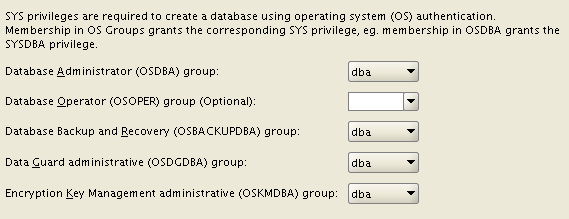
Once the GI is installed, the Database installation asks for many new OS groups: OSBACKUPDBA, OSDGDBA, OSKMDBA. This give you more possibilities to split administration duties, not specifying them will lead to the “old behavior”.
new_OSGROUPS

You can decide to use an ACFS filesystem for both the installation AND the database files (with some exceptions, e.g. Windows servers). So, you can take advantage of the snapshot features of ACFS for your data, provided that the performance is acceptable (I’ll try to test and blog more about this). You can use the feature Copy-On-Write to provide writable snapshot copies, directly embedding a special syntax inside the “create pluggable database” command. Unfortunately, Oracle has decided to deliver pluggable databases as an extra-cost option. :-/

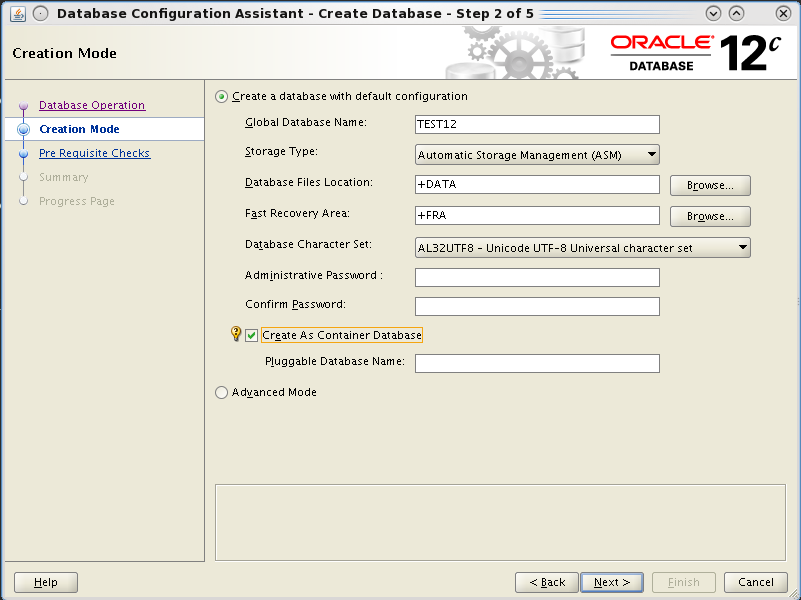
The database creation with DBCA is even easier, you have an option for a very default installation, you can guess it uses templates with all options installed by default.

But the Hot topic is that you can create it as a “Container Database”. This is done by appending the keywords “enable pluggable database;” at the end of the create database command. The process will then put all the required bricks (creation of the pdb$seed database and so on), I’ll cover the topic in separate posts cause it’s the really biggest new feature.
dbca_create_as_pluggable

You can still use advanced mode to have the “old style” database creation, where you can customize your database.

If you try to create only the scripts and run them manually (that’s my habit), you’ll notice that SQL scripts are not run directly within the opened SQL*Plus session, but they’re run from a perl script that basically suppresses all the output to terminal, giving the impression of a cleaner installation. IMO it could be better only if everything runs fine.

Finally, I’ll get something familiar, but with a brand new release number! 🙂

Stay tuned, I’ll write soon about some really interesting features of the new Oracle Database 12c!

Cheers

Ludo

Generating graphs massively from Windows Performance Counters logs

Windows Performance Monitor is an invaluable tool when you don’t have external enterprise monitoring tools and you need to face performance problems, whether you have a web/application server, a mail server or a database server.

But what I don’t personally like of it is what you get in terms of graphing. If you schedule and collect a big amount of performance metrics you will likely get lost in adding/removing such metrics from the graphical interface.

What I’ve done long time ago (and I’ve done again recently after my old laptop has been stolen 🙁 ) is to prepare a PHP script that parse the resulting CSV file and generate automatically one graph for each metric that could be found.

Unfortunately, most of Windows Sysadmin between you will disagree that I’ve done this using a Linux Box. But I guess you can use my script if you install php inside cygwin. The other tool you need, is rrdtool, again I use it massively to resolve my graphing needs.

How to collect your data

Basically you need to create any Data Collector within the Performance Monitor that generates a log file. You can specify directly a CSV file (Log format: Comma separated) or generate a BLG file and convert it later (Log format: Binary). System dumps are not used, so if you use the standard Performace template, you can delete it from your collection.

Remember that the more counters you take, the more the graph generation will take. The script does not run in parallel, so it will use only one core. Generally:

Where (Speed factor) is depending on both the CPU speed and the disk speed because of the huge number of syncs required to update several thousands of files. I’ve tried to reduce the number of rrdupdates by queuing several update values in a single command line and I’ve noticed an important increase of performances, but I know it’s not enough.

Converting a BLG (binary) log into a CSV log

Just use the relog tool:

 Generating the graphs

Transfer the CSV on the box where you have the php and rrdtool configured, then run:


generated_graphs

Now it’s done! 

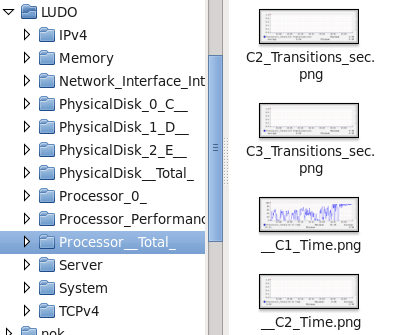
The script generate a folder with the name of the server (LUDO in my example) and a subfolder for each class of counters (as you see in Performance Monitor).

Inside each folder you will have a PNG (and an rrd) for each metric.


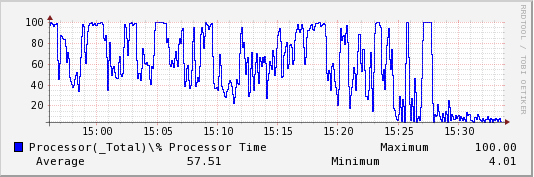
generated_graph_cpu


Important: The RRD are generated with a single round-robin archive with a size equal to the number of samples. If you want to have the rrd to store your historical data you’ll need to modify the script. Also, the size of the graph will be the same as the number of samples (for best reading), but limited to 1000 to avoid huge images.

Future Improvements

Would be nice to have a prepared set of graphs for standard graphs with multiple metrics (e.g. CPU user, system and idle together) and additional lines like regressions…

Download the script: process_l_php.txt and rename it with a .php extension.

Hope you’ll find it useful!

Cheers

Ludo

ORA-00600 and user identified by values ”

With rel. 10.2.0.5 was possibile to do this:

With 11.2.0.3 an ORA-00600 is raised.

Mass datafile resizing

Recently I needed to extend many datafiles on a database with more than 500 tablespaces because a lot of tablespaces were reaching the critical threshold.
Autoextend was not an option due to a bug I encountered on 10gR2 RAC on ASM and AIX.

The solution was the following script: it generates statements to autoextend datafiles with usage over a defined threshold (the “80” in the where clause) to low down the percentage below another defined threshold (the “75” in the select clause).

Prior to extend it’s possible to show how much space is required to do this mass resizing:

Dog eat Dog… Oracle deletes itself by mistake!

While implementing the backup on a new DB inherited from a customer, I scheduled our standard backup “type disk” procedure through rman, on Windows.
The morning after I saw that the “delete obsolete” tried to delete ALL CURRENT DATAFILES!!

i criteri di conservazione RMAN verranno applicati al comando
i criteri di conservazione RMAN sono impostati su una ridondanza 1
canale allocato: ORA_DISK_1
canale ORA_DISK_1: sid=29 devtype=DISK
Eliminazione dei seguenti backup e copie obsoleti:
Tipo Chiave Ora fine Nome file/Handle
-------------------- ------ ------------------ --------------------
Set di backup 917 28-GIU-11
...
Set di backup 927 29-GIU-11
Backup piece 1005 29-GIU-11 H:\ORACLE\BACKUP\ORAPERSP\RMAN\SPFILEBCK_20110629
Copia file di dati 14 29-NOV-10 E:\ORACLE\ORADATA\ORAPERSP\INDX01.DBF
Copia file di dati 16 29-NOV-10 E:\ORACLE\ORADATA\ORAPERSP\TOOLS01.DBF
Copia file di dati 17 29-NOV-10 E:\ORACLE\ORADATA\ORAPERSP\USERS01.DBF
Copia file di dati 18 29-NOV-10 E:\ORACLE\ORADATA\ORAPERSP\DRSYS01.DBF
Copia file di dati 19 29-NOV-10 E:\ORACLE\ORADATA\ORAPERSP\EXAMPLE01.DBF
Copia file di dati 20 29-NOV-10 E:\ORACLE\ORADATA\ORAPERSP\ODM01.DBF
Copia file di dati 21 29-NOV-10 E:\ORACLE\ORADATA\ORAPERSP\XDB01.DBF
Copia file di dati 22 29-NOV-10 E:\ORACLE\ORADATA\ORAPERSP\CWMLITE01.DBF
Copia file di dati 23 29-NOV-10 E:\ORACLE\ORADATA\ORAPERSP\TBLDATI01.ORA
Copia file di dati 24 29-NOV-10 E:\ORACLE\ORADATA\ORAPERSP\TBLINDEX01.ORA
Copia file di dati 25 29-NOV-10 E:\ORACLE\ORADATA\ORAPERSP\OEM_REPOSITORY1.ORA
Copia file di dati 26 29-NOV-10 E:\ORACLE\ORADATA\ORAPERSP\SYSTEM01.DBF
Copia file di dati 27 29-NOV-10 E:\ORACLE\ORADATA\ORAPERSP\UNDOTBS01.DBF
backup piece eliminata
...
backup piece eliminata
handle di backup piece=H:\ORACLE\BACKUP\ORAPERSP\RMAN\C-2220366420-20110628-02 recid=990 stamp=755031582
backup piece eliminata
handle di backup piece=H:\ORACLE\BACKUP\ORAPERSP\RMAN\C-2220366420-20110629-00 recid=1002 stamp=755130872
backup piece eliminata
handle di backup piece=H:\ORACLE\BACKUP\ORAPERSP\RMAN\CTL_20110629 recid=1004 stamp=755130883
backup piece eliminata
handle di backup piece=H:\ORACLE\BACKUP\ORAPERSP\RMAN\SPFILEBCK_20110629 recid=1005 stamp=755130885
RMAN-00571: ===========================================================
RMAN-00569: =============== ERROR MESSAGE STACK FOLLOWS ===============
RMAN-00571: ===========================================================
RMAN-03009: failure of delete command on ORA_DISK_1 channel at 06/29/2011 22:34:55
ORA-19584: file E:\ORACLE\ORADATA\ORAPERSP\INDX01.DBF già in usoRecovery Manager ha terminato.

That’s because all current datafiles were registered into recovery catalog as backup copy. With a recovery redundancy of 1, all datafiles were set as obsolete! But since it’s windows, a delete command doesn’t delete datafiles if they are already in use. What it was on unix? We had just luck!

Then we had to uncatalog all copies.


RMAN> list copy;

la specifica non corrisponde a nessuno dei log di archivio del Recovery Catalog

Lista di copie del file di dati
Chiave SCN Ckp file S Ora di completamento Nome Ora ckp
------- ---- - -------------------- ---------- -------------------- ----
26 1 X 29-NOV-10 18535127593 29-NOV-10 E:\ORACLE\ORADATA\ORAPERSP\SYSTEM01.DBF
27 2 X 29-NOV-10 18535127762 29-NOV-10 E:\ORACLE\ORADATA\ORAPERSP\UNDOTBS01.DBF
14 3 X 29-NOV-10 18535122625 29-NOV-10 E:\ORACLE\ORADATA\ORAPERSP\INDX01.DBF
16 4 X 29-NOV-10 18535123721 29-NOV-10 E:\ORACLE\ORADATA\ORAPERSP\TOOLS01.DBF
17 5 X 29-NOV-10 18535124423 29-NOV-10 E:\ORACLE\ORADATA\ORAPERSP\USERS01.DBF
18 6 X 29-NOV-10 18535124439 29-NOV-10 E:\ORACLE\ORADATA\ORAPERSP\DRSYS01.DBF
19 7 X 29-NOV-10 18535124453 29-NOV-10 E:\ORACLE\ORADATA\ORAPERSP\EXAMPLE01.DBF
20 8 X 29-NOV-10 18535124554 29-NOV-10 E:\ORACLE\ORADATA\ORAPERSP\ODM01.DBF
21 9 X 29-NOV-10 18535125790 29-NOV-10 E:\ORACLE\ORADATA\ORAPERSP\XDB01.DBF
22 10 X 29-NOV-10 18535125874 29-NOV-10 E:\ORACLE\ORADATA\ORAPERSP\CWMLITE01.DBF
23 11 X 29-NOV-10 18535125887 29-NOV-10 E:\ORACLE\ORADATA\ORAPERSP\TBLDATI01.ORA
24 12 X 29-NOV-10 18535126750 29-NOV-10 E:\ORACLE\ORADATA\ORAPERSP\TBLINDEX01.ORA
25 13 X 29-NOV-10 18535127211 29-NOV-10 E:\ORACLE\ORADATA\ORAPERSP\OEM_REPOSITORY1.ORA


RMAN> change copy of datafile 1..N uncatalog;

copia non catalogata del file di dati
filename di copia del file di dati=E:\ORACLE\ORADATA\ORAPERSP\INDX01.DBF recid=14 stamp=736336991
Oggetti 1 non catalogati
...

until no “obsolete” current datafile were reported!


RMAN> report obsolete;

i criteri di conservazione RMAN verranno applicati al comando
i criteri di conservazione RMAN sono impostati su una ridondanza 1
non sono stati trovati backup obsoleti

Lesson learned: never schedule delete obsolete without actually checking what could be deleted!

10gR2 RAC hangs and “KSV master wait”

We recently migrated a customer’s 10gR2 RAC on AIX6.1 from GPFS+HACMP to a “basic” Clusterware with datafiles over ASM.
After (many) problems related to various installation bugs (the list of requirements for AIX is very long, incomplete and requires many one-off patches to complete), we had a problem during an import of a new schema: the import hung with no apparent wait events. We found that the event it was waiting for was classified as ‘Idle’:

The on ASM instance:

The problem was related to datafile resize (we use autoextend) and according to MOS, we were encountering a bug:

Bug 11712836: RESIZING DATAFILE HUNG WAITING FOR KSV MASTER WAIT IN RAC

Shutting down one instance solved the problem. Now we have to avoid autoextend……. We never encountered this bug in many 10.2.0.4 rac installations.

Dataguard check script for Real Application Clusters (MAA)

Two years after my posts:
Quick Oracle Dataguard check script and More about Dataguard and how to check it I faced a whole new Dataguard between two Oracle Real Application Clusters, aka Oracle Maximum Availability Architecture (MAA).

This enviromnent is relying on Windows OS. Don’t know how this could be called “availability” but here we are. I revisited my scripts in a quick and very dirty way. Please consider that I did copy and paste to check the alignment once per thread, but it should be improved with some kind of iteration to check each thread in a more structured fashion.

Please foreward me every improvement you implement over my code: it would be nice to post it here.

Oracle capacity planning with RRDTOOL

RRDize everything, chapter 2

Oracle Database Server has the most powerful system catalog that allows to query almost any aspect inside an oracle instance.
You can query many v$ fixed views at regular intervals and populate many RRD files through rrdtool: space usage, wait events. system statistics and so on…

Since release 10.1 Oracle has introduced Automatic Workload Repository, a finer version of old good Statspack.
No matter if you are using AWR or statspack, you can rely on their views to collect data for your RRDs.

If you are administering a new instance and you haven’t collected its statistics so far, you can query (as example) the DBA_HIST_BG_EVENT_SUMMARY view to gather all AWR data about wait events. Historical views could be useful also to collect historical data once a week rather than query the fixed views every few minutes doing the hard work twice (you and AWR).

The whole process of gathering performance data and update rrd files can be resumed into the following steps:

– connect to the database
– query the AWR’s views
– build and execute an rrdtool update command
– check if rrd file exists or create it
– update the rrd file

The less rrdtool update commands you will execute, the better the whole process will perform.
Do it in a language you are comfortable with and that supports easily connection descriptors.

Since I’m very comfortable with php, I did it this way.

This is a very basilar script that works greatly for me with good performances:

Depending on how many different wait events you have, you’ll have a certain number of rrd files:

As you can see, they are not so big…

Once you have your data in rrd files, it’s quite simple to script even complex plots with several datasources. Everything depends on the results you want.
This script stack all my wait events for a certain instance: it takes the directory containing all the rrds as first argument and the number of hours we want to be plotted as second argument:

The resulting command is very long:

This is the resulting graph:
Graph plotted with rrdtool displaying Oracle instance Wait Events

OHHHHHHHHHHHH COOOOL!!!
😉

Any comment is appreciated! thanks

How to collect Oracle Application Server performance data with DMS and RRDtool

RRDize everything, chapter 1

If you are managing some Application Server deployments you should have wondered how to check and collect performance data.
As stated in documentation, you can gather performance metrics with the dmstool utility.
AFAIK, this can be done from 9.0.2 release upwards, but i’m concerned DMS will not work on Weblogic.

Mainly, you should have an external server that acts as collector (it could be a server in the Oracle AS farm as well): copy the dms.jar library from an Oracle AS installation to your collector and use it as you would use dmstool:

There are three basilar methods to get data:

Get all metrics at once:

Get only the interesting metrics:

Get metrics included into specific DMS tables:

What youraddress:// is, it depends on the component you are trying to connect:

If you are trying to connect to the OHS (Apache), be careful to allow remote access from the collector by editing the dms.conf file.

Now that you can query dms data, you should store it somewhere.
Personally, I did a first attempt with dmstool -dump format=xml. I wrote a parser in PHP with SimpleXML extension and I did a lot of inserts into a MySQL database. After a few months the whole data collected from tens of servers was too much to be mantained…
To avoid the maintenance of a DWH-grade database I investigated and found RRDTool. Now I’m asking how could I live without it!

I then wrote a parser in awk that parse the output of the dms.jar call and invoke an rrdtool update command.
I always use dms.jar -table command. The output has always the same format:

So I written an awk file that works for me.
use it this way:

And this is the code for update_metric_rrd:

Once you have all your rrd files populated, it’s easy to script automatic reporting. You would probably want a graph with the request count served by your Apache cluster, along with its linear regression:

This is the result:
OHS request completed
OHHHHHHHHHHHH!!!! COOL!!!!

That’s all for DMS capacity planning. Stay tuned, more about rrdtool is coming!

More about Dataguard and how to check it

After my post Quick Oracle Dataguard check script I have some considerations to add:
to check the gap of applied log stream by MRP0 process it’s sufficient to replace this query in the perl script I posted:

with this new one:

To check this you have to meet the following condition: You should have real-time apply enabled (and possibly NODELAY clause specified in your recover statement). Check it with this query:

It should be “MANAGED REAL TIME APPLY”.
If not using realtime apply your MRP0 process will wait until you have a new archive, so even if you have redo transport mode set to LGWR you’ll wait for standby log completion. Your gap of applied redo stream will be at least one sequence#.

With transport mode set to LGWR and real-time apply the output of the perl script is similar to this one:

The whole gap between your primary and standby database should be LOW.