Ludovico is a member of the Oracle Database High Availability (HA), Scalability & Maximum Availability Architecture (MAA) Product Management team in Oracle.
He focuses on Oracle Data Guard, Flashback technologies, and Cloud MAA.
For truth’s sake, I wasn’t planning to head at Oracle Open World this year. I’ve never had this opportunity, and the same days my company is planning it’s great internal conference (Trivadis Tech Event) that I always enjoy and I hope will be made public soon.
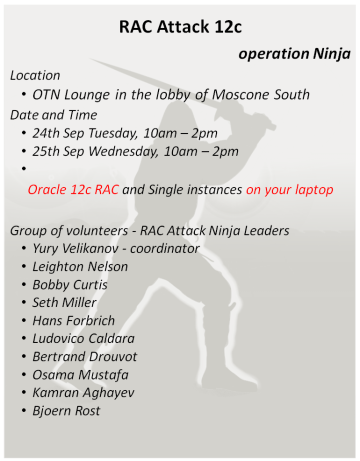
But this summer I’ve started contributing heavily to the rewriting of the RAC Attack project, now focusing on Oracle RAC 12c.
So I’ve seized the opportunity and asked my managers to send me at OOW (with partial success). The final result is that I’m attending Oracle Open World and I’ll be glad to meet everyone of you! 🙂 I’ll also mentor the RAC Attack (Operation Ninja) event, so make sure you come at the OTN Lounge, lobby of Moscone South, Tuesday and Wednesday between 10:00AM and 2:00PM and meet the whole team of RAC experts.
My Agenda
I’m very struggled with timing conflicts between the many sessions I would like to attend. It’s a unique opportunity to meet and listen to all my favorite bloggers, technologists and tweeps, and will be a pity to miss many of their sessions.
However, I’ve ended up with this Agenda, it’s a semi-definitive one, but I reserve the right to change things the last minute, so follow me on twitter during these days.
You may notice the two huge slots I’ve reserved for the RAC Attack, and many sessions I’ll follow at the Oak Table World 2013. Most of my favorite technologists will head there.
I’ll also attend to two fitness events on Sunday and Monday, if you’re brave enough you can join us! 🙂
What I’ve realized by is that Policy Managed Databases are not widely used and there is a lot misunderstanding on how it works and some concerns about implementing it in production.
My current employer Trivadis (@Trivadis, make sure to call us if your database needs a health check :-)) use PMDs as best practice, so it’s worth to spend some words on it. Isn’t it?
Why Policy Managed Databases?
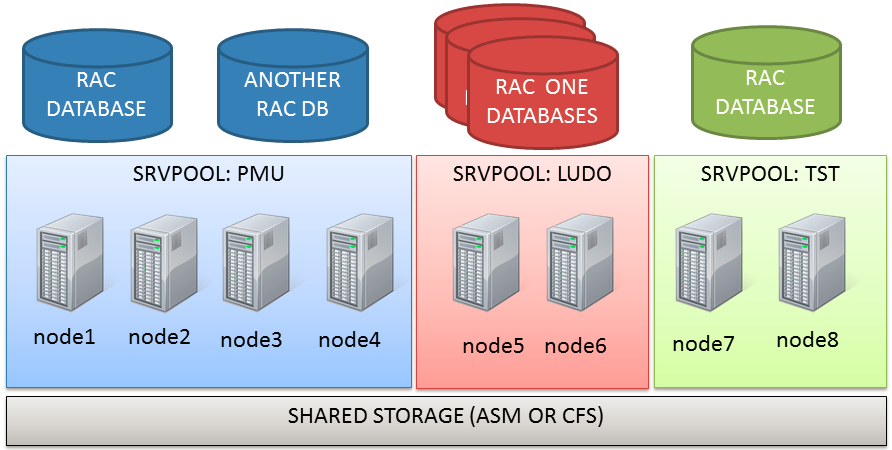
PMDs are an efficient way to manage and consolidate several databases and services with the least effort. They rely on Server Pools. Server pools are used to partition physically a big cluster into smaller groups of servers (Server Pool). Each pool have three main properties:
A minumim number of servers required to compose the group
A maximum number of servers
A priority that make a server pool more important than others
If the cluster loses a server, the following rules apply:
If a pool has less than min servers, a server is moved from a pool that has more than min servers, starting with the one with lowest priority.
If a pool has less than min servers and no other pools have more than min servers, the server is moved from the server with the lowest priority.
Poolss with higher priority may give servers to pools with lower priority if the min server property is honored.
This means that if a serverpool has the greatest priority, all other server pools can be reduced to satisfy the number of min servers.
Generally speaking, when creating a policy managed database (can be existent off course!) it is assigned to a server pool rather than a single server. The pool is seen as an abstract resource where you can put workload on.
Cloud computing is a model for enabling ubiquitous, convenient, on-demand network access to a shared
pool of configurable computing resources (e.g., networks, servers, storage, applications, and services) that
can be rapidly provisioned and released with minimal management effort or service provider interaction
There are some major benefits in using policy managed databases (that’s my solely opinion):
PMD instances are created/removed automatically. This means that you can add and remove nodes nodes to/from the server pools or the whole cluster, the underlying databases will be expanded or shrinked following the new topology.
Server Pools (that are the base for PMDs) allow to give different priorities to different groups of servers. This means that if correctly configured, you can loose several physical nodes without impacting your most critical applications and without reconfiguring the instances.
PMD are the base for Quality of Service management, a 11gR2 feature that does resource management cluster-wide to achieve predictable performances on critical applications/transactions. QOS is a really advanced topic so I warn you: do not use it without appropriate knowledge. Again, Trivadis has deep knowledge on it so you may want to contact us for a consulting service (and why not, perhaps I’ll try to blog about it in the future).
RAC One Node databases (RONDs?) can work beside PMDs to avoid instance proliferation for non critical applications.
Oracle is pushing it to achieve maximum flexibility for the Cloud, so it’s a trendy technology that’s cool to implement!
I’ll find some other reasons, for sure! 🙂
What changes in real-life DB administration?
Well, the concept of having a relation Server -> Instance disappears, so at the very beginning you’ll have to be prepared to something dynamic (but once configured, things don’t change often).
As Martin pointed out in his blog, you’ll need to configure server pools and think about pools of resources rather than individual configuration items.
The spfile doesn’t contain any information related to specific instances, so the parameters must be database-wide.
The oratab will contain only the dbname, not the instance name, and the dbname is present in oratab disregarding if the server belongs to a serverpool or another.
1
2
3
+ASM1:/oracle/grid/11.2.0.3:N# line added by Agent
PMU:/oracle/db/11.2.0.3:N# line added by Agent
TST:/oracle/db/11.2.0.3:N# line added by Agent
Your scripts should take care of this.
Also, when connecting to your database, you should rely on services and access your database remotely rather than trying to figure out where the instances are running. But if you really need it you can get it:
1
2
3
4
5
6
7
# srvctl status database -d PMU
Instance PMU_4 isrunning on node node2
Instance PMU_2 isrunning on node node3
Instance PMU_3 isrunning on node node4
Instance PMU_5 isrunning on node node6
Instance PMU_1 isrunning on node node7
Instance PMU_6 isrunning on node node8
An approach for the crontab: every DBA soon or late will need to schedule tasks within the crond. Since the RAC have multiple nodes, you don’t want to run the same script many times but rather choose which node will execute it.
My personal approach (every DBA has his personal preference) is to check the instance with cardinality 1 and match it with the current node. e.g.:
1
2
3
4
5
6
7
# [ `crsctl stat res ora.tst.db -k 1 | grep STATE=ONLINE | awk '{print $NF}'` == `uname -n` ]
# echo $?
0
# [ `crsctl stat res ora.tst.db -k 1 | grep STATE=ONLINE | awk '{print $NF}'` == `uname -n` ]
# echo $?
1
In the example, TST_1 is running on node1, so the first evaluation returns TRUE. The second evaluation is done after the node2, so it returns FALSE.
This trick can be used to have an identical crontab on every server and choose at the runtime if the local server is the preferred to run tasks for the specified database.
A proof of concept with Policy Managed Databases
My good colleague Jacques Kostic has given me the access to a enterprise-grade private lab so I can show you some “live operations”.
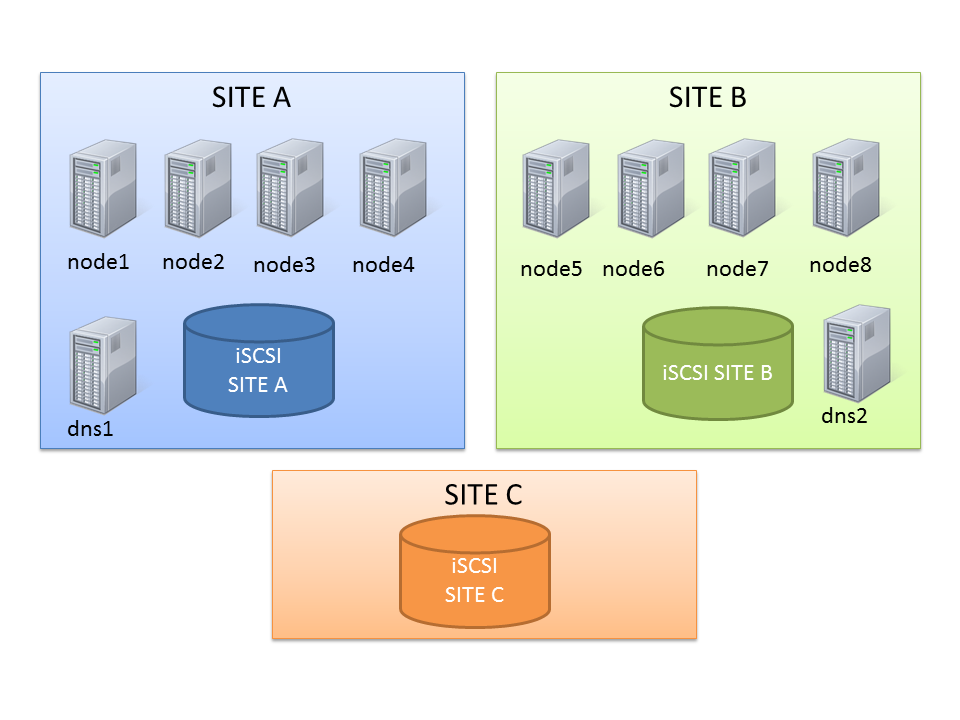
Let’s start with the actual topology: it’s an 8-node stretched RAC with ASM diskgroups with failgroups on the remote site.
This should be enough to show you some capabilities of server pools.
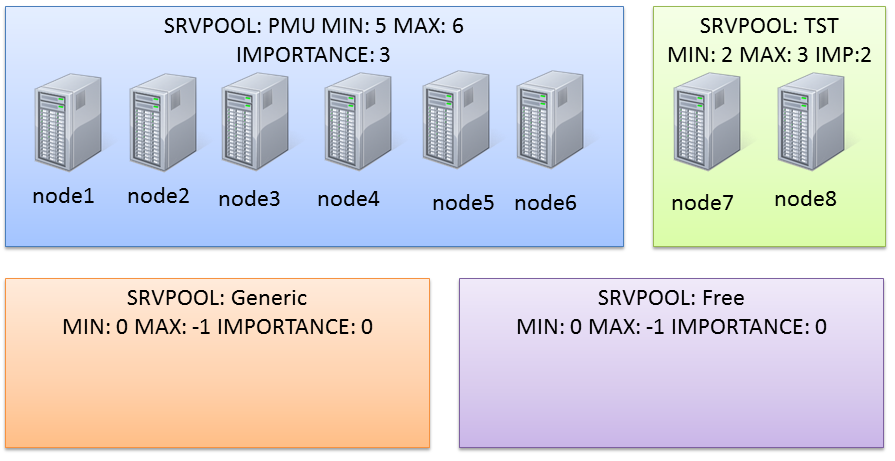
The Generic and Free server pools
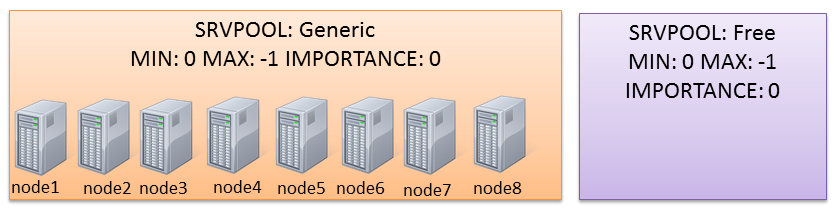
After a clean installation, you’ll end up with two default server pools:
The Generic one will contain all non-PMDs (if you use only PMDs it will be empty). The Free one will own servers that are “spare”, when all server pools have reached the maximum size thus they’re not requiring more servers.
New server pools
Actually the cluster I’m working on has two serverpools already defined (PMU and TST):
(the node assignment in the graphic is not relevant here).
They have been created with a command like this one:
Oracle PL/SQL
1
#srvctladdserverpool-gPMU-l5-u6-i3
Oracle PL/SQL
1
#srvctladdserverpool-gTST-l2-u3-i2
“srvctl -h ” is a good starting point to have a quick reference of the syntax.
You can check the status with:
1
2
3
4
5
6
7
8
9
# srvctl status serverpool
Server pool name:Free
Active servers count:0
Server pool name:Generic
Active servers count:0
Server pool name:PMU
Active servers count:6
Server pool name:TST
Active servers count:2
and the configuration:
1
2
3
4
5
6
7
8
9
10
11
12
13
# srvctl config serverpool
Server pool name:Free
Importance:0,Min:0,Max:-1
Candidate server names:
Server pool name:Generic
Importance:0,Min:0,Max:-1
Candidate server names:
Server pool name:PMU
Importance:3,Min:5,Max:6
Candidate server names:
Server pool name:TST
Importance:2,Min:2,Max:3
Candidate server names:
Modifying the configuration of serverpools
In this scenario, PMU is too big. The sum of minumum nodes is 2+5=7 nodes, so I have only one server that can be used for another server pool without falling below the minimum number of nodes.
I want to make some room to make another server pool composed of two or three nodes, so I reduce the serverpool PMU:
1
# srvctl modify serverpool -g PMU -l 3
Notice that PMU maxsize is still 6, so I don’t have free servers yet.
Oracle PL/SQL
1
2
3
4
5
6
7
#srvctlstatusdatabase-dPMU
InstancePMU_4isrunningonnodenode2
InstancePMU_2isrunningonnodenode3
InstancePMU_3isrunningonnodenode4
InstancePMU_5isrunningonnodenode6
InstancePMU_1isrunningonnodenode7
InstancePMU_6isrunningonnodenode8
So, if I try to create another serverpool I’m warned that some resources can be taken offline:
1
2
3
4
5
6
# srvctl add serverpool -g LUDO -l 2 -u 3 -i 1
PRCS-1009:Failed tocreate server pool LUDO
PRCR-1071:Failed toregister orupdate server pool ora.LUDO
CRS-2737:Unable toregister server pool'ora.LUDO'asthiswill affect running resources,but the force option was notspecified
The clusterware proposes to stop 2 instances from the db pmu on the serverpool PMU because it can reduce from 6 to 3, but I have to confirm the operation with the flag -f.
Modifying the serverpool layout can take time if resources have to be started/stopped.
1
2
3
4
5
6
7
8
9
10
11
# srvctl status serverpool
Server pool name:Free
Active servers count:0
Server pool name:Generic
Active servers count:0
Server pool name:LUDO
Active servers count:2
Server pool name:PMU
Active servers count:4
Server pool name:TST
Active servers count:2
My new serverpool is finally composed by two nodes only, because I’ve set an importance of 1 (PMU wins as it has an importance of 3).
Inviting RAC One Node databases to the party
Now that I have some room on my new serverpool, I can start creating new databases.
With PMD I can add two types of databases: RAC or RACONDENODE. Depending on the choice, I’ll have a database running on ALL NODES OF THE SERVER POOL or on ONE NODE ONLY. This is a kind of limitation in my opinion, hope Oracle will improve it in the near future: would be great to specify the cardinality also at database level.
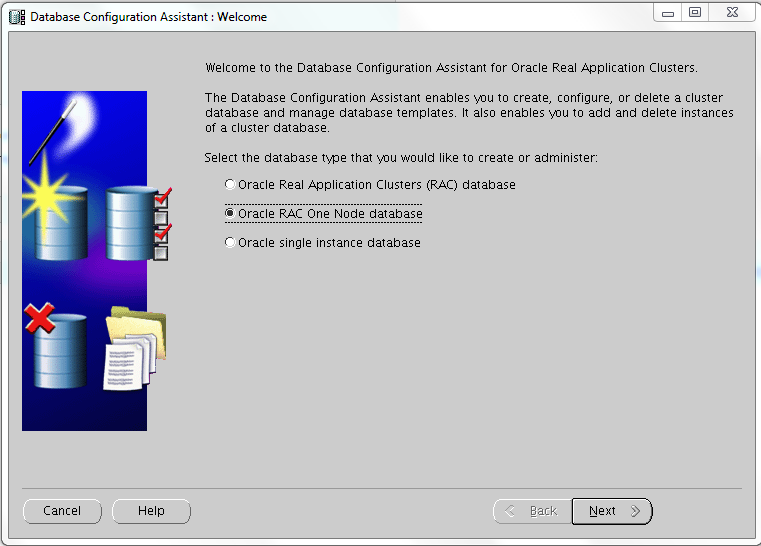
Creating a RAC One DB is as simple as selecting two radio box during in the dbca “standard” procedure:
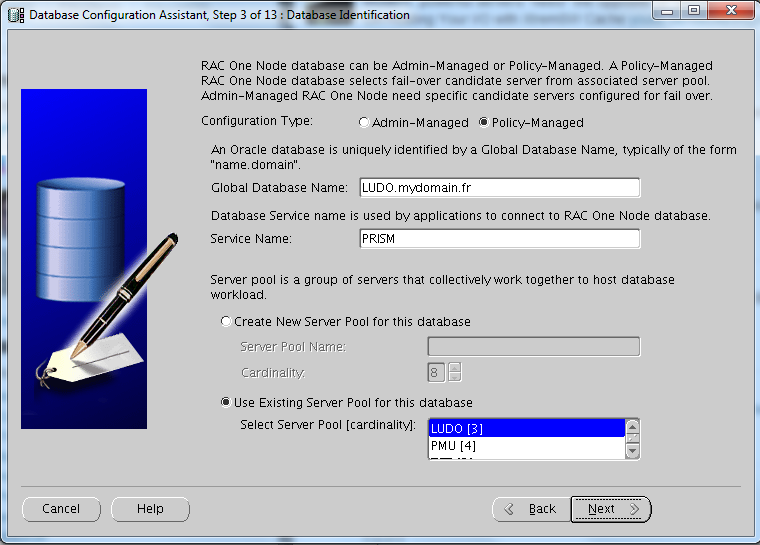
The Server Pool can be created or you can specify an existent one (as in this lab):
The node was belonging to the pool LUDO, however I have this situation right after:
1
2
3
4
5
6
7
8
9
10
11
# srvctl status serverpool
Server pool name:Free
Active servers count:0
Server pool name:Generic
Active servers count:0
Server pool name:LUDO
Active servers count:2
Server pool name:PMU
Active servers count:3
Server pool name:TST
Active servers count:2
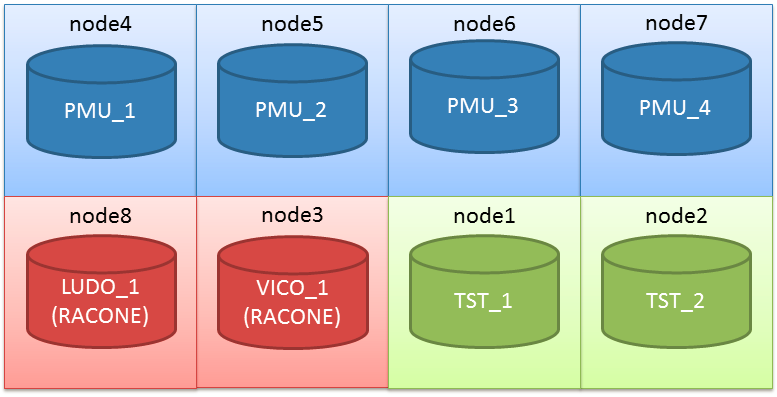
A server has been taken from the pol PMU and given to the pool LUDO. This is because PMU was having one more server than his minimum server requirement.
Now I can loose one node at time, I’ll have the following situation:
1 node lost: PMU 3, TST 2, LUDO 2
2 nodes lost: PMU 3, TST 2, LUDO 1 (as PMU is already on min and has higher priority, LUDO is penalized because has the lowest priority)
3 nodes lost:PMU 3, TST 2, LUDO 0 (as LUDO has the lowest priority)
4 nodes lost: PMU 3, TST 1, LUDO 0
5 nodes lost: PMU 3, TST 0, LUDO 0
So, my hyper-super-critical application will still have three nodes to have plenty of resources to run even with a multiple physical failure, as it is the server pool with the highest priority and a minimum required server number of 3.
What I would ask to Santa if I’ll be on the Nice List (ad if Santa works at Redwood Shores)
Dear Santa, I would like:
To create databases with node cardinality, to have for example 2 instances in a 3 nodes server pool
Server Pools that are aware of the physical location when I use stretched clusters, so I could end up always with “at least one active instance per site”.
The installation process of a typical Standard Edition RAC does not differ from the Enterprise Edition. To achieve a successful installation refer to the nice quick guide made by Yury Velikanov and change accordingly the Edition when installing the DB software.
Standard Edition and Feature availability
The first thing that impressed me, is that you’re still able to choose to enable pluggable databases in DBCA even if Multitenant option is not available for the SE.
So I decided to create a container database CDB01 using template files, so all options of EE are normally cabled into the new DB. The Pluggable Database name is PDB01.
1
2
3
4
5
6
7
8
9
10
11
[oracle@se12c01~]$sqlplus
SQL*Plus:Release12.1.0.1.0Production on Wed Jul314:21:472013
With the Real Application Clusters andAutomatic Storage Management options
As you can see, the initial banner contains “Real Application Clusters and Automatic Storage Management options“.
Multitenant option is not avilable. How SE reacts to its usage?
First, on the ROOT db, dba_feature_usage_statistics is empty.
1
2
3
4
5
6
7
8
9
SQL>alter session set container=CDB$ROOT;
Session altered.
SQL>select *from dba_feature_usage_statistics;
no rows selected
SQL>
This is interesting, because all features are in (remember it’s created from the generic template) , so the feature check is moved from the ROOT to the pluggable databases.
On the local PDB I have:
1
2
3
4
5
6
7
8
9
SQL>alter session set container=PDB01;
Session altered.
SQL>select *from dba_feature_usage_statistics where lower(name)like'%multitenant%';
alter database move datafile'DATA/CDB01/E09CA0E26A726D60E043A138A8C0E475/DATAFILE/users.284.819821651'
*
ERROR at line1:
ORA-00439:feature notenabled:online move datafile
Create a Service on the RAC Standard Edition (just to check if it works)
I’ve just followed the steps to do it on an EE. Keep in mind that I’m using admin managed DB (something will come about policy managed DBs, stay tuned).
As you can see it works pretty well. Comparing to 11g you have to specify the -pdb parameter:
Oracle Database 12c says goodbye to a tool being around after the 10gR1: the Database Console.
OC4J for the 10g and weblogic for the 11g, both have had a non-negligible overhead on the systems, especially with many configured instances.
In many cases I’ve decided to switch to Grid/Cloud Control for the main reason to avoid too many db consoles, in other cases I’ve just disabled at all web management.
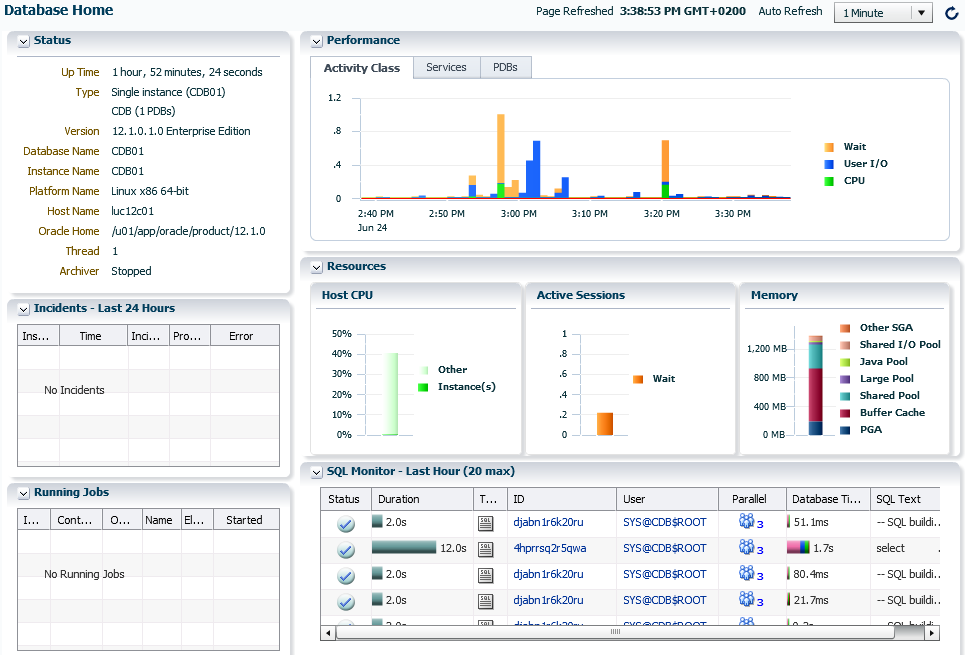
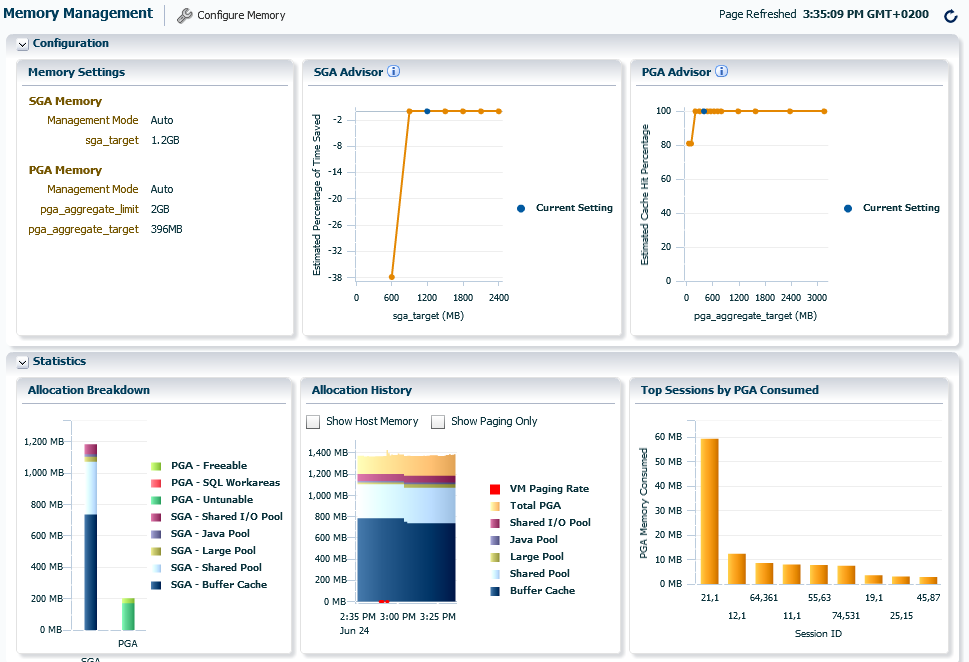
The new 12c brings a new tool called Database Express (indeed, very similar to its predecessors).
Where’s my emca/emctl?
The DB Express runs entirely with pl/sql code within the XDB schema. It’s XDB that leverages its features to enable a web-based console, and it’s embedded by default in the database.
To enable it, it’s necessary to check that the parameter dispatchers is enabled for XDB:
If you’ve already done it but you don’t remember the port number you can get it with this query:
PgSQL
1
2
3
4
5
SQL>selectdbms_xdb_config.gethttpsport()fromdual;
DBMS_XDB_CONFIG.GETHTTPSPORT()
------------------------------
5502
You can now access the web interface by using the address:
1
https://yourserver:5502/em
Lower footprint, less features
From one side DB Express is thin (but not always fast on my laptop…), from the other it has clearly fewer features comparing to the DB Console.
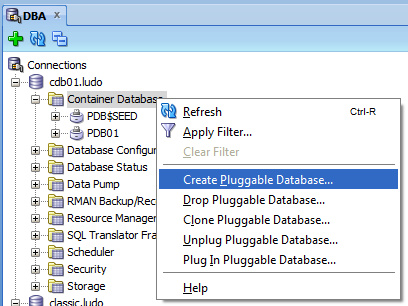
It’s not clear to me if Oracle wants to make it more powerful in future releases or if it’s a move to force everybody to use something else (SQLDeveloper or EM12c Cloud Control). However the DBA management plugin of the current release of SQL Developer is fully compatible with the 12c, including the ability to manage pluggable databases:
So is the EM 12c Cloud Control, so you have plenty of choice to manage your 12c databases from graphical interfaces.
Oracle Database 12c comes with a new feature named “RMAN table level recovery”.
After a quick try it’s easy to understand that we are talking about Tablespace Point-in-Time Recovery (TSPITR) with some automation to have it near-transparent.
How to launch it
The syntax is quite trivial. Suppose you’ve dropped a table ludovico.reco and then purged it (damn!) then you can’t flashback it to before drop and don’t want to flashback the entire database.
You identify the schema.table:partition to restore, optionally you can pass the pluggable database containing the table to recover, the time definition as usual (scn, seq# or timestamp) and an auxiliary destination.
This Auxiliary destination is well-known to be mandatory for TSPITR. You can pass other options like table renaming or tablespace remapping.
Off course, the database must be open in read-write, in archivelog mode and at least one successful backup must be taken.
How it works
Oracle prepare an auxiliary instance by restoring the SYSTEM, UNDO and SYSAUX tablespaces.
It uses then the read-only dictionary to take the tablespace that was containing the table before the data loss. This tablespace (users in my example) is restored and recovered, and the database is opened.
Oh, and yes, now we can select directly from RMAN! 🙂
My opinion
It still needs the amount of space needed to recover the auxiliary instance (system, sysaux, temp and the user tablespace containing the missing data), so it has all the defeats of the typical TSPITR, but it’s automatic so is an improvement for the real life.
Restoring the user tablespace separately from the system tablespaces can be an issue if you’re saving backupsets over tape: you can end up by reading twice the same backupset that could be read once instead.
But Oracle has fixed this twice, in the new release it’s possible to use identity columns as well, avoiding the necessity to create explicitly a new sequence:
The new Oracle Database 12c allows to move datafiles ONLINE while they’re been used. This allows great availability when dealing with database moving, compared to the previous approach.
Controlfiles cannot be moved online yet. The other kind of files (temp and redo logs) off course can be moved easily by creating the new ones and deleting the old ones, as it was on pre-12c releases.
Oracle instances on Unix/Linux servers have been composed historically by separated server processes to allow the database to be multi-user, in opposite with Windows that has always been multithread (Oracle 7 on MS-DOS was a single-user process, but this is prehistory…). The background processes number has increased to support all the new features of Oracle, up to this new Oracle 12c release. On a simple database installation you’ll be surprised to have this output from a ps command (38 processes):
1
2
3
4
5
6
7
8
9
10
11
12
13
14
15
16
17
18
19
20
21
22
23
24
25
26
27
28
29
30
31
32
33
34
35
36
37
38
39
40
# ps -eaf | grep CLASSIC | grep -v grep
oracle35821021:59?00:00:00ora_pmon_CLASSIC
oracle35841021:59?00:00:00ora_psp0_CLASSIC
oracle35901421:59?00:00:51ora_vktm_CLASSIC
oracle35961021:59?00:00:00ora_gen0_CLASSIC
oracle35991021:59?00:00:00ora_mman_CLASSIC
oracle36081021:59?00:00:00ora_diag_CLASSIC
oracle36121021:59?00:00:00ora_dbrm_CLASSIC
oracle36161021:59?00:00:00ora_dia0_CLASSIC
oracle36201021:59?00:00:00ora_dbw0_CLASSIC
oracle36241021:59?00:00:04ora_lgwr_CLASSIC
oracle36281021:59?00:00:00ora_ckpt_CLASSIC
oracle36321021:59?00:00:00ora_smon_CLASSIC
oracle36361021:59?00:00:00ora_reco_CLASSIC
oracle36401021:59?00:00:00ora_lreg_CLASSIC
oracle36441021:59?00:00:00ora_rbal_CLASSIC
oracle36481021:59?00:00:00ora_asmb_CLASSIC
oracle36521021:59?00:00:01ora_mmon_CLASSIC
oracle36591021:59?00:00:00ora_mmnl_CLASSIC
oracle36641021:59?00:00:00ora_d000_CLASSIC
oracle36671021:59?00:00:00ora_s000_CLASSIC
oracle36721021:59?00:00:00ora_mark_CLASSIC
oracle37071021:59?00:00:01ora_o000_CLASSIC
oracle37171021:59?00:00:01ora_o001_CLASSIC
oracle37251021:59?00:00:00ora_tmon_CLASSIC
oracle37291021:59?00:00:00ora_tt00_CLASSIC
oracle37361021:59?00:00:00ora_smco_CLASSIC
oracle37381022:00?00:00:00ora_w000_CLASSIC
oracle37491022:00?00:00:00ora_fbda_CLASSIC
oracle37511022:00?00:00:00ora_aqpc_CLASSIC
oracle37571022:00?00:00:00ora_qm02_CLASSIC
oracle37591022:00?00:00:00ora_p000_CLASSIC
oracle37631022:00?00:00:00ora_p001_CLASSIC
oracle37651022:00?00:00:00ora_q002_CLASSIC
oracle37671022:00?00:00:00ora_p002_CLASSIC
oracle37691022:00?00:00:00ora_q003_CLASSIC
oracle37711022:00?00:00:00ora_p003_CLASSIC
oracle37741022:00?00:00:00ora_cjq0_CLASSIC
oracle38011022:00?00:00:02ora_vkrm_CLASSIC
If you have consolidated many databases without the pluggable database feature, you’ll end up to have several hundreds of processes even without users connected. But Oracle 12c now introduce the possibility to start an instance using multithreading instead of the traditional processes. This could lead to some optimizations due to the shared process memory, and reduced context switches overhead, I presume (need to test it).
Enabling the Multithreaded Execution
By default this feature is not enabled, so you have to set it explicitly:
1
2
3
4
5
SQL>alter system set threaded_execution=truescope=spfile;
System altered.
SQL>
And in parallel, you’ll need to add this line to the listener.ora:
1
DEDICATED_THROUGH_BROKER_listener=on
After a restart, the instance will show only a bunch of processes:
So we have the Process Monitor (pmon), the Process Spawner (psp0), the Virtual Keeper of Time (vktm), the Database Writer (dbw0) and two new multithreaded processes (u004) and (u005). “U” can stand for User or Unified?
Where can I find the information on the other processes?
They still exist in the v$process view, thus leading to some confusion when talking about Oracle Processes with your sysadmins… The new EXECUTION_TYPE column show if the Oracle Process is executed as a thread or as an OS process, and the SPID let us know which process actually executes it.
1
2
3
4
5
6
7
8
9
10
11
12
13
14
15
16
17
18
19
20
21
22
23
24
25
26
27
28
29
30
31
32
33
34
35
36
37
38
39
40
41
42
43
44
45
46
47
48
49
50
51
PID SPID PNAME EXECUTION_
-----------------------------
24792PMON PROCESS
34794PSP0 PROCESS
44800VKTM PROCESS
54804GEN0 THREAD
64804SCMN THREAD
184804LREG THREAD
194804RBAL THREAD
204804ASMB THREAD
114804DBRM THREAD
144804LGWR THREAD
154804CKPT THREAD
164804SMON THREAD
74804MMAN THREAD
174810RECO THREAD
124810DIA0 THREAD
104810SCMN THREAD
94810DIAG THREAD
254810N000 THREAD
504810Q002 THREAD
494810W004 THREAD
214810MMON THREAD
224810MMNL THREAD
234810D000 THREAD
244810S000 THREAD
514810Q003 THREAD
264810MARK THREAD
274810W001 THREAD
284810THREAD
294810THREAD
304810TMON THREAD
314810TT00 THREAD
324810SMCO THREAD
334810FBDA THREAD
344810W000 THREAD
354810AQPC THREAD
364810CJQ0 THREAD
374810P000 THREAD
384810P001 THREAD
394810P002 THREAD
404810P003 THREAD
414810VKRM THREAD
424810THREAD
434810O000 THREAD
454810W002 THREAD
464810QM02 THREAD
474810W003 THREAD
134818DBW0 PROCESS
84884PROCESS
1NONE
What about the User processes?
Well, I’ve spawned 200 user processes with sqlplus, and got 200 threads:
1
2
3
4
5
6
7
8
9
10
SQL>select BACKGROUND,EXECUTION_TYPE,count(*)
2>fromv$process group by background,EXECUTION_TYPE;
BEXECUTION_ COUNT(*)
---------------------
1PROCESS4
1THREAD34
PROCESS1
NONE1
THREAD200
On the OS side, I’ve registered an additional process to distribute the load of the new user processes. Damn, I start to being confusional using the term “process” o_O
By using the multithreaded execution, the operating system authentication doesn’t work.
1
2
3
4
5
6
7
8
9
10
[oracle@luc12c01~]$sqlplus/assysdba
SQL*Plus:Release12.1.0.1.0Production on Fri May1001:14:172013
Copyright(c)1982,2013,Oracle.All rights reserved.
ERROR:
ORA-01017:invalid username/password;logon denied
Enter user-name:
Unless Oracle will review it’s authentication mechanism in a future patchset, you’ll need to rely on the password file and use the password to connect to the instance as sysdba, even locally.
What about performance?
In theory, threads should be faster and with a lower footprint:
The main benefit of threads (as compared to multiple processes) is that the context switches are much cheaper than those required to change current processes. Sun reports that a fork() takes 30 times as long as an unbound thread creation and 5 times as long as a boundthread creation.
In some operating systems running on some hardware, switching between threads belonging to the same process is much faster than switching to a thread from different process (because it requires more complicated process context switch). http://en.wikipedia.org/wiki/Thread_switching_latency
In practice, I’ll do some tests and let you know! 🙂
What about the good old OS kill command to terminate processes?
Good question! Currently I have not found any references to an orakill command (that exists on Windows). Hope it will arrive soon!
After a long, long wait, Oracle finally announced the availability of his new generation database. And looking at the new features, I think it will take several months before I’ll learn them all. The impressive number of changes brings me back to the release 10gR1, and I’m not surprised that Oracle has waited so long, I still bet that we’ll find a huge amount of bugs in the first release. We need for sure to wait a first Patchset, as always, before going production.
Does ‘c’ stand for cloud?
While Oracle has developed this release with the cloud in mind, the first word that comes out of my mind is “consolidation”. The new claimed feature Pluggable Database (aka Oracle Multitenancy) will be the dream of every datacenter manager along with CloneDB (well, it was somehow already available on 11.2.0.2) and ASM Thin_provisioned diskgroups.
But yes, it’s definitely the best for clouds
Other features like Flex ASM, Flex Cluster, several new security features, crossplatform backups… let imagine how deeply we can work to make private, multi-tenant clouds.
First steps, what changes with a typical installation
The process for a traditional standalone DB+ASM installation is the same as the old 11gR2: You’ll need to install the Grid Infrastructure first (and then take advantage of the Oracle Restart feature) and subsequently the Database installation.
The installation documentation is complete as always and is getting quite huge as the Grid Infrastructure capabilities increment.
To meet most installation prerequisites, Oracle has prepared again an RPM that does the dirty work:
Oracle suggests to use Ksplice and also explicitly recommends to use the deadline I/O scheduler (it has been longtime a best practice but I can’t remember it was documented officially).
The splash screen has become more “red” giving a colorful experience on the installation process. 😉
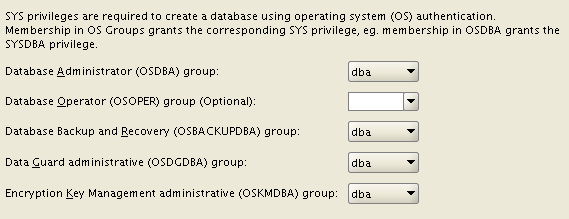
Once the GI is installed, the Database installation asks for many new OS groups: OSBACKUPDBA, OSDGDBA, OSKMDBA. This give you more possibilities to split administration duties, not specifying them will lead to the “old behavior”.
You can decide to use an ACFS filesystemfor both the installation AND the database files (with some exceptions, e.g. Windows servers). So, you can take advantage of the snapshot features of ACFS for your data, provided that the performance is acceptable (I’ll try to test and blog more about this). You can use the feature Copy-On-Write to provide writable snapshot copies, directly embedding a special syntax inside the “create pluggable database” command. Unfortunately, Oracle has decided to deliver pluggable databases as an extra-cost option. :-/
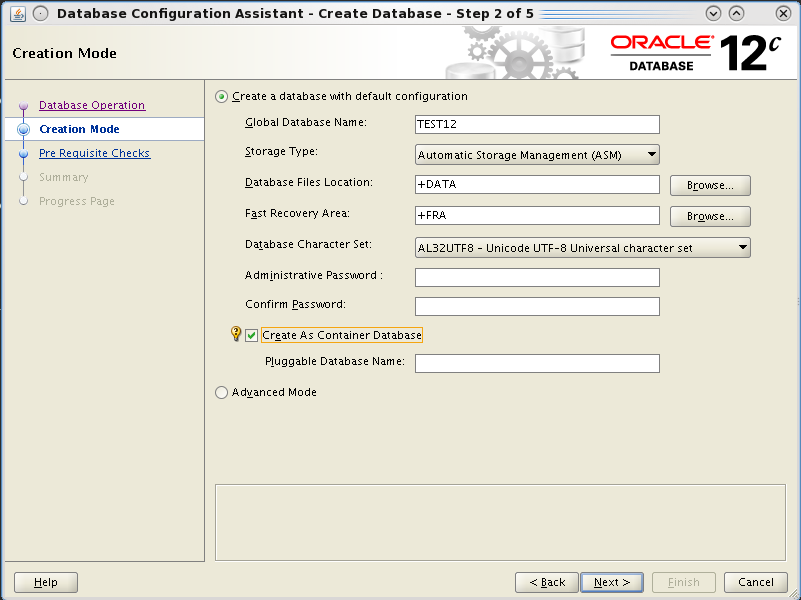
The database creation with DBCA is even easier, you have an option for a very default installation, you can guess it uses templates with all options installed by default.
But the Hot topic is that you can create it as a “Container Database”. This is done by appending the keywords “enable pluggable database;” at the end of the create database command. The process will then put all the required bricks (creation of the pdb$seed database and so on), I’ll cover the topic in separate posts cause it’s the really biggest new feature.
You can still use advanced mode to have the “old style” database creation, where you can customize your database.
If you try to create only the scripts and run them manually (that’s my habit), you’ll notice that SQL scripts are not run directly within the opened SQL*Plus session, but they’re run from a perl script that basically suppresses all the output to terminal, giving the impression of a cleaner installation. IMO it could be better only if everything runs fine.
I’ve taken my MySQL 5.0 OCP certification in 2010. A little late because this certification has been around for longtime, but surprisingly, it’s still the only version for MySQL OCP certification.
The 5.0 branch started in 2003 and it went GA in 2005:
“MySQL 5.0.0, a new version of the popular Open Source/Free SoftwareDatabase Management System, has been released.”
Michael Widenius, December 24 2003
“It is my pleasure to announce the production release of MySQL 5.0, which is hereby GA (Generally Available).”
Kaj Arnö, October 24th 2005
If we make a comparison, it’s like if the certification release for Oracle was the 10gR1.
Yesterday I’ve received an email from Oracle University claiming new courses on MySQL 5.6 to add certifications to the resume:
“The MySQL for Database Administrators course is for DBAs and other database professionals who want to install and configure MySQL Server, set up replication and security, perform database backups and performance tuning, and protect MySQL databases. This course has been updated to cover commercial features of MySQL as well as enhanced replication capabilities in MySQL 5.6.”
Oracle University, May 20th 2013
I’ve started thinking that a new certification path on 5.6 was available, but on the Oracle site I see that the certification is always the same. They have just added a sentence in the preparation notes:
“This exam has been validated through MySQL 5.5. The recommended course is based on MySQL 5.6. Candidates wishing to use this course to prepare may wish to consult product documentation to ensure they understand the differences between MySQL 5.5 and MySQL 5.6”
I hope we’ll see something new soon!
Ludovico
This website uses cookies to improve your experience. We'll assume you're ok with this, but you can opt-out if you wish.Accept
Privacy & Cookies Policy
Privacy Overview
This website uses cookies to improve your experience while you navigate through the website. Out of these, the cookies that are categorized as necessary are stored on your browser as they are essential for the working of basic functionalities of the website. We also use third-party cookies that help us analyze and understand how you use this website. These cookies will be stored in your browser only with your consent. You also have the option to opt-out of these cookies. But opting out of some of these cookies may affect your browsing experience.
Necessary cookies are absolutely essential for the website to function properly. This category only includes cookies that ensures basic functionalities and security features of the website. These cookies do not store any personal information.
Any cookies that may not be particularly necessary for the website to function and is used specifically to collect user personal data via analytics, ads, other embedded contents are termed as non-necessary cookies. It is mandatory to procure user consent prior to running these cookies on your website.


 For truth’s sake, I wasn’t planning to head at Oracle Open World this year. I’ve never had this opportunity, and the same days my company is planning it’s great internal conference (Trivadis Tech Event) that I always enjoy and I hope will be made public soon.