
This post is part of a blog series.
Each Oracle release makes setup easier, but configuring naming resolution and authentication for Data Guard is still a challenging step. Editing files like tnsnames.ora and sqlnet.ora remains tedious, even with LDAP (recommended) or EZConnect. Automation tools like Puppet, Ansible, or cloud solutions help, but aren’t always in place.
For Data Guard, accurate naming resolution and authentication are crucial for successful broker connections. The DGConnectIdentifier property defines the main connection string.
Data Guard 26ai introduces the VALIDATE DGConnectIdentifier command, which tests connectivity, including credentials, from each instance to every member.
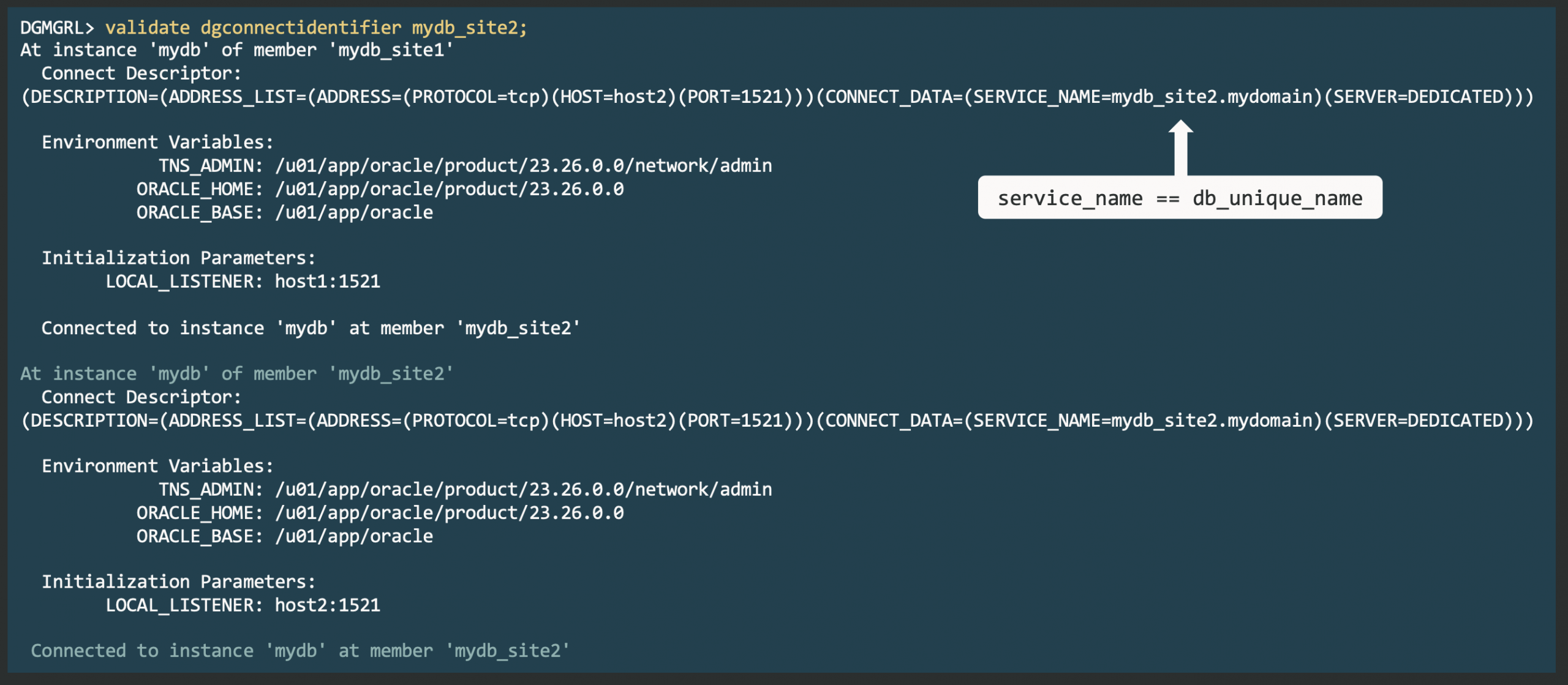
This proactive check helps you avoid errors like ORA-01017 and ORA-12514 during operations such as SWITCHOVER. Unlike earlier manual sqlplus checks, this command verifies connections using the actual database environment, offering true validation from the connecting database.


Latest posts by Ludovico (see all)
- Data Guard 26ai – #28: Fast-Start Failover Validation - April 17, 2026
- Data Guard 26ai – #27: Enhanced Observer Diagnostics - April 16, 2026
- Data Guard 26ai – #26: Fast-Start Failover Lag Histogram - April 7, 2026