
This post is part of a blog series.
The PL/SQL APIs published for general use in 26ai have also powered SQLcl’s command line for some time. SQLcl has supported Data Guard commands since version 21c. It’s another nice addition that you get when upgrading from 19c.
SQLcl is a robust Java-based command line tool that excels at running SQL and can also (incomplete list):
- launch Data Pump jobs
- retrieve metadata
- run Liquibase commands
- manage projects
- operate as an MCP server for natural language queries
- and now, execute Data Guard commands
To run a Data Guard command, simply prefix a standard DGMGRL command with “DG ” in your SQLcl session.
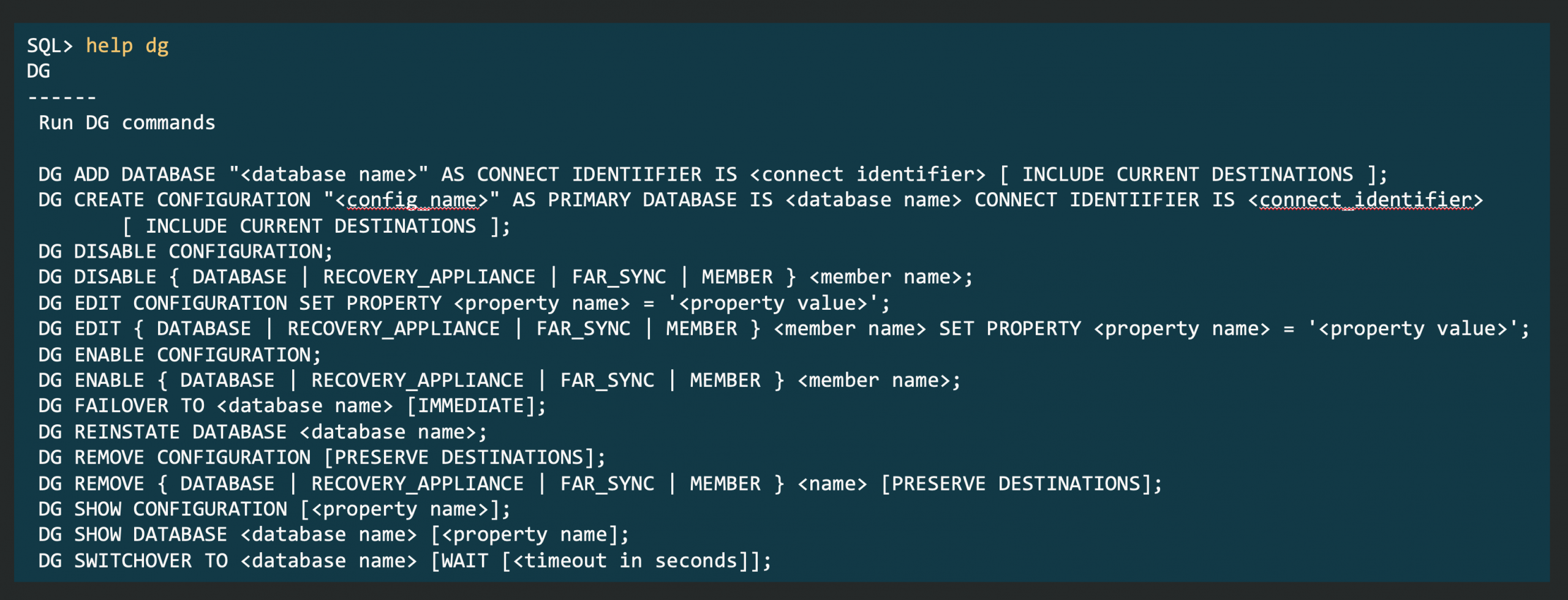
While not every Data Guard feature is available—some validation commands are missing—core management commands work without issue. The real advantage is convenience: you can use both SQL and Data Guard commands from the same interface, no need to switch tools.
Looking ahead, we plan to add more features, and SQLcl will eventually become our recommended tool for Data Guard. Today, you can switch between SQLcl and DGMGRL as needed. Note: Observer functionality remains unique to DGMGRL; SQLcl does not yet support it.


Latest posts by Ludovico (see all)
- Data Guard 26ai – #28: Fast-Start Failover Validation - April 17, 2026
- Data Guard 26ai – #27: Enhanced Observer Diagnostics - April 16, 2026
- Data Guard 26ai – #26: Fast-Start Failover Lag Histogram - April 7, 2026