
This post is part of a blog series.
I’ve previously blogged about how in 26ai you can automatically prepare the primary database using DGMGRL’s command “PREPARE DATABASE FOR DATA GUARD“; you can find the link here for more details.
Many Oracle ACEs and bloggers also blogged about it:
- https://oracle-base.com/articles/21c/data-guard-prepare-database-for-data-guard-21c
- https://www.dbi-services.com/blog/oracle-20c-the-new-prepare-database-for-data-guard/
- https://gavinsoorma.com.au/knowledge-base/prepare-database-for-data-guard/
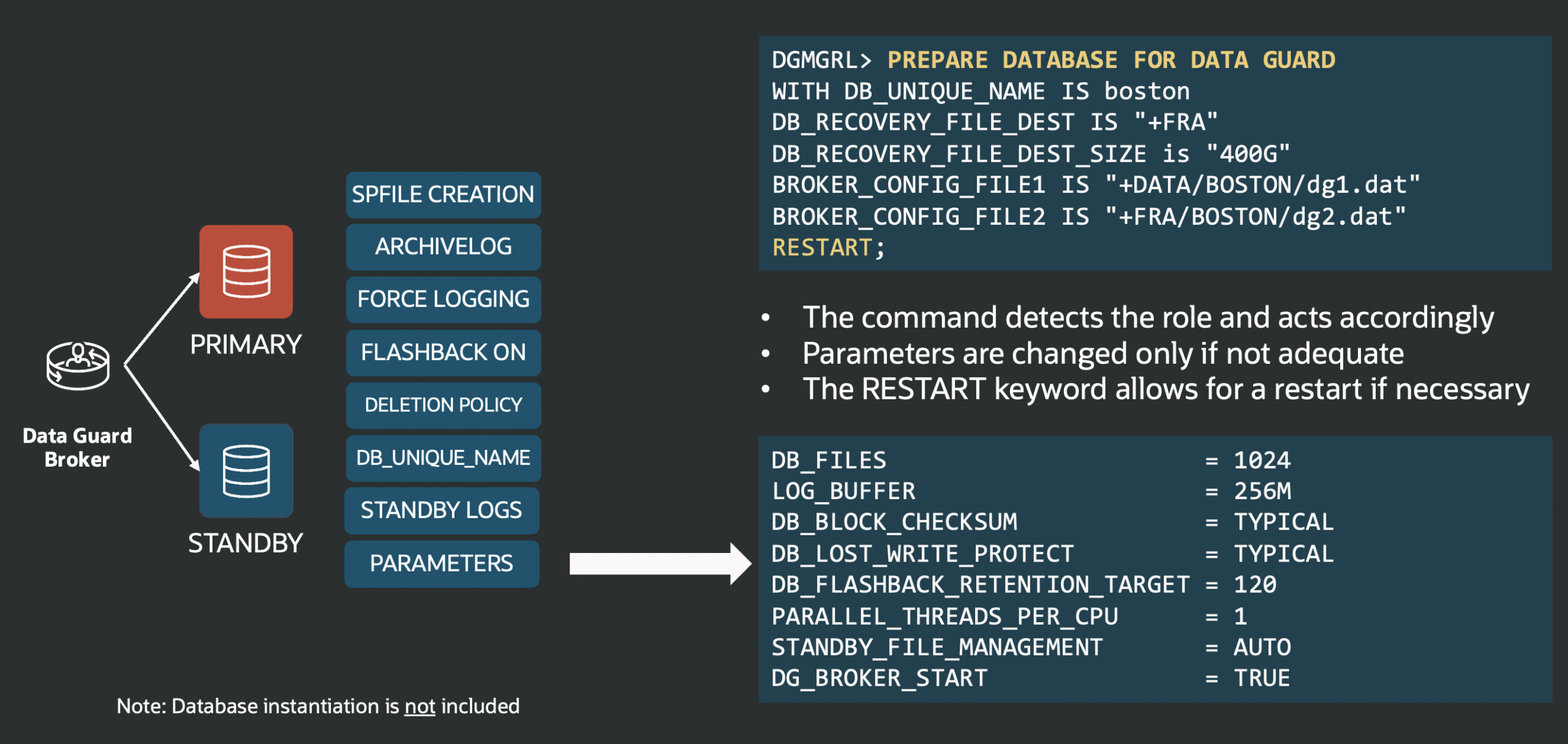
As of version 23.26.0 (released October ’25), the “PREPARE DATABASE FOR DATA GUARD” command supports both primary and standby databases. While you’ll still need to create your standby database manually, the command now recognizes the role of the database and automatically sets recommended parameters, creates required components, and enforces the necessary settings for joining a Data Guard configuration.
The following two tabs change content below.


Latest posts by Ludovico (see all)
- Data Guard 26ai – #28: Fast-Start Failover Validation - April 17, 2026
- Data Guard 26ai – #27: Enhanced Observer Diagnostics - April 16, 2026
- Data Guard 26ai – #26: Fast-Start Failover Lag Histogram - April 7, 2026