
This post is part of a blog series.
Adding tempfiles in a Data Guard configuration has always been tricky. In 19c or lower, adding a tempfile doesn’t automatically create it on the standby database because tempfile operations (including creation) don’t generate redo. As a result, the standby doesn’t notice the change.
To work around this, you had to manually add the tempfile on the standby by opening the standby PDB in read-only mode—after stopping redo if you didn’t have an Active Data Guard license. Mohamadou explained this workaround in detail:
https://www.dbi-services.com/blog/dataguard-environment-and-database-tempfiles/
In release 26ai, the process is finally automatic—if you use Oracle-Managed Files (OMF) and set standby_file_management to auto. The system now writes a new redo marker whenever a tempfile is added, ensuring automatic creation on the standby.
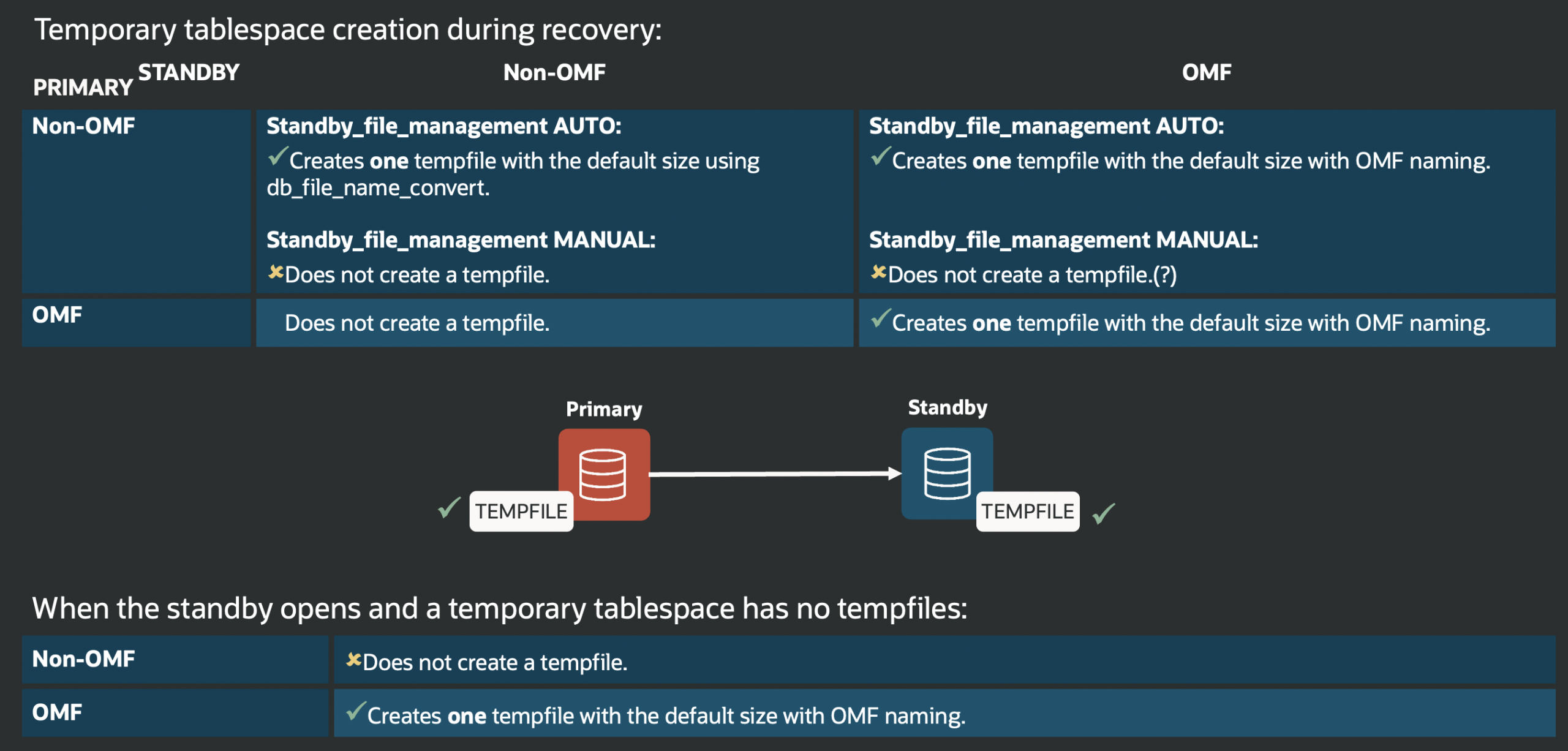
My colleague Sinan also covered this topic here:
https://database-heartbeat.com/2023/09/26/temp-file-dg/


Latest posts by Ludovico (see all)
- Data Guard 26ai – #25: New view V$FAST_START_FAILOVER_CONFIG - April 2, 2026
- Data Guard 26ai – #24: Validate DGConnectIdentifier - March 13, 2026
- Data Guard 26ai – #23: New view V$DG_BROKER_PROPERTY - March 9, 2026