
This post is part of a blog series.
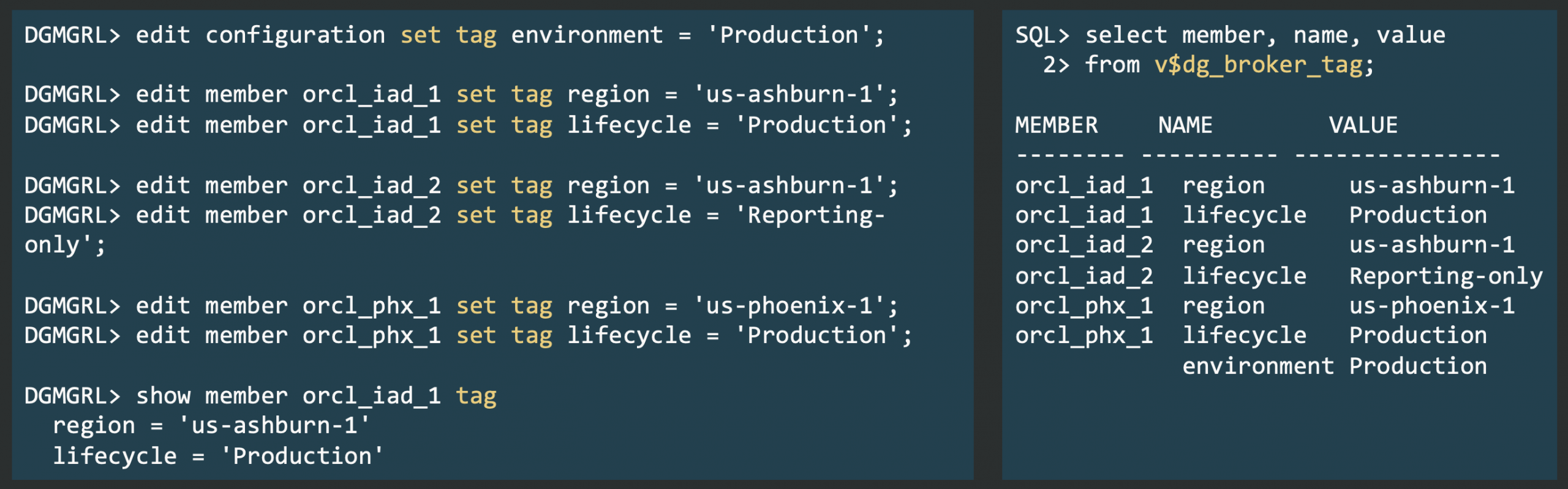
Oracle AI Database Release Update 23.26.1 introduces tagging for broker configurations and their members. Tags (key-value pairs) let you add custom context to configuration objects like databases and far sync instances.
Currently, tags serve only for organization and classification, based on your business needs. For example, you might tag databases to track their lifecycle status, flag compliance requirements, or group them by location or department.
Use these commands to manage tags:
- EDIT CONFIGURATION SET TAG
- SHOW CONFIGURATION TAG
- EDIT DATABASE|FAR_SYNC|MEMBER SET TAG
- SHOW DATABASE|FAR_SYNC|MEMBER TAG
You can also view tags using the new fixed view V$DG_BROKER_TAG, or manage them with standard interfaces like the PL/SQL API and SQLcl.
Tag names beginning with “ORA” are reserved for possible future features, so avoid using that prefix. We may add new capabilities that rely on ORA-reserved tags.
Note: With 23.26.1, you have to explicitly activate this feature with:
|
1 |
EDIT CONFIGURATION SET PROPERTY TagMode=1; |
This requirement will be removed in a future release update.


Latest posts by Ludovico (see all)
- Data Guard 26ai – #25: New view V$FAST_START_FAILOVER_CONFIG - April 2, 2026
- Data Guard 26ai – #24: Validate DGConnectIdentifier - March 13, 2026
- Data Guard 26ai – #23: New view V$DG_BROKER_PROPERTY - March 9, 2026