
This post is part of a blog series.
Monitoring your Data Guard configuration is essential to ensure your database remains healthy. The Data Guard broker includes a VALIDATE DATABASE command which assesses the system’s health and determines its readiness for switchover or failover.
Up to 21c, this command checks technical readiness for these operations and confirms whether they are likely to succeed. However, some misconfigurations, such as disabled flashback logging or offline PDBs, might not cause immediate failures but still present risks of data loss or other operational issues.
For example, if flashback logging is disabled, a failover would require reinstating the former primary. If there are offline PDBs on the standby database, perhaps because the primary was cloned without copying over the data files, these PDBs would not be available after a failover. This situation could cause data loss. Other issues may not block a switchover, yet still lead to unwanted results.
Oracle Data Guard 26ai introduces strict database validation. This feature marks a database as not ready for switchover or failover if any advanced checks fail.
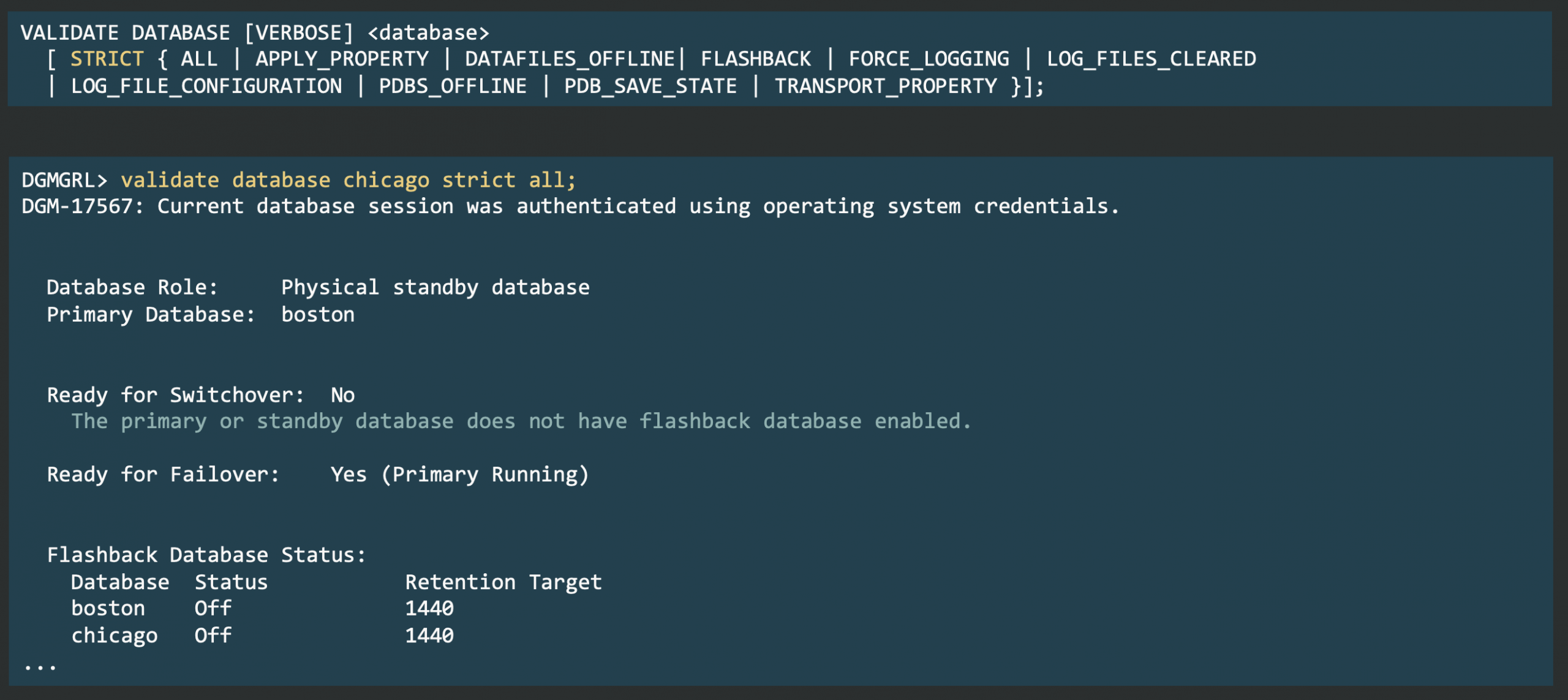 Strict validation checks include:
- Matching apply properties
- Matching transport properties
- All data files online
- All PDBs online
- Flashback logging and force logging enabled
- Properly configured and cleared log files
- No saved PDB states, which is important to avoid issues with Active Data Guard
To run all these checks at once, use:
|
1 |
VALIDATE DATABASE {db_unique_name} STRICT ALL; |


Latest posts by Ludovico (see all)
- Data Guard 26ai – #26: Fast-Start Failover Lag Histogram - April 7, 2026
- Data Guard 26ai – #25: New view V$FAST_START_FAILOVER_CONFIG - April 2, 2026
- Data Guard 26ai – #24: Validate DGConnectIdentifier - March 13, 2026