
This post is part of a blog series.
Oracle Data Guard 26ai adds JSON output support to DGMGRL.
Previously, you needed Linux tools like sed, awk, or grep to extract information from DGMGRL command-line output.
Now, you can display DGMGRL results as JSON, making them easy to parse with standard libraries or tools such as jq.
While you can programmatically interact with the broker using PL/SQL or REST, JSON output modernizes existing scripts and simplifies automation.
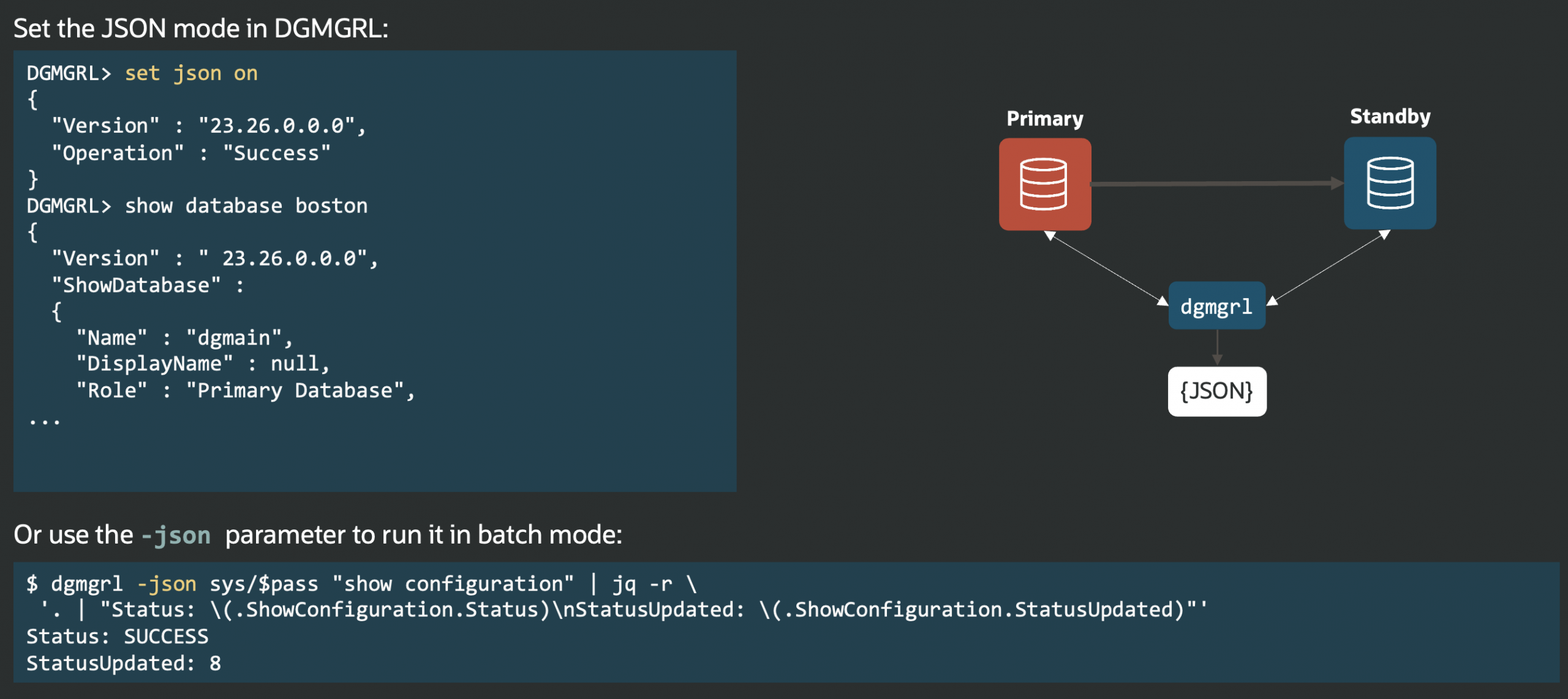
Enable JSON output by running DGMGRL in batch mode with the -json argument, or toggle it on and off in interactive mode with set json on and set json off.
The following two tabs change content below.


Latest posts by Ludovico (see all)
- Data Guard 26ai – #25: New view V$FAST_START_FAILOVER_CONFIG - April 2, 2026
- Data Guard 26ai – #24: Validate DGConnectIdentifier - March 13, 2026
- Data Guard 26ai – #23: New view V$DG_BROKER_PROPERTY - March 9, 2026