About Ludovico

Ludovico is a member of the Oracle Database High Availability (HA), Scalability & Maximum Availability Architecture (MAA) Product Management team in Oracle. He focuses on Oracle Data Guard, Flashback technologies, and Cloud MAA.

Data Guard 26ai – #8: Multiple ASYNC connections

This post is part of a blog series.

With a Data Guard asynchronous configuration, there is usually one asynchronous process that handles redo for multiple standby databases. If one or more standby databases are much slower at receiving redo than the others, Data Guard can automatically create extra asynchronous processes for the slower ones.

Before version 26ai, each asynchronous process could open only one connection for each standby database. This limited throughput when network setups restricted bandwidth per connection.

Starting in 26ai, an asynchronous process can notice when a connection is using all its available bandwidth and then open extra connections for better throughput and less lag. This change helps especially in cloud environments, where each connection often has its own bandwidth limit. On the receiving side, there is one RFS process for every connection.
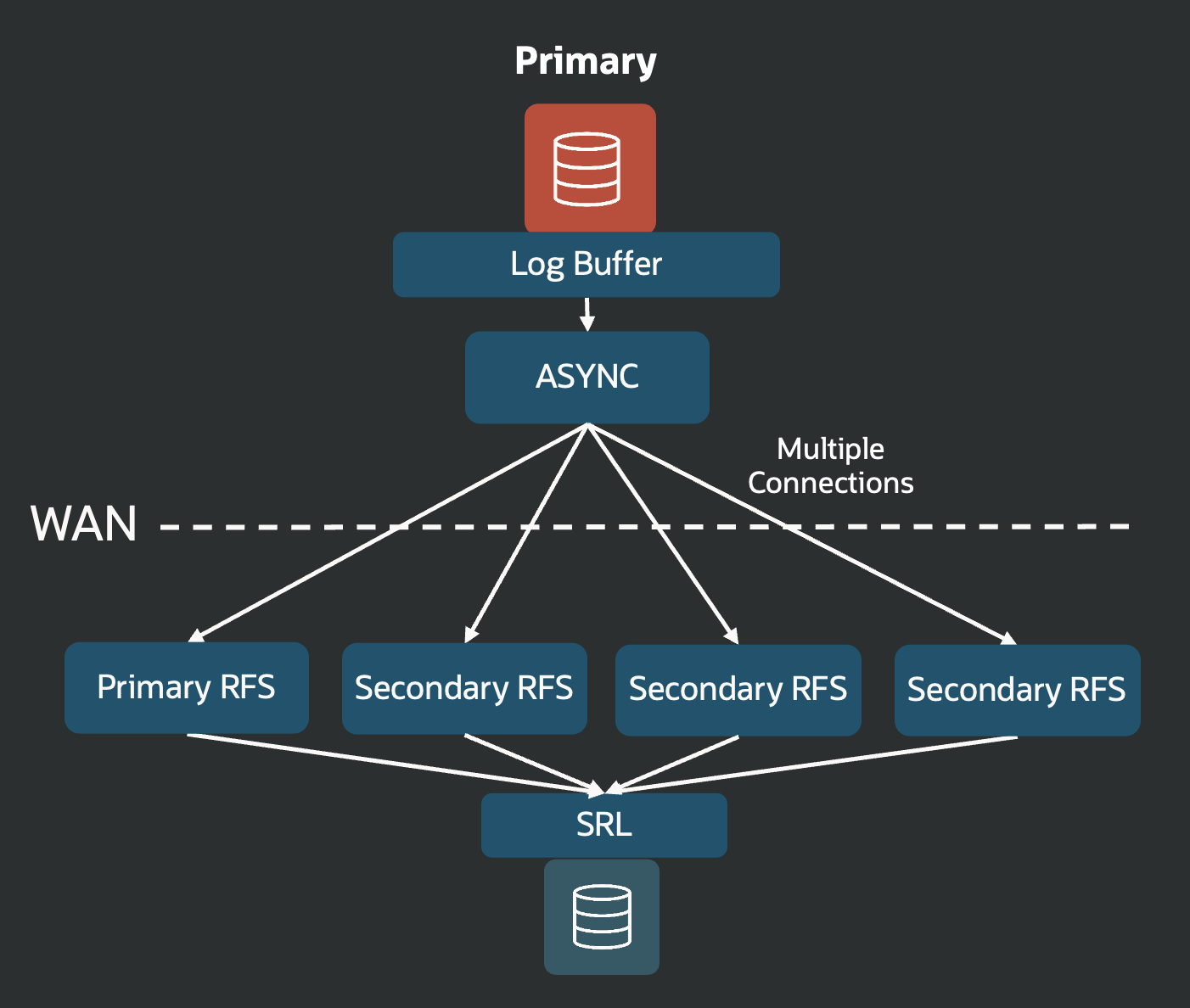
A primary database async process has multiple connections with a matching number of RFS processes receiving the redo on the standby side.

You do not need to change any configuration to get this benefit. Just upgrade to 26ai and the improvement automatically works.
Data Guard 26ai – #7: Rolling Upgrade with Application Continuity

This post is part of a blog series.

One of my favorite Oracle Active Data Guard features is Rolling Upgrades. Introduced in 12c, Rolling Upgrades use the DBMS_ROLLING package to keep downtime during upgrades to a minimum: your apps stay connected almost the entire time.

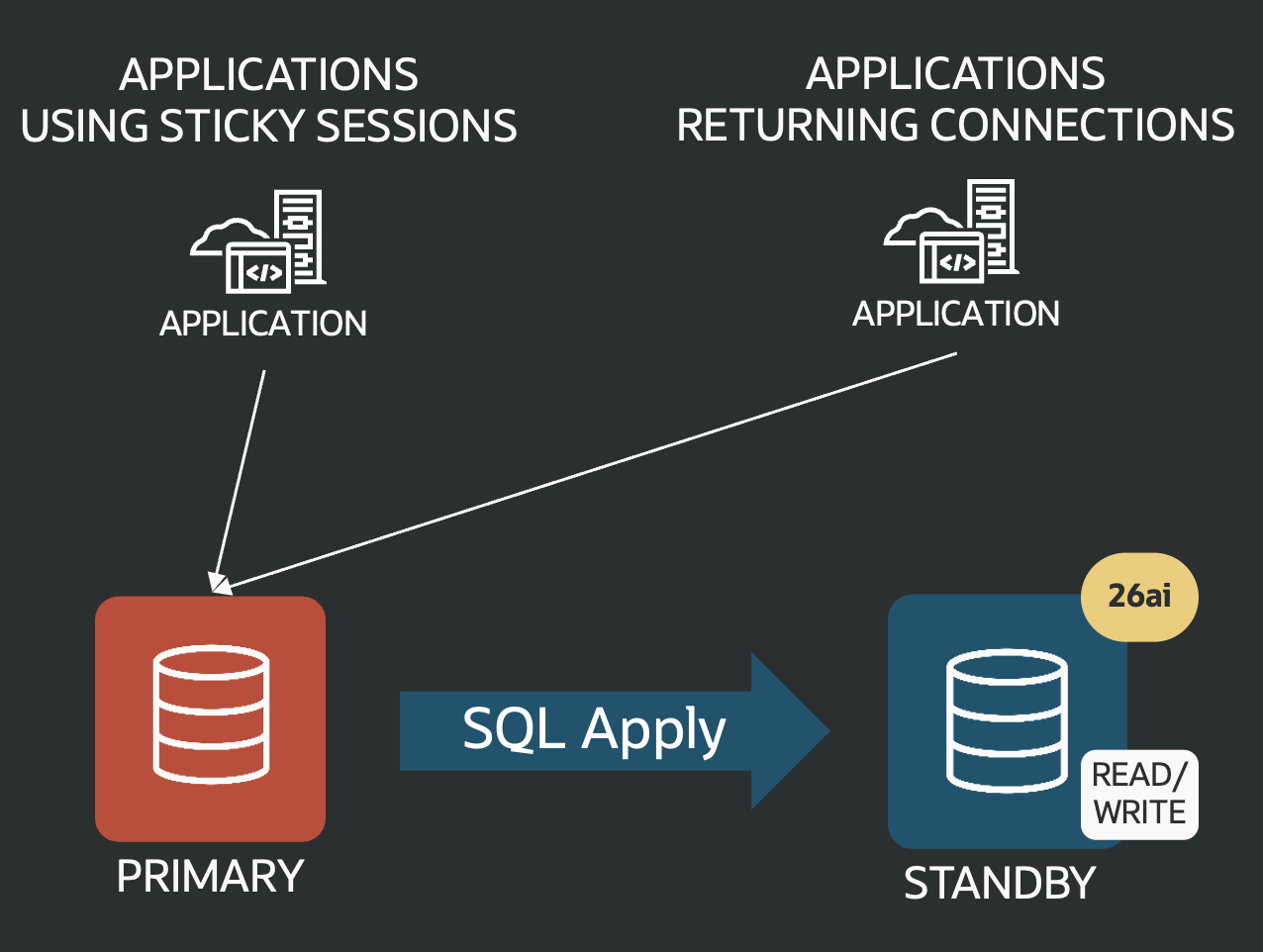
Here’s how it works in real life: when it’s time for a major upgrade or maintenance, you convert your physical standby database to a transient logical standby (so it uses SQL apply instead of redo apply).

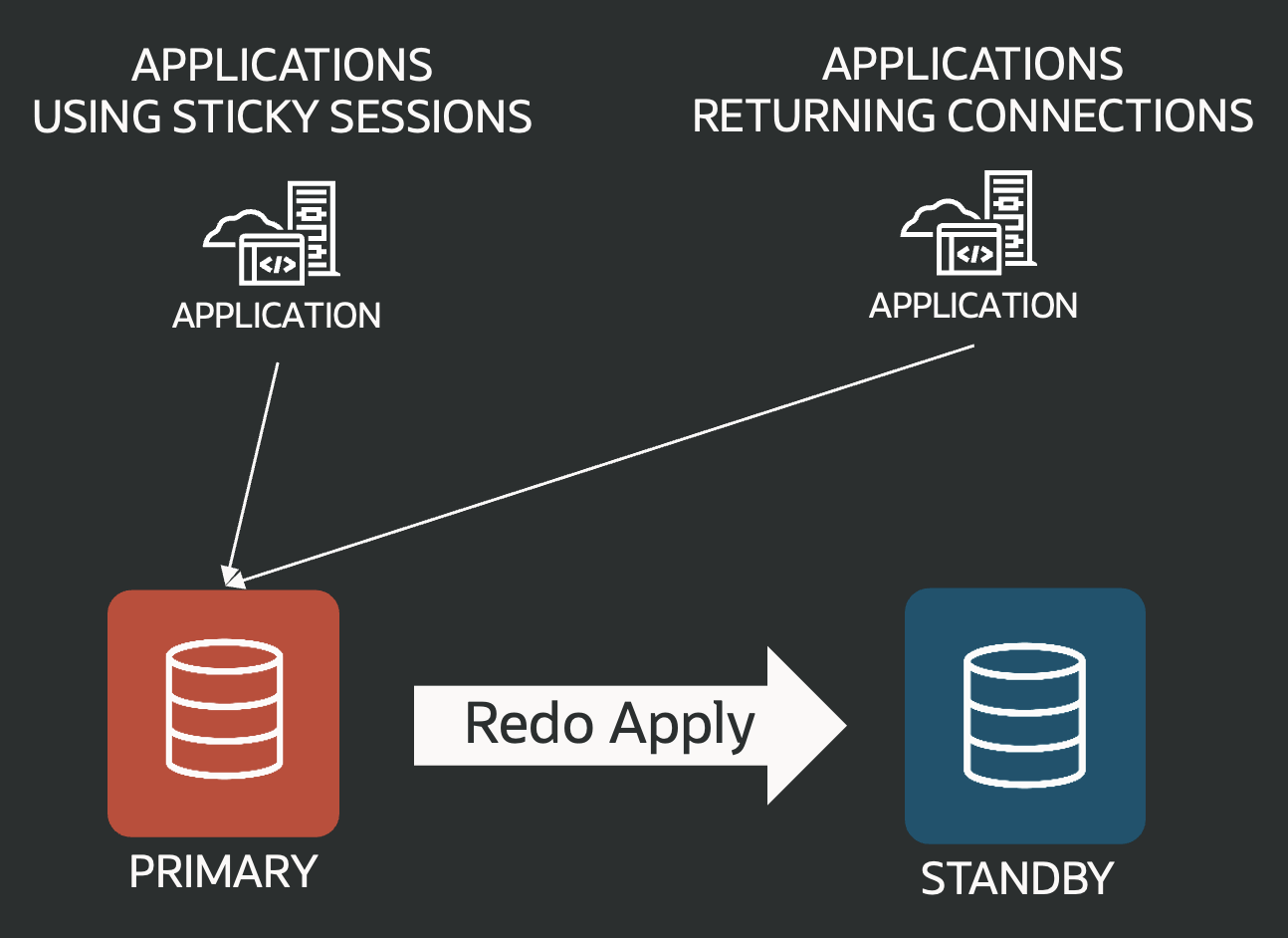
Data Guard configuration using physical standby database

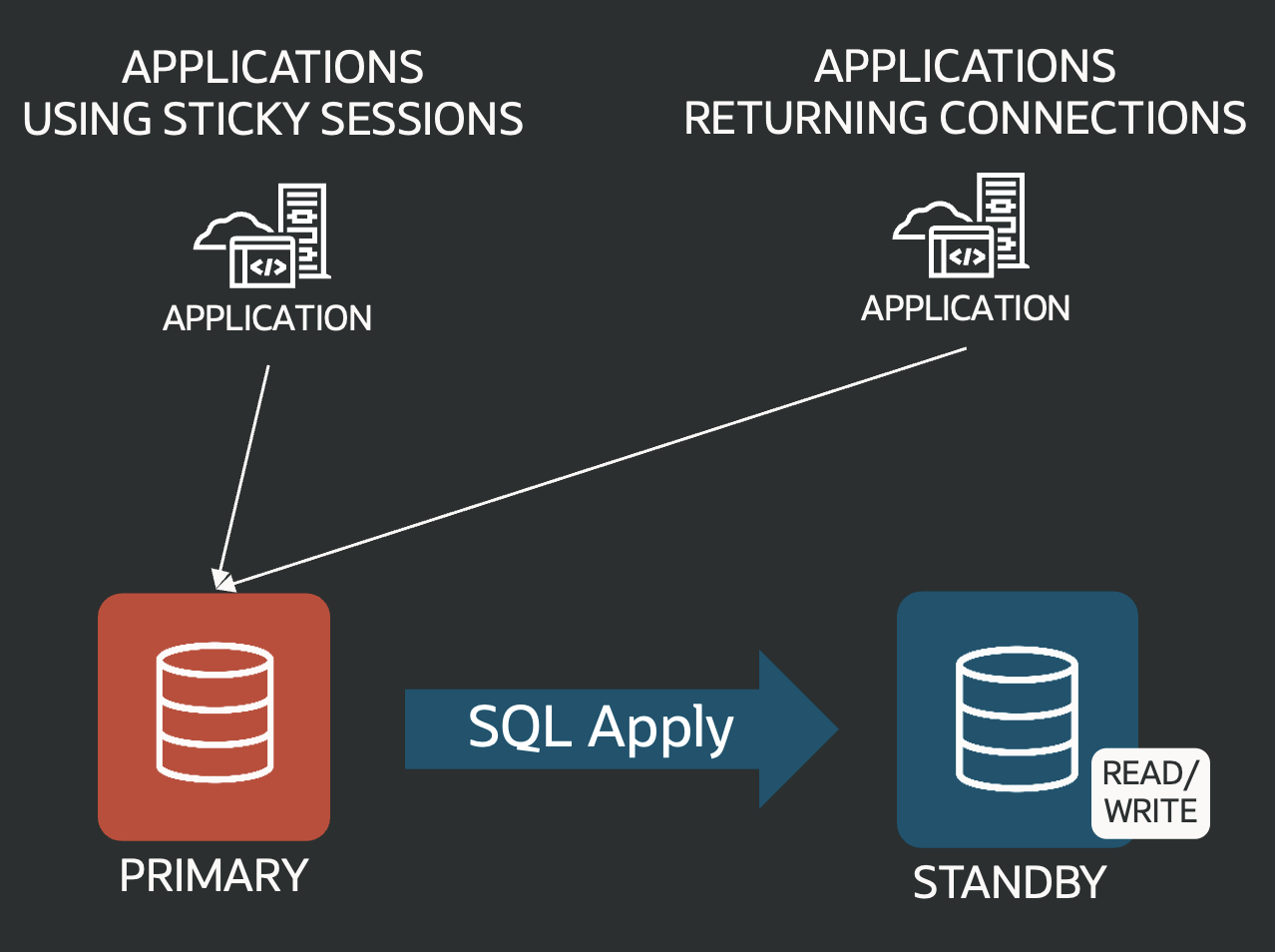
Data Guard configuration using logical standby (SQL apply)

With that done, your standby is open for read/write. You stop replication, upgrade the standby (say, to 26ai), and then bring it back into sync with the primary.

Data Guard with SQL apply aligning a standby that has already been upgraded

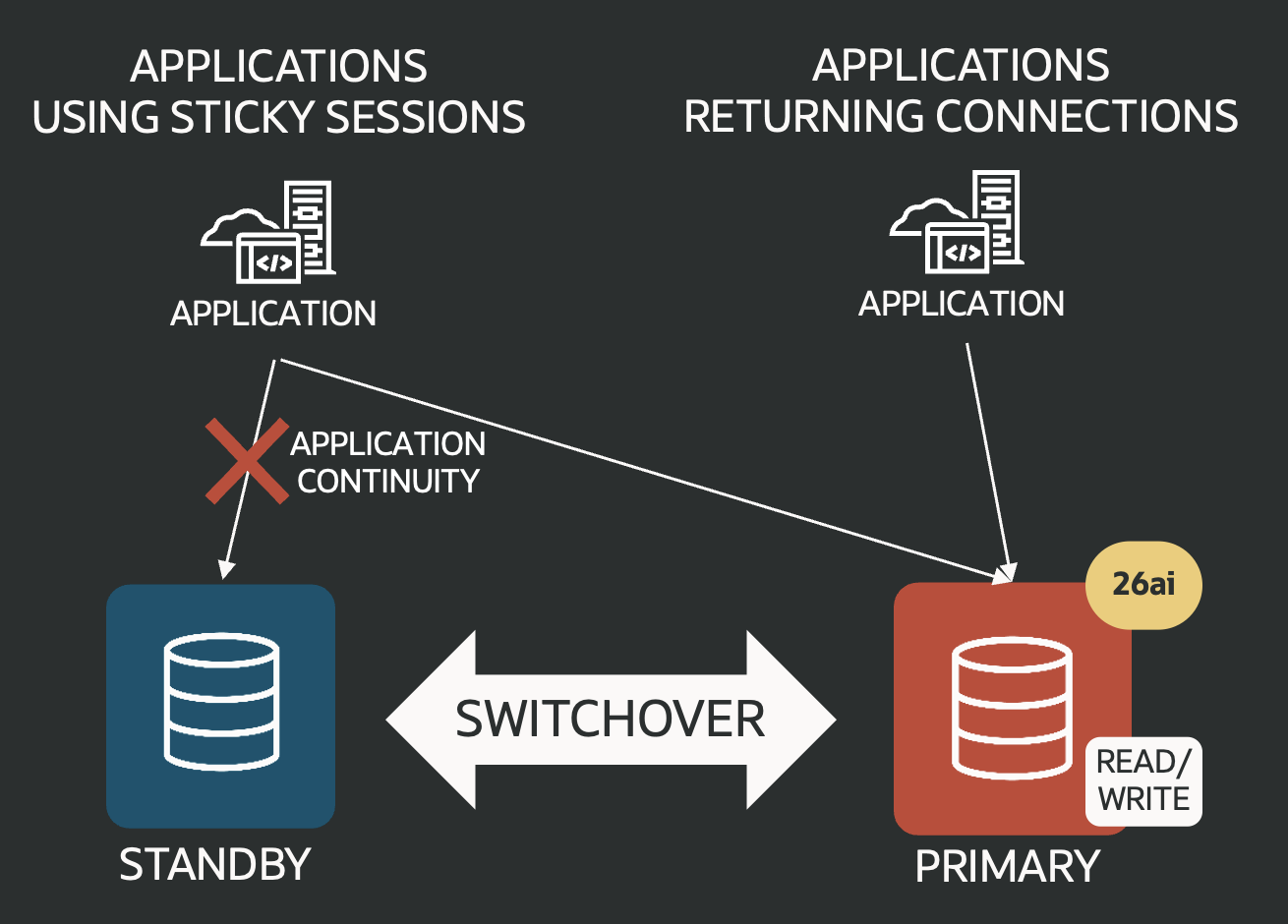
Once everything’s caught up, you finish with a switchover: the upgraded standby becomes the new primary. Apps stay connected most of the time; actual downtime is basically just the switchover itself. DBMS_ROLLING automates everything except the actual upgrade, which you can handle with AutoUpgrade or Fleet Patching and Provisioning.

If your applications use a proper connection pool, they’ll disconnect and transparently reconnect during the switchover, so your users won’t even notice. But sticky sessions (apps that hold onto DB connections) used to be a problem: connections would break, and apps had to catch exceptions and reconnect, or had to be restarted manually.

Now, with 26ai, everything’s easier. DBMS_ROLLING’s switchover supports Application Continuity and Transparent Application Continuity!

Applications reconnect with application continuity to the new upgraded database.

Even sticky-session apps automatically reconnect and pick up where they left off, so transactions flow smoothly. That means that application can start a transaction in 19c and finish it in 26ai! 🤯 This is possible because Oracle has backported this feature to 19c (19.30 release update), letting you upgrade from 19c to 26ai with Application Continuity support.

Data Guard 26ai – #6: Up to four Fast-Start Failover Observers

This post is part of a blog series.

Just like observer priorities, this is another cool feature first introduced in Oracle 21c.

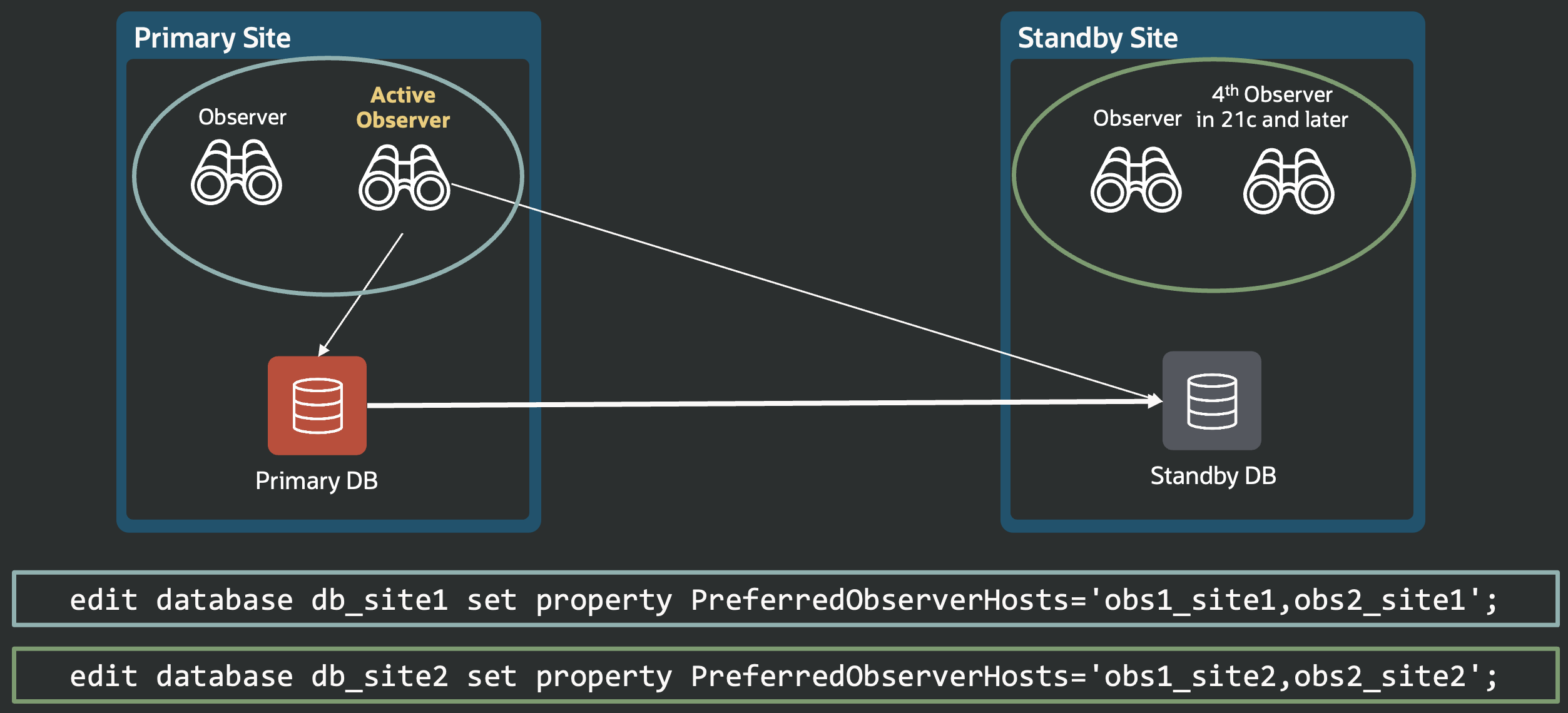
If your Fast-Start Failover setup doesn’t have a third site for the observer, the usual advice is to place it with your primary database. But if you want true high availability, making sure the observer is always up, you’ll want two observers on the primary site and two on the secondary site (for when the standby takes over as primary).

Before 21c, you could only use up to three observers, which made this setup impossible.

a diagram shows two databases in a Data Guard configuration, each with its two preferred local observers.

Starting with 21c (and, of course, 26ai), you can now configure four observers. That solves the high-availability challenge when you’ve only got two sites.

Data Guard 26ai – #5: Fast-Start Failover Observer Priority

This post is part of a blog series.

Technically, this is a 21c feature, but it’s worth calling out some of those 21c improvements, because most customers are still running on 19c or earlier. That means when you upgrade to 26ai, you’ll pick up all the 21c goodies too!

Here’s one: Fast-Start Failover observer’s priority. In 19c, you could list preferred observers for each possible primary with the property PreferredObserverHosts , but you couldn’t actually assign an observer priority based, for example, to the observer’s location.

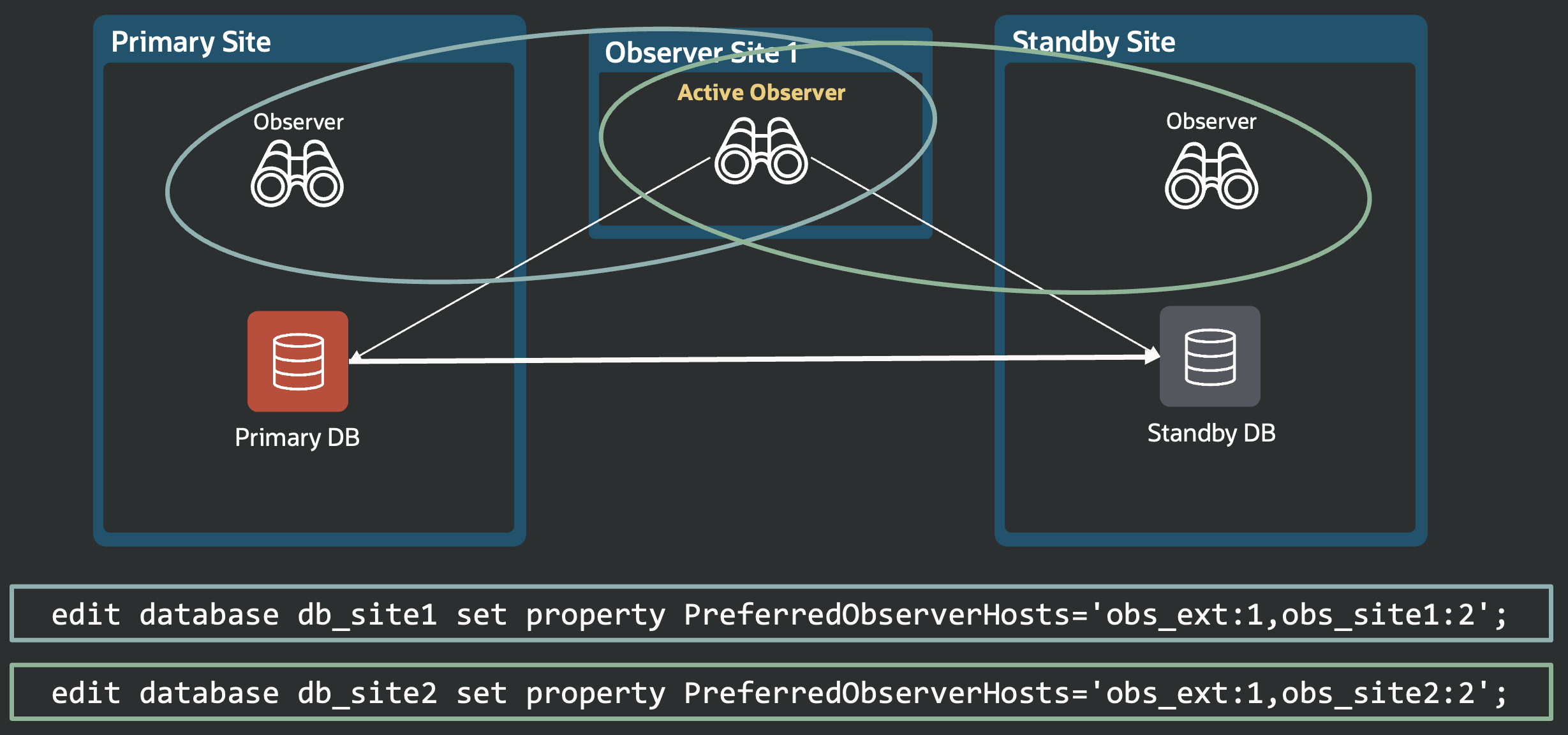
21c fixes that. Now, you can give each observer a priority by adding a colon and a number right after the hostname. The lower the number, the higher the priority. This lets you spell out exactly which observers should be chosen first if a promotion is needed.

The diagram below shows an example: the external site’s observer is set as the top pick for both databases at the primary and the secondary sites, with each site’s local observer as the backup (which is our recommendation in this case).

two databases, one per site, have the top preferred observer on an external site, and both have a backup observer locally on their respective site.

You can create that setup now—thanks to observer priorities.

Data Guard 26ai – #4: Faster DML Redirection

This post is part of a blog series.

Before Oracle 26ai, Active Data Guard’s DML redirection was significantly slower than DMLs executed directly on the primary database. When your app ran DML on the standby, the changes had to be executed on the primary and then returned and applied on the standby before your session could continue. That led to unnecessary pauses, with sessions often waiting on the “standby query scn advance” wait event.

Most of that waiting isn’t always needed. Theoretically, you only have to wait if your session needs to commit or read the updated data.

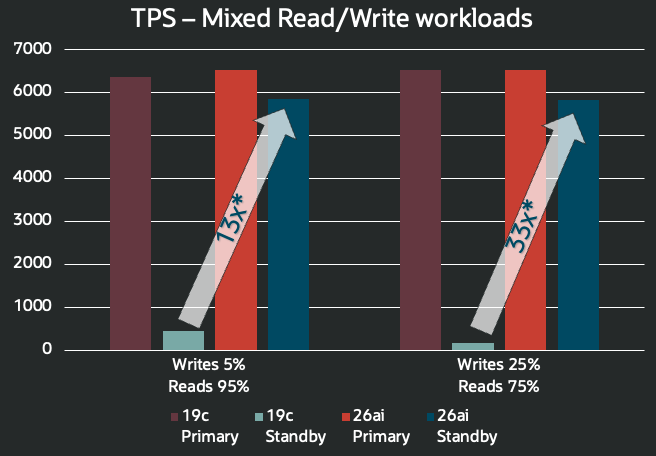
Oracle AI Database 26ai fixes this. Now, once DML succeeds on the primary, your session can continue with the next statement (or commit) without waiting. The only wait required to keep ACID consistency is upon commit or read. With this brilliant change, redirected transactions are up to 33 times faster in our internal tests compared to 19c.

This new behavior is on by default, but if you prefer the old way, you can set the hidden parameter “_alter_adg_redirect_behavior” to “sync_each_dml”.

The chart below shows the difference. We tested both 19c and 26ai (primary and standby) with SwingBench running 16 concurrent order-entry sessions, each doing a mix of “newCustomerProess” and “browseProducts” operations.

a chart shows that 26ai redirected DML transactions are 13x faster in mixed workloads with 5% of writes, and 33x faster in mixed workloads with 25% writes.

Data Guard 26ai – #3: Choice of Lag Type for Fast-Start Failover

This post is part of a blog series.

In Data Guard, when Fast-Start Failover runs in Maximum Performance mode, the FSFP process tracks lag to keep the primary database within safe limits.
Traditionally, FSFP used APPLY LAG to measure lag, a legacy from older redo transport. But APPLY LAG may not reflect real data loss risk: TRANSPORT LAG shows how much data hasn’t reached the standby.
With 26ai, you can set FastStartFailoverLagType to APPLY (default) or TRANSPORT.
Consider switching this property to TRANSPORT to track real data loss exposure.

a table shows that before 26ai "APPLY" is the only lag type, while in 26ai it can also be TRANSPORT.

Data Guard 26ai – #2: Minimized Stall in Maximum Performance

This post is part of a blog series.

Did you know that Oracle Data Guard fast-start failover in maximum performance mode can briefly stall your primary database?

Most users don’t notice, but in environments with strict performance needs, these stalls can matter.

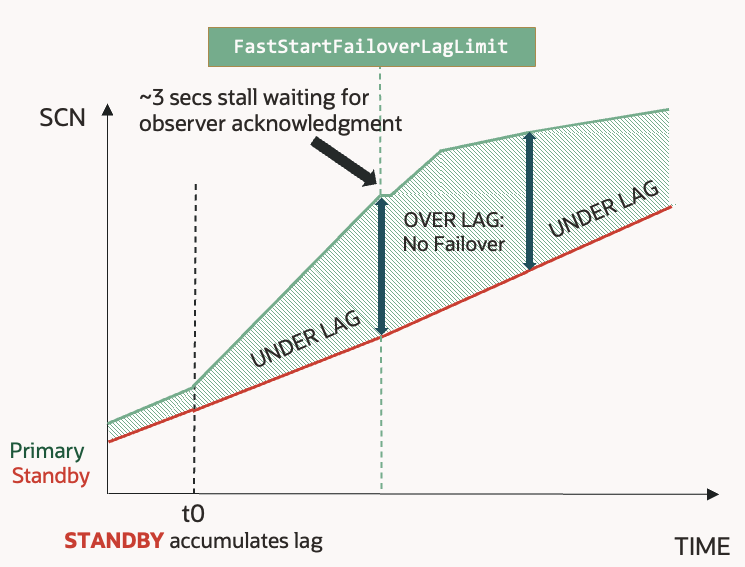
Here’s why: when the database shifts from “UNDER LAG” to “OVER LAG” status, the primary waits for the observer’s acknowledgment. This pause ensures the database doesn’t breach its recovery point objective set with the FastStartFailoverLagLimit property, but it can last up to three seconds (default observer ping time).

when transitioning to "OVER LAG" the primary stalls waiting for the observer's acknowlegment.Stalls are especially common if the standby can’t keep up with primary redo generation, causing frequent state transitions.

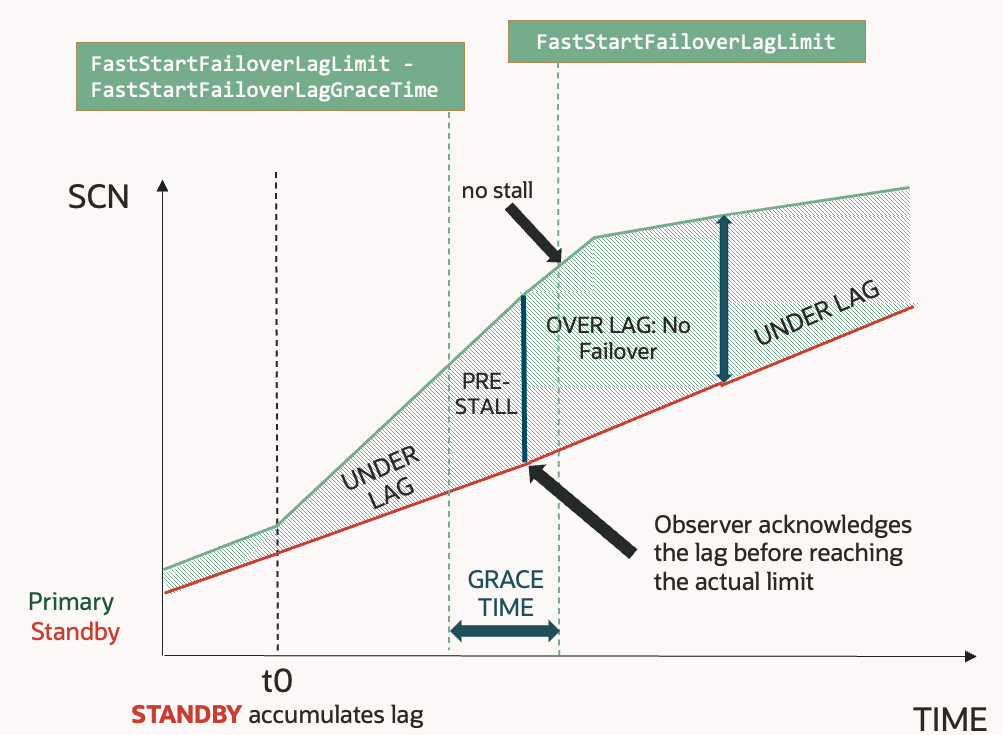
There's a grace period where the primary asks the observer to pre-acknowledge the state change before stalling.
Now in 26ai, the new FastStartFailoverLagGraceTime property lets the observer acknowledge a “pre-stall” before reaching the real lag limit. That way, when the database hits the actual limit, it won’t need to pause: the acknowledge’s already done.
This simple change removes stalls during state transitions, so even the strictest environments meet their performance goals.

What you need to do: set FastStartFailoverLagGraceTime to a value greater than 0 and lower or equal to 3 to make this feature effective. The default of 0 keeps the old behavior.


Data Guard 26ai – #1: Faster role transitions

This post is part of a blog series.
I’ve already blogged about it on the official Oracle MAA Blog (read here) , but let me insist on this.

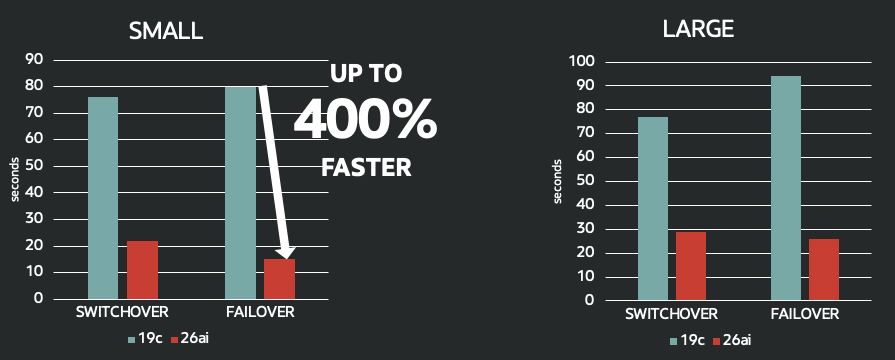
Role transitions (switchover, failover) are much faster in Oracle Data Guard 26ai.

Depending on the configuration and workload, they can be up to five times faster! No changes to the application code or configuration: you get this improvement out of the box.

Here’s an example of two identical configurations using 19.29 and 23.26.1, one PDB, and no application services (basically, an empty database):

Switchover in 19.29

Total: ~44 seconds

Switchover in 23.26.1

Total: < 20 seconds

😎

Mini-blog series: Oracle Data Guard 26ai new features

Thank you for your patience: Oracle AI Database 26ai is now available on Linux x86_64 systems!
This release delivers many new features, including key updates to Data Guard and Active Data Guard: two areas I track as a product manager.
Some improvements aren’t listed in the feature guide, so I’m launching a daily series of brief blog posts over the next month. Each one will spotlight a practical change or enhancement you can try right away.

Announcing ADG-Topology

Today is my birthday! 🎂🍾

📣 I’m excited to announce the release of my personal project, ADG-Topology: a free, open-source tool to help you create RedoRoutes rules by drawing Oracle Active Data Guard topologies. This is not an official Oracle product: it’s available “AS IS” under the MIT license.

What is ADG-Topology?

Draw Active Data Guard Topologies

ADG-Topology is a web application built with ReactFlow. It lets you easily design complex Active Data Guard diagrams, then automatically generates DGMGRL commands to create the corresponding RedoRoutes rules.

Get Active Data Guard RedoRoutes generated automatically

Key Features

  • Draw topologies that include cascaded physical standbys, Far Sync, and ZDLRA
  • Model different redo topologies for every possible primary
  • Support alternate destinations
  • Perform basic validation (see the GitHub repository for details)
  • 100% browser-based: your data never leaves your computer
  • Auto-generate RedoRoutes rules
  • Export and import reusable JSON files

Try it out!

Get started at ludovicocaldara.net/adg-topology. There’s a direct link in my blog’s menu.
Want to build or customize it? Visit the GitHub repository for setup instructions and details on contributing.
I hope ADG-Topology makes your Active Data Guard projects easier and more efficient.

Happy diagramming!