Announcing ADG-Topology

Today is my birthday! πŸŽ‚πŸΎ

πŸ“£ I’m excited to announce the release of my personal project, ADG-Topology: a free, open-source tool to help you create RedoRoutes rules by drawing Oracle Active Data Guard topologies. This is not an official Oracle product: it’s available “AS IS” under the MIT license.

What is ADG-Topology?

Draw Active Data Guard Topologies

ADG-Topology is a web application built with ReactFlow. It lets you easily design complex Active Data Guard diagrams, then automatically generates DGMGRL commands to create the corresponding RedoRoutes rules.

Get Active Data Guard RedoRoutes generated automatically

Key Features

  • Draw topologies that include cascaded physical standbys, Far Sync, and ZDLRA
  • Model different redo topologies for every possible primary
  • Support alternate destinations
  • Perform basic validation (see the GitHub repository for details)
  • 100% browser-based: your data never leaves your computer
  • Auto-generate RedoRoutes rules
  • Export and import reusable JSON files

Try it out!

Get started at ludovicocaldara.net/adg-topology. There’s a direct link in my blog’s menu.
Want to build or customize it? Visit the GitHub repository for setup instructions and details on contributing.
I hope ADG-Topology makes your Active Data Guard projects easier and more efficient.

Happy diagramming!

Reinstate an Oracle Database after failover without Flashback logging enabled

The key difference between a switchover and a failover in Data Guard is the synchronization between primary and standby to avoid data loss.

Switchover
A switchover is a planned event. The primary and standby databases synchronize to allow a smooth, lossless role reversal:

  • The primary database stops the activity.
  • It writes a “redo marker” to the redo stream.
  • It flushes all the remaining redo to the standby.
  • The standby applies all the redo and, upon reaching the marker, knows it’s up to date and can open as the new primary.
  • Finally, the old primary becomes a standby and starts recovering changes from the new primary.

Failover
A failover usually happens after the primary becomes unavailable. Unlike a switchover, the new primary may not have all the latest redo from the old primary, even in synchronous mode because in-progress changes can exist past the last transmitted redo. As a result, their timelines diverge. The former primary (and possibly other standbys) must be reinstated to rejoin the configuration.

Flashback and Reinstate
Oracle’s Flashback Database feature allows you to rewind a database to a specific point in time. This makes recovering a failed primary much faster and easier because it does not require a full restore.
With Flashback enabled, the Data Guard Broker can quickly reinstate the former primary after a failover with a single command:

A customer recently asked how to reinstate a former primary when Flashback Logging is disabled.
Although we strongly recommend enabling Flashback Logging, some environments cannot support it due to storage constraints.
In such cases, you can still reinstate the database manually. Here’s how.

Step-by-step: reinstate a database from a backup and re-enable it in the broker

We are in a Maximum Performance configuration:

Let’s fail over:

Then restart the former primary in MOUNT mode:

The broker now says the former primary requires a reinstate:

As I said, we can’t proceed with a normal reinstate if there’s no flashback:

Let’s restore! This is the only way to bring a database to a past point in time if there is no flashback logging.

First, we put the DB in nomount mode to restore the standby controlfile:

Then we wipe out the directory that contains the DB (careful with this command!)

We restore the standby controlfile and the database:

Now let’s enable the freshly reinstated standby database:

Oups, I made a mistake. The Real-Time Apply isn’t working. Of course! I also deleted the standby logs, so I need to clear them.

Everything looks good now.

HTH
Ludovico

SHOW CONFIGURATION VERBOSE changes in 23.9

Traditionally, the DGMGRL command SHOW CONFIGURATION VERBOSE not only retrievedΒ  detailed configuration information but also triggered a health check. The health check operation can be resource-intensive and time-consuming, especially when executed repeatedly across multiple database instances or as part of automated workflows.

Starting with Oracle 23.9 (and planned also for a future 19c Release Update), the behavior of SHOW CONFIGURATION VERBOSE changes with the introduction of the following fix:

Bug 37829413 – ‘SHOW CONFIGURATION VERBOSE’ UNNECESSARILY TRIGGERS A FORCED HEALTH CHECK

You can check it yourself in the Oracle Release Analyzer Diff Utility:

https://oradiff.oraclecorp.com/ords/r/oradiff/oradiff/search-fixes

Previous behavior

Each use of SHOW CONFIGURATION VERBOSE triggered a fresh, full health check before showing configuration details, regardless of whether up-to-date health information was needed.

New behavior

The command now returns comprehensive configuration details and property values without forcing an immediate health check.

Why this change?

This change eliminates unnecessary resource usage and network communication, improving performance especially in automated systems that repeatedly gather configuration info, such as Oracle TFA or custom scripts. The goal is to make monitoring and troubleshooting more efficient.

What’s the impact for me?

When you execute SHOW CONFIGURATION, at the bottom you see when the last health check was executed:

The health check is scheduled automatically every minute.

When there was a warning, it was common to execute “SHOW CONFIGURATION VERBOSE” to force a refresh of the status and get the most recent status. This won’t work anymore, and you’ll have to wait until the next scheduled health check.

In Oracle 23ai, you can still force a health check explicitly with:

Remember, avoid running it unless you are in an emergency!

Ludovico

New views in Oracle Data Guard 23c

Oracle Data Guard 23c comes with many nice improvements for observability, which greatly increase the usability of Data Guard in environments with a high level of automation.

For the 23c version, we have the following new views.V$DG_BROKER_ROLE_CHANGE

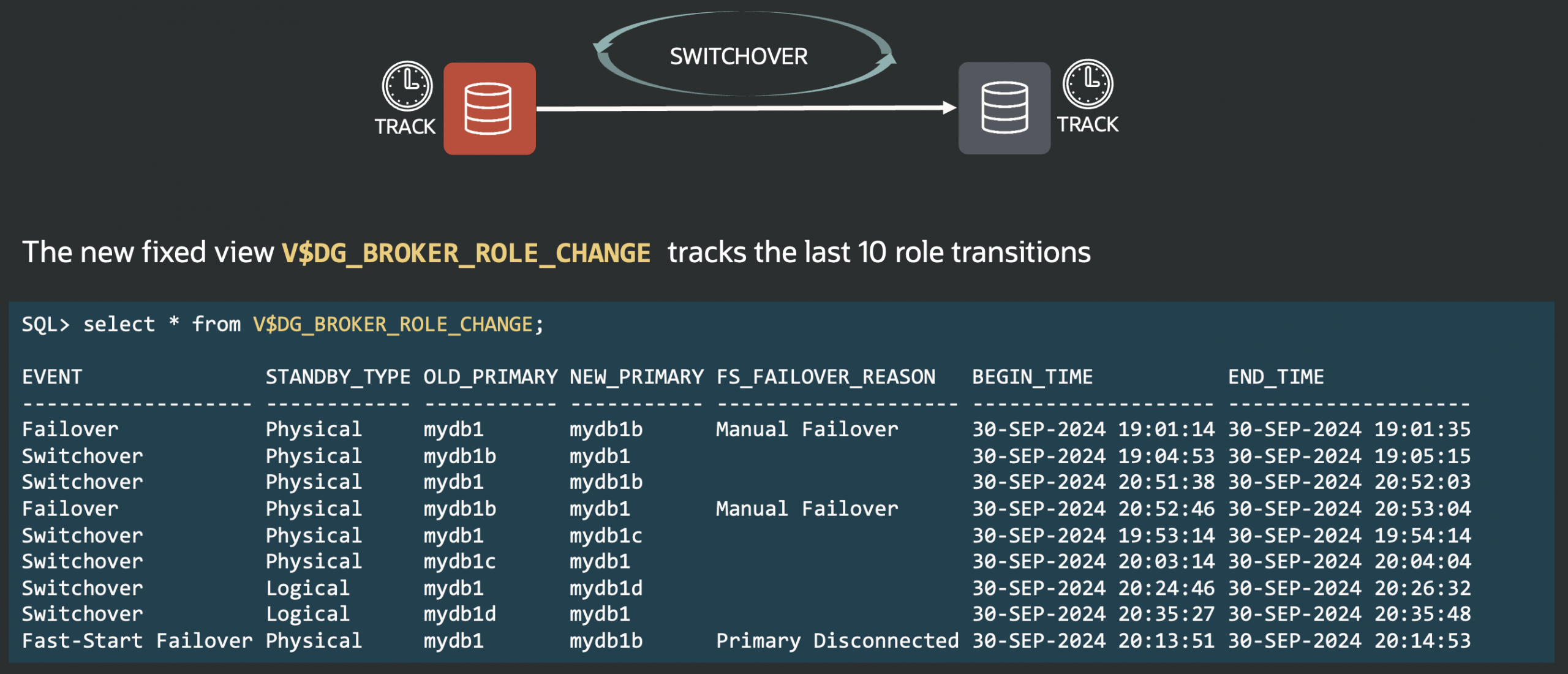
This view tracks the last role transitions that occurred in the configuration. Example:

The event might be a Switchover, Failover, or Fast-Start Failover.

In the case of Fast-Start Failover, you will see the reason (typically “Primary Disconnected” if it comes from the observer, or whatever reason you put in DBMS_DG.INITIATE_FS_FAILOVER.

No more need to analyze the logs to find out which database was primary at any moment in time!

V$DG_BROKER_PROPERTY

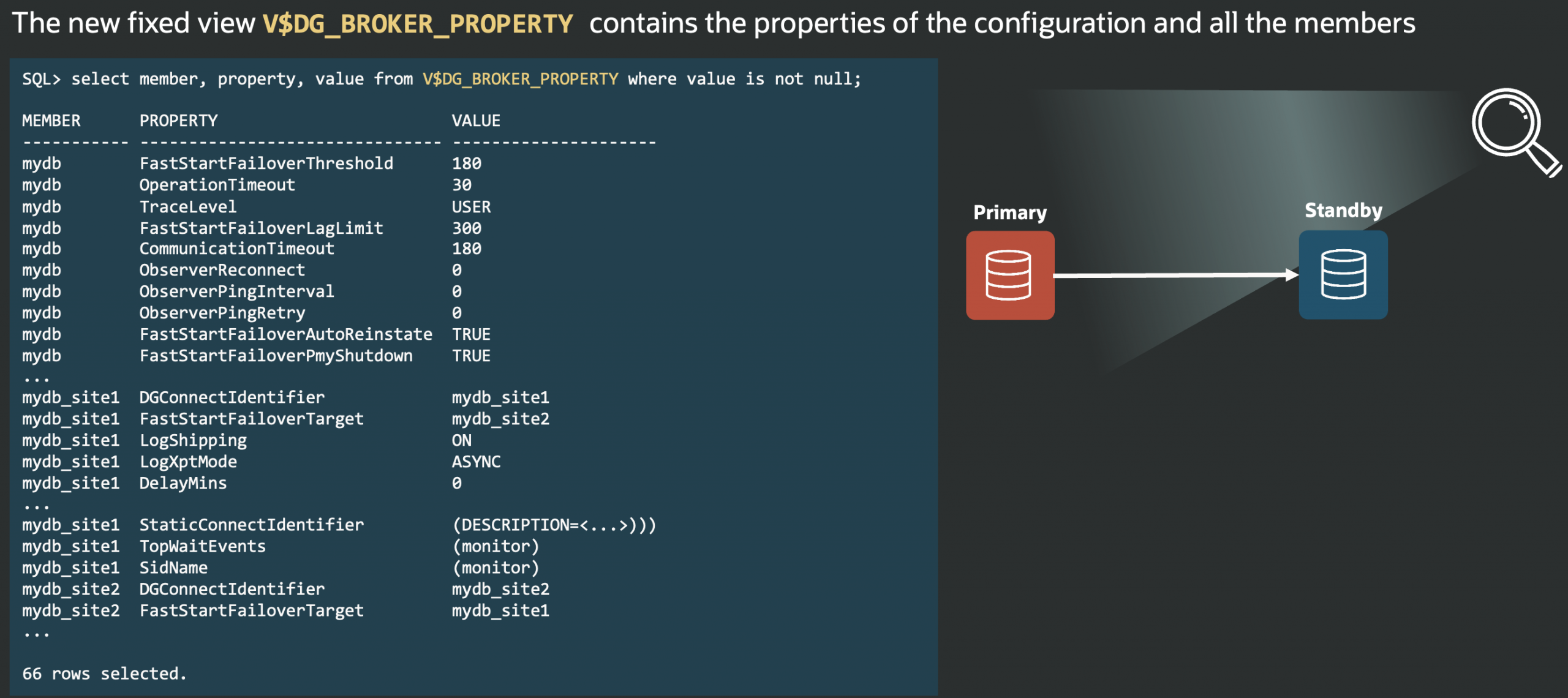
Before 23c, the only possible way to get a broker property from SQL was to use undocumented (unsupported) procedures in the fixed package DBMS_DRS. I’ve blogged about it in the past, before joining Oracle.

Now, it’s as easy as selecting from a view, where you can get the properties per member or per configuration:

The example selects just three columns, but the view is rich in detailing which properties apply to which situation (scope, valid_role):

The monitorable properties can be monitored using DBMS_DG.GET_PROPERTY(). I’ll write a blog post about the new PL/SQL APIs in the upcoming weeks.

I wish I had this view when I was a DBA πŸ™‚

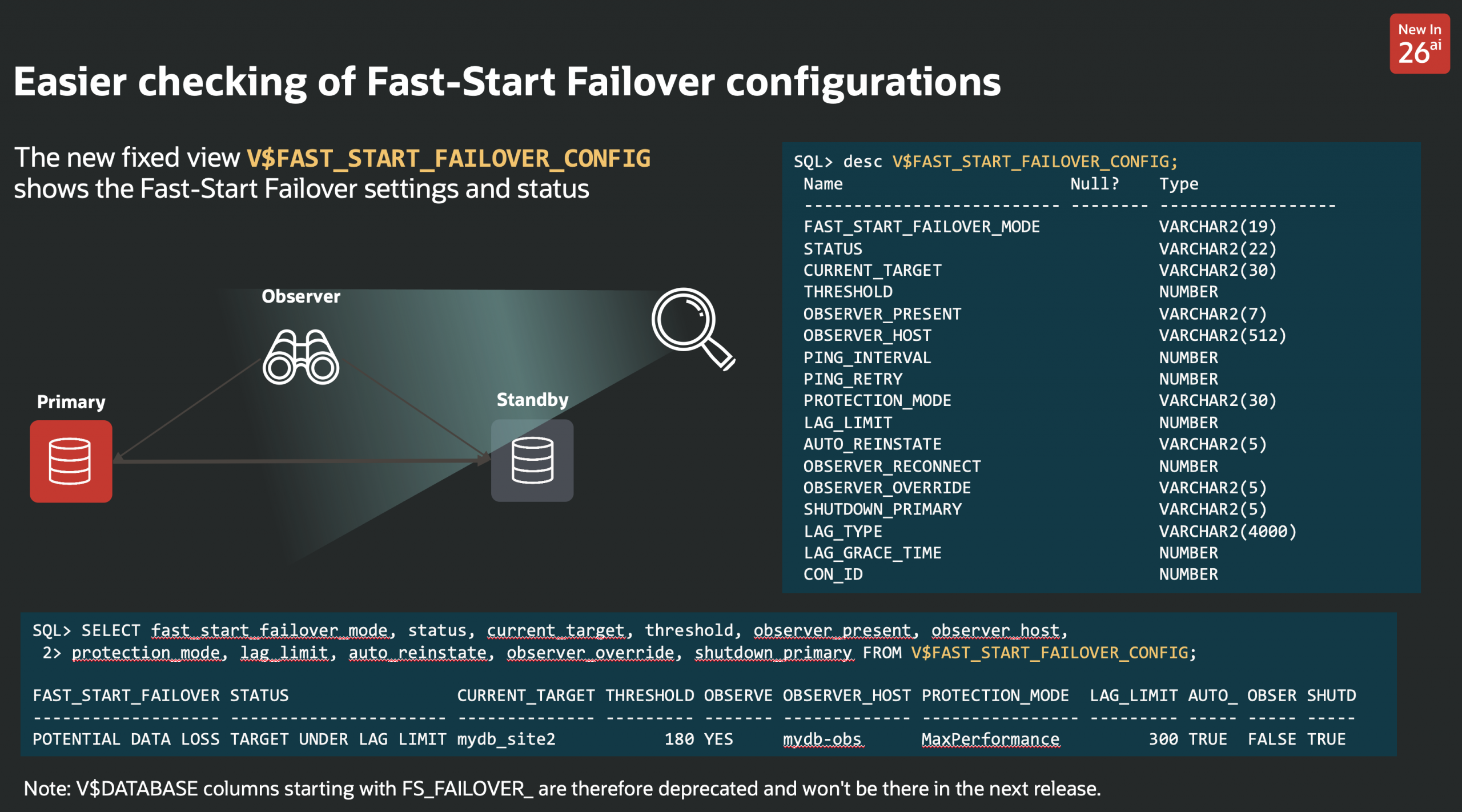
V$FAST_START_FAILOVER_CONFIG

If you have a Fast-Start Failover configuration, this view will show its details:

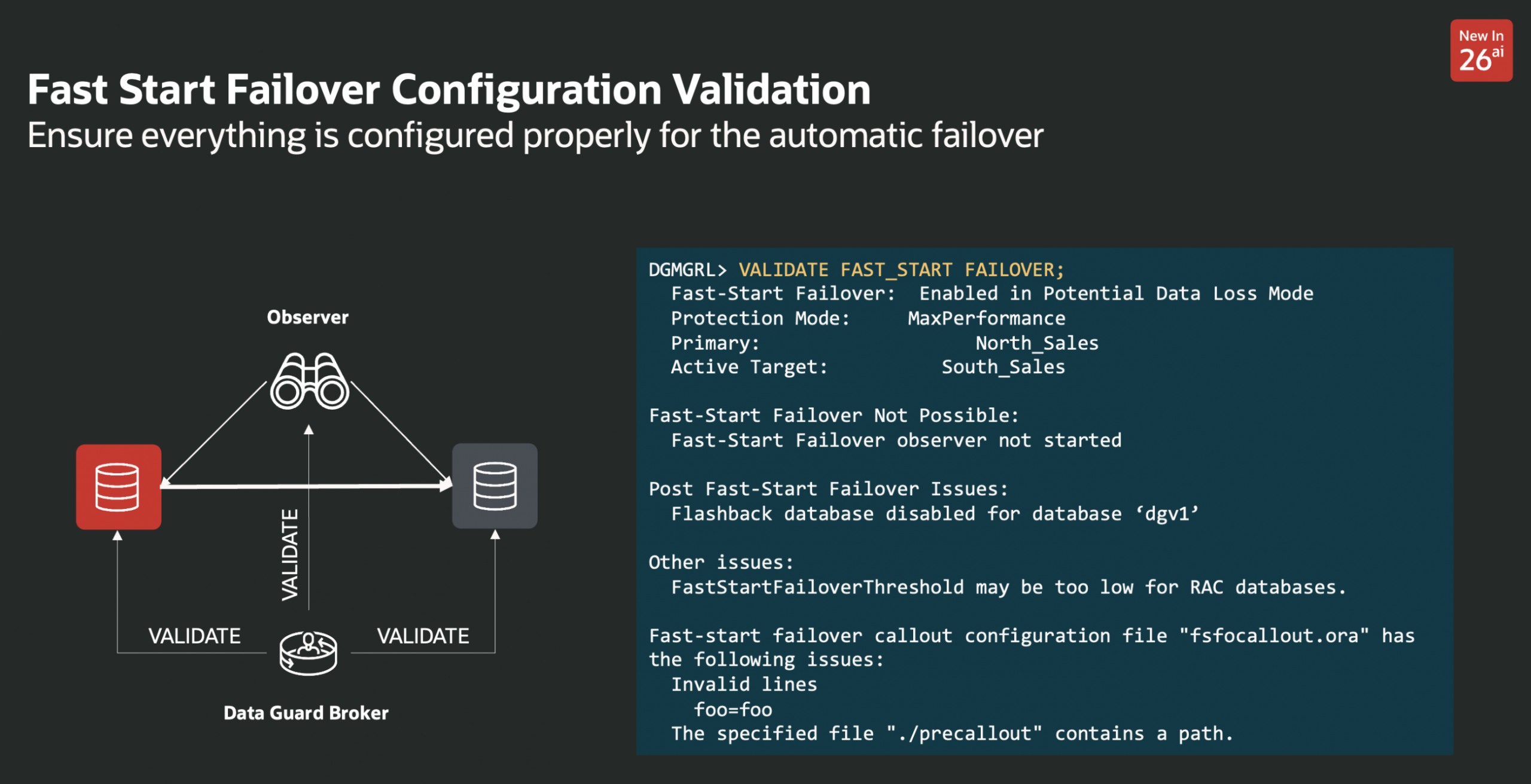
This view replaces some columns currently in v$database, that are therefore deprecated:

V$FS_LAG_HISTOGRAM

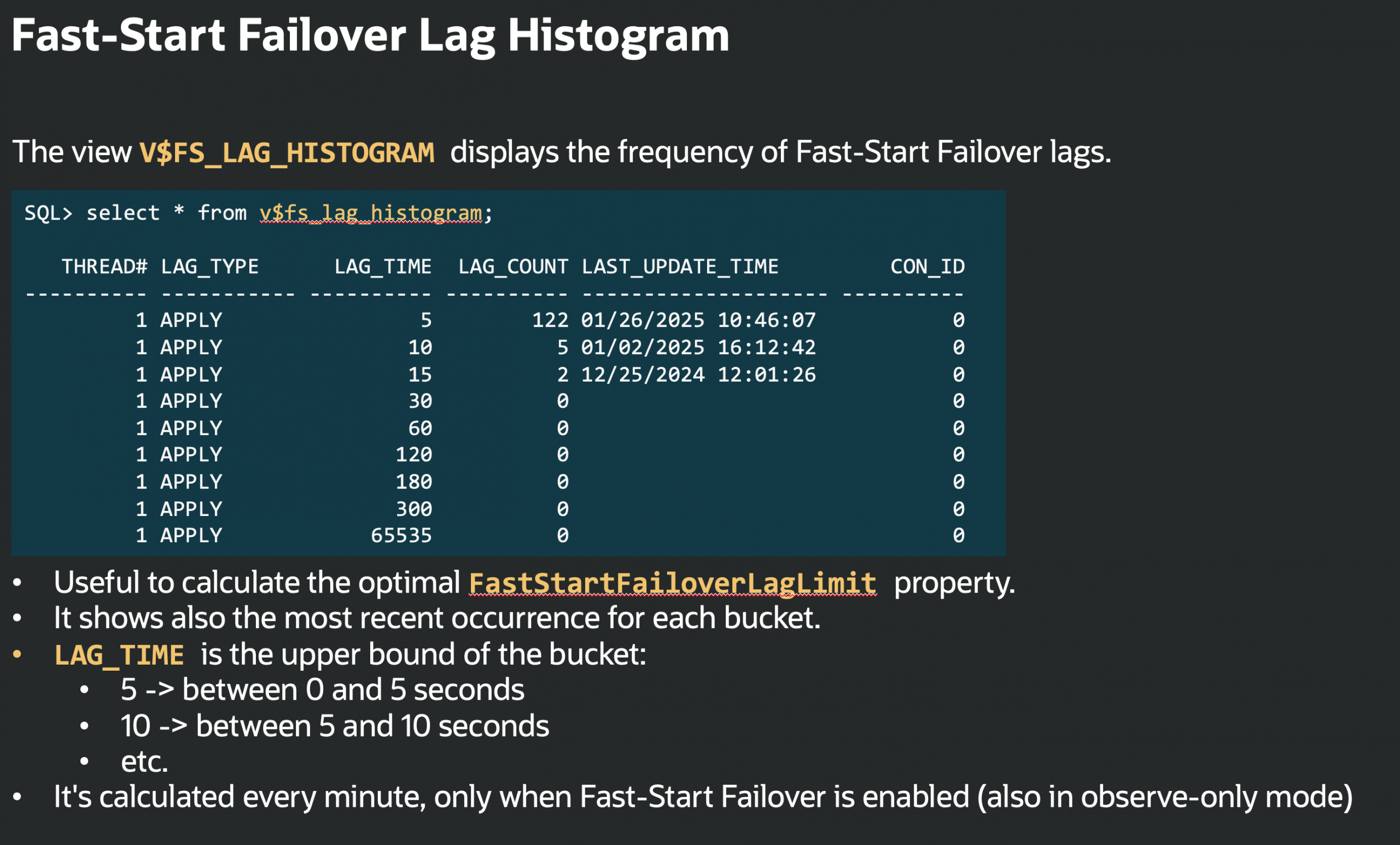
This view is useful to calculate the optimal FastStartFailoverLagTime.

It shows the frequency of Fast-Start Failover lags and the most recent occurrence for each bucket.

LAG_TIME is the upper bound of the bucket, e.g.

  • 5 -> between 0 and 5 seconds
  • 10 -> between 5 and 10 seconds
  • etc.

It’s refreshed every minute, only when Fast-Start Failover is enabled (also in observe-only mode).

V$FS_FAILOVER_OBSERVERS

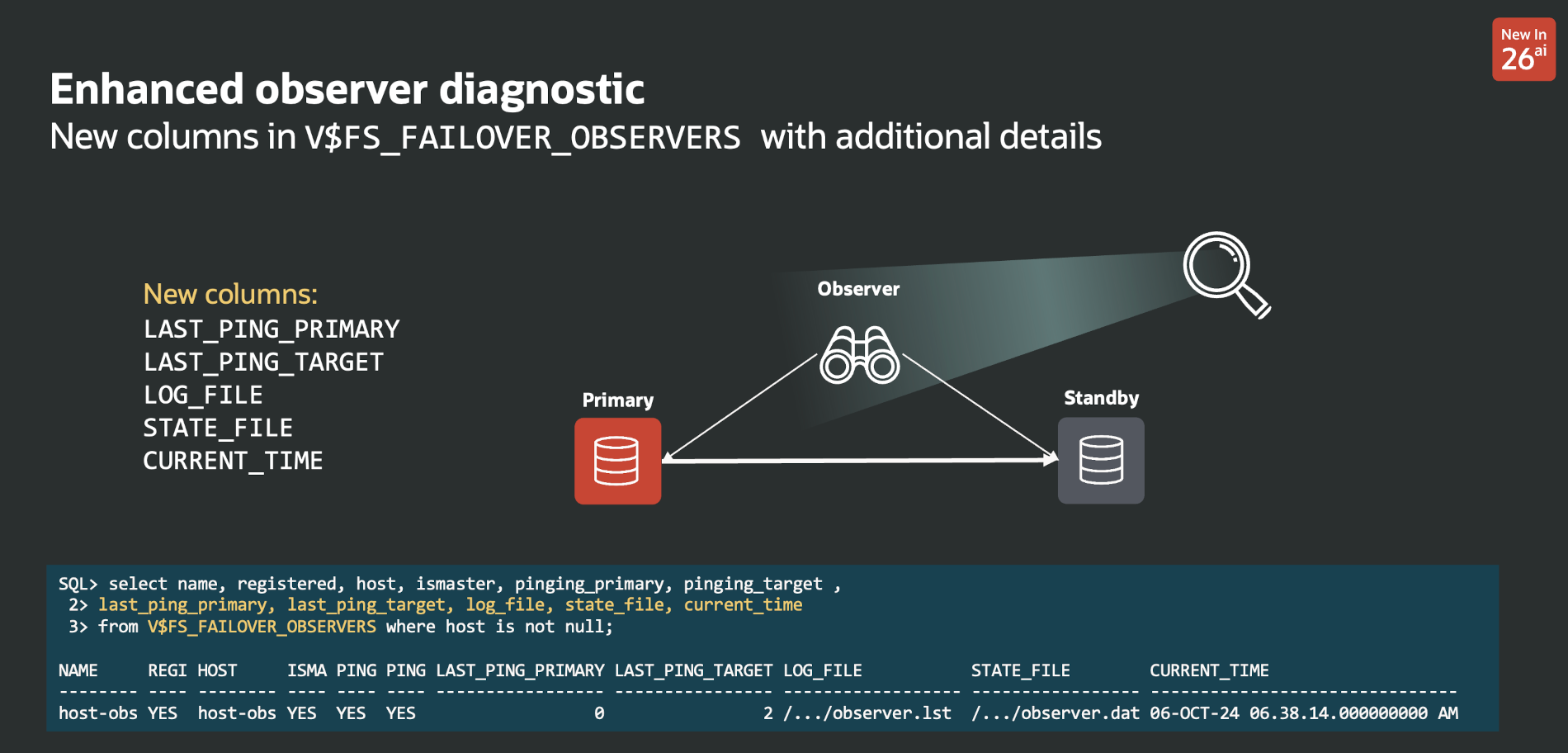
This view is not new, however, its definition now contains more columns:

This gives important additional information about the observers, for example, the last time a specific observer was able to ping the primary or the target (in seconds).

Also, the path of the log file and runtime data file are available, making it easier to find them on the observer host in case of a problem.

Conclusion

These new views should greatly improve the experience when monitoring or diagnosing problems with Data Guard. But they are just a part of many improvements we introduced in 23c. Stay tuned for more πŸ™‚

Ludovico

New in Data Guard 21c and 23c: Automatic preparation of the primary

Oracle Data Guard 21c came with a new command:

The command prepare database for data guard automatically sets parameters and creates standby redo logs according to best practices.This command prepares a database to become primary in a Data Guard configuration.

It sets many recommended parameters:

Sets the RMAN archive deletion policy, enables flashback and force logging, creates the standby logs according to the online redo logs configuration, and creates an spfile if the database is running with an init file.

If you tried this in 21c, you have noticed that there is an automatic restart of the database to set all the static parameters. If you weren’t expecting this, the sudden restart could be a bit brutal approach.

In 23c, we added an additional keyword “restart” to specify that you are OK with the restart of the database. If you don’t specify it, the broker will complain that it cannot proceed without a restart:

If you specify it, it will proceed with the restart:

Notice that if you already have these static parameters set, the broker will just set the missing dynamic parameters without the need for a restart:

This new command greatly simplifies the preparation of a Data Guard configuration!

Before 21c, you had to do everything by hand.

Ludo

Does FLASHBACK QUERY work across incarnations or after a Data Guard failover?

Short answer: yes.

Let’s just see it in action.

First, I have a Data Guard configuration in place. On the primary database, the current incarnation has a single parent (the template from which it has been created):

Just to make room for some undo, I increase the undo_retention. On a PDB, that requires LOCAL UNDO to be configured (I hope it’s the default everywhere nowadays).

Then, I update some data to test flashback query:

At this point, I can see the current data, and the data as it was 1 hour ago:

Now, I kill the primary database and fail over to the standby database:

After connecting to the new primary, I can see the new incarnation due to the open resetlogs after the failover.

And I can still query the data as of a previous timestamp:

Or flash back the table, if required:

So yes, that works. The caveat is still that you need to retain enough data in the undo tablespace to rebuild the rows in their previous state.

Ludo

When it comes to using Oracle, trust Oracle…

A month ago, I saw this article published on the AWS architecture blog:

Disaster Recovery for Oracle Database on Amazon EC2 with Fast-Start Failover

I love seeing people suggesting Oracle Data Guard Fast-Start Failover for high availability. Nevertheless, there are a few problems with the architecture and steps proposed in the article.

I sent my comments via Disqus on the AWS blogging platform, but after a month, my comment was rejected, and the blog content hasn’t changed.

For this reason, I don’t have other places to post my comment but here…

  1. The link to the setup procedure is from 2009.
    We have official documentation that we keep up to date. The Fast-Start Failover part:
    https://docs.oracle.com/en/database/oracle/oracle-database/19/dgbkr/using-data-guard-broker-to-manage-switchovers-failovers.html#GUID-D26D79F2-0093-4C0E-98CD-224A5C8CBFA4
    and the Best Practices guide:
    https://docs.oracle.com/en/database/oracle/oracle-database/19/haovw/oracle-data-guard-best-practices.html#GUID-C3A78B07-6584-4380-8D53-E5B831A5894C
  2. The part about cascading standbys references a step-by-step guide from an external blog written many years ago for 11gR2.
  3. The DBMS_SERVICE doc is from 12cR1, while other links are from 21c doc or 19c doc. As of today, most implement 19c. That’s probably the version to use.
    https://docs.oracle.com/en/database/oracle/oracle-database/19/arpls/DBMS_SERVICE.html#GUID-C11449DC-EEDE-4BB8-9D2C-0A45198C1928
  4. The steps used to create the database service do not include any HA property, which will make most efforts useless. (see Table 153-6 in the link above).
  5. The article talks about TAF, but no steps exist to configure it. We don’t recommend TAF since 12c anyway. Today (19c), the recommendation is TAC (Transparent Application Continuity).
    https://www.oracle.com/docs/tech/application-checklist-for-continuous-availability-for-maa.pdf
  6. But, most important, TAF (or Oracle connectivity in general) does NOT require a host IP change! There is no need to change the DNS when using the recommended connection string with multiple address_lists.
  7. Some RedoRoutes examples are not correct. In this video I explain how they work and how to set them up:
    https://www.youtube.com/watch?v=huG8JPu_s4Q
  8. The diagram shows the master observer together with the standby database, which is a bad practice. I explain why and how here:
    https://www.youtube.com/watch?v=e81UPLfnLi0

The central message is:

If you need to implement a complex architecture using a software solution, pay attention that the practices suggested by the partner/integrator/3rd party match the ones from the software vendor. In the case of Oracle Data Guard, Oracle knows better πŸ˜‰

Cheers

Ludovico


Video: Where should I put the Observer in a Fast-Start Failover configuration?

The video explains best practices and different failure scenarios for different observer placements. It also shows how to configure high availability for the observer.

Here’s the summary:

  • Always try to put the observer(s) on an external site.
  • If you don’t have any, put it where the primary database is, and have one ready on the secondary site after the role transition.
  • Don’t put the observer together with the standby database!
  • Configure multiple observers for high availability, and use the PreferredObserverHosts Data Guard member property to ensure you never run the observer where the standby database is.


Far Sync and Fast-Start Failover Protection modes

Oracle advertises Far Sync as a solution for “Zero Data Loss at any distance”. This is because the primary sends its redo stream synchronously to the Far Sync, which relays it to the remote physical standby.

There are many reasons why Far Sync is an optimal solution for this use case, but that’s not the topic of this post πŸ™‚

Some customers ask: Can I configure Far Sync to receive the redo stream asynchronously?

Although a direct standby receiving asynchronously would be a better idea, Far Sync can receive asynchronously as well.

And one reason might be to send asynchronously to one Far Sync member that redistributes locally to many standbys.

It is very simple to achieve: just changing the RedoRoutes property on the primary.

This will work seamlessly. The v$dataguard_process will show the async transport process:


What about Fast-Start Failover?

Up to and including 19c, ASYNC transport to Far Sync will not work with Fast-Start Failover (FSFO).

ASYNC redo transport mandates Maximum Performance protection mode, and FSFO supports that in conjunction with Far Sync only starting with 21c.

Before 21c, trying to enable FSFO with a Far Sync will fail with:

So if you want FSFO with Far Sync in 19c, it has to be MaxAvailability (and SYNC redo transport to the FarSync).


If you don’t need FSFO, as we have seen, there is no problem. The only protection mode that will not work with Far Sync is Maximum Protection:

If FSFO is required, and you want Maximum Performance before 21c, or Maximum Protection, you have to remove Far Sync from the redo route.

Ludovico